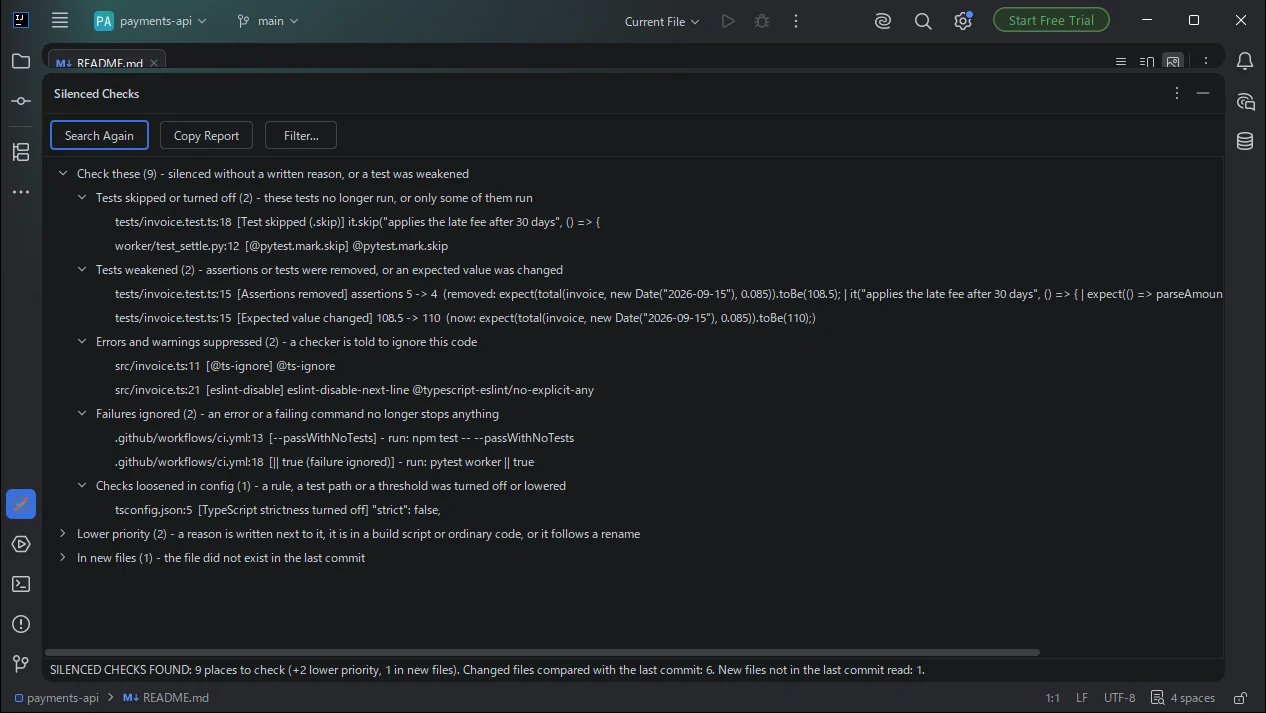
A short list to review
Only what changed since your last commit. Places with no written reason come first; double-click to jump to the line.
JetBrains IDE plugin
Catch it when an AI coding agent skips tests, weakens assertions, changes expected values or adds @ts-ignore to get a green build. One scan lists each new place since your last git commit, with file and line.
Scan and results are free. Pro has a free trial.
Only what changed since your last commit. Places with no written reason come first; double-click to jump to the line.
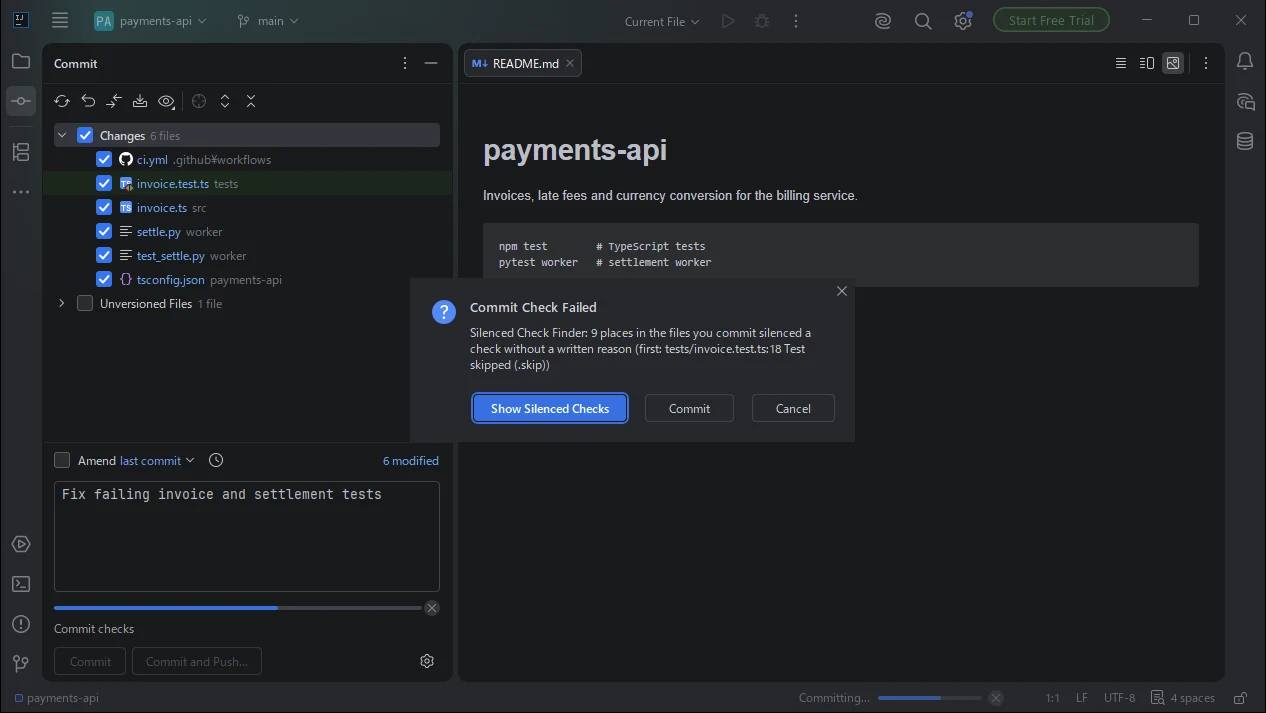
The commit dialog tells you when a file you commit has a place in Check these, with a link to the list.
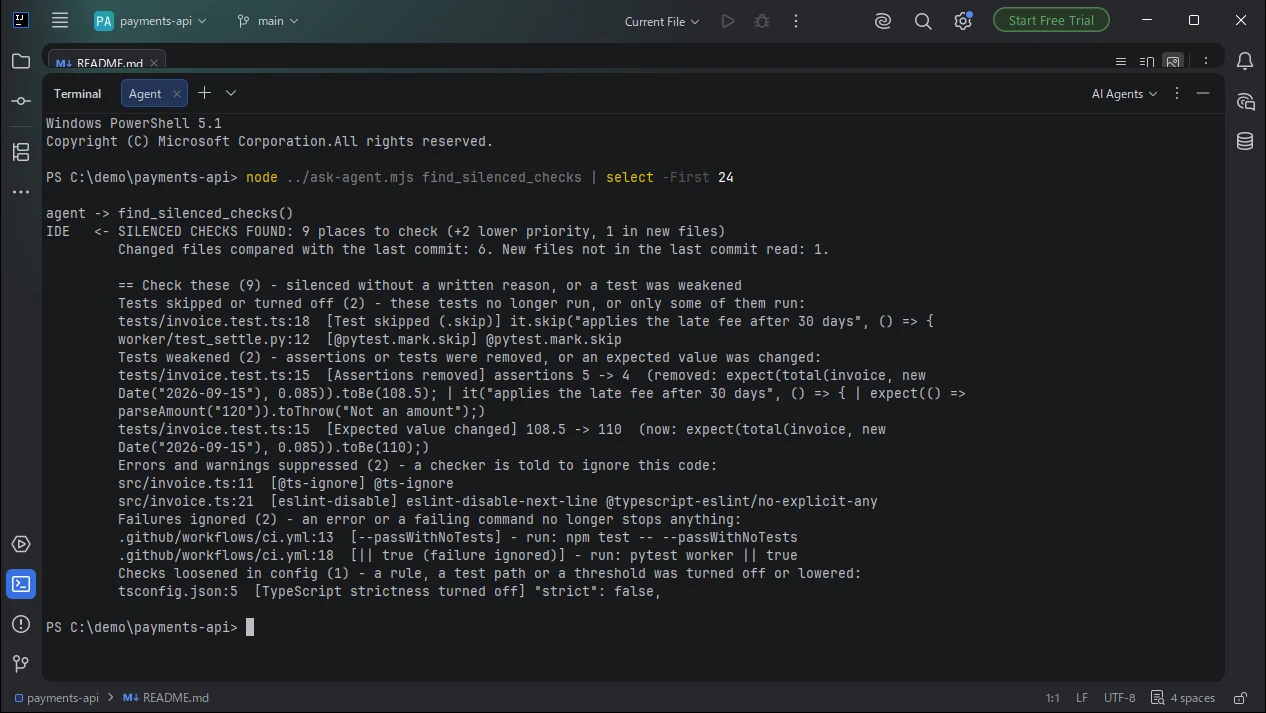
Connected AI agents call find_silenced_checks before they say a task is done, and fix or explain each place.
it.skip, test.only, @pytest.mark.skip, @Disabled, @Ignore, t.Skip(), #[ignore], a CI test step set to if: false or removed, a test file renamed so it no longer runs.
Assertions or whole tests removed, a test file deleted, an expected value changed while the test stayed the same.
@ts-ignore, @ts-expect-error, eslint-disable, # noqa, # type: ignore, @SuppressWarnings, //nolint, NOSONAR and similar comments.
Empty catch blocks, except: pass, || true, continue-on-error: true, --passWithNoTests, -DskipTests, --no-verify.
A lint rule set to off, TypeScript strict turned off, a coverage threshold lowered, tests excluded in a test config.
A suppression that was already in the last commit is not listed again, so you see only what the agent added. A place with a written reason, such as # noqa: E501 -- generated file, goes to Lower priority.
Commit your work before the agent starts. When the agent says the build is green, run Tools | Find Silenced Checks in IntelliJ IDEA, PyCharm, WebStorm or another JetBrains IDE with AI Silenced Check Finder installed. It lists the tests that were newly skipped or turned off since your last git commit, such as it.skip, test.only, @pytest.mark.skip, @Disabled or @Ignore, a CI test step set to if: false or removed, and a test file renamed so it no longer runs, each with file and line. Double-click a result to jump to it.
Run one scan with AI Silenced Check Finder. It lists the new @ts-ignore, @ts-expect-error, eslint-disable, # noqa, # type: ignore, @SuppressWarnings, //nolint and similar comments added since your last commit. A suppression that was already in the last commit is not listed again, so you only see what the agent added. Places with no written reason are grouped under Check these.
AI Silenced Check Finder lists assertions or whole tests removed from a test file, deleted test files, and expected values that changed while the test itself stayed the same. When the expected value changed because something was renamed in the code, it goes to Lower priority instead of Check these.
Yes, with Pro. In JetBrains IDEs that include the built-in MCP server, connected AI agents can call the read-only tool find_silenced_checks. Its answer starts with a one-line verdict and lists the places to check, and it is meant to be called before the agent reports a task as done. Pro also warns you in the commit dialog when a file you commit has a place in Check these.
No. No account is needed and the plugin makes no network connections. It reads the files of the open project and uses the git installed on your machine. The tool for AI agents returns the matching lines only to the agent you connected.
IntelliJ IDEA, PyCharm, WebStorm, PhpStorm, GoLand, RubyMine, CLion, Rider and Android Studio, version 2025.2 and later, in a project inside a git repository with at least one commit.
No account is needed. The plugin makes no network connections and does not send your code or files anywhere. It reads the files of the open project and uses the git on your machine.
If something does not work as expected, email contact@gramshift.com or open an issue at github.com/gramshiftofficial/jetbrains-plugins. We answer within 2 business days for problems that block your work and within 5 business days for other questions.
Only changes since the last commit are checked. Very large files, binary files and dependency or build-output folders such as node_modules are skipped, and files that could not be read are named in the results. A listed place is a place to look at: a suppression with a good reason is fine once the reason is written next to it.
Review what the agent silenced before you commit.
Get AI Silenced Check Finder