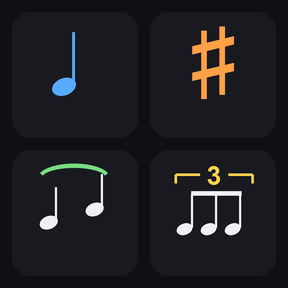
167 MuseScore Studio shortcuts on your Stream Deck
To use a Stream Deck with MuseScore Studio, install Notehead Keys, a profile with 167 one-press keys for note input, intervals, articulations, tuplets and more, on 10 pages for the Stream Deck MK.2 (15 keys) on Windows. Keep MuseScore Studio in front, select notes and press a key, so scoring runs from the pad instead of memorized shortcuts.
Stream Deck profile · For the Stream Deck MK.2 (15 keys) on Windows with the Stream Deck app (7.6), and MuseScore Studio 4.7 or 4.6 with its default shortcuts.
What you can do
Enter notes: notes A to G, rests, durations from 64th to longa and the dot.
Change pitch and build chords: octave up and down, sharp, flat and add A to G.
Add intervals: unison to 10th, above and below.
Mark articulations: staccato, slur, tie, grace note and bends.
Write tuplets from duplet to nonuplet and switch between voices 1 to 4.
Add text: tempo, dynamics, lyrics and chord symbols.
Work with measures: add, insert, breaks and locks, plus edit keys such as undo, swap, paste half or double, and repeat.
Navigate and play: move by notes, measures and pages, play, zoom, open panels and save.
Use it on a Japanese or US keyboard layout: the keys send the same key codes on both, and the numpad keys work without a physical numpad and with NumLock on or off.
How it works
Install the profile from the Elgato Marketplace and select it on your Stream Deck.
PREV and NEXT at the bottom right move between the 10 pages; the MORE key opens a folder with more keys of the same page, and BACK returns.
Keep MuseScore Studio in front with a score open, select notes or measures, and press a key.
Each key sends one of MuseScore Studio's default keyboard shortcuts to the active window, so nothing needs to be imported into MuseScore.
Install the Notehead Keys profile and select it on your 15-key Stream Deck. Keep MuseScore Studio in front with a score open, select notes first and press a key; PREV and NEXT move between the 10 pages.
How do I enter new notes with the keys?
Press NOTE INPUT first, as in MuseScore, then use the note and duration keys.
Does it work with a Japanese keyboard layout?
Yes. The profile is built for both Japanese and US layouts. It sends letters, digits, F-keys, navigation keys and the numpad keys + - . /, which have the same key codes on both, and the numpad keys work without a physical numpad.
A key does nothing or does something else. What do I do?
Make sure MuseScore Studio is the active window and click the score once so it has the keyboard focus. Most keys need a selection, such as a note for pitch, interval, articulation and tuplet keys. The keys send MuseScore Studio's default shortcuts, so if you changed one, change that key's Hotkey in the Stream Deck app to match.
Which keys remove or close something?
Delete, Cut, Delete Measures and Close. Undo brings back what the other three removed.
Does it work on Mac, Stream Deck XL or Stream Deck +?
This version is for Windows with the 15-key Stream Deck (MK.2). Other devices are not covered in this version.
Limits
Made for the 15-key Stream Deck (MK.2); Stream Deck XL, Stream Deck + and other devices are not covered in this version.
Windows only; not for MuseScore Studio on Mac.
Needs MuseScore Studio with its default shortcuts; a changed shortcut needs the key's Hotkey changed to match.
Shortcuts that exist only on symbol keys, such as natural and hairpins, are not included.