Stream Deck profile for Windows
PaintTool SAI shortcuts on your Stream Deck
Put PaintTool SAI shortcuts on your Stream Deck and keep the pen in your other hand.
Art Deck gives illustration and digital painting artists the SAI 2 keys for Pencil, Brush, Water Color, Eraser, brush size, density, undo, rotate and flip view, selection and layers, one press away from your pen tablet.
Profiles for Stream Deck MK.2, XL, Neo, + and + XL, and for the Corsair Galleon 100 SD, on Windows. Most keys use the default shortcuts of PaintTool SAI Ver.2, so you can start drawing right after the import.
- Tools and undo
- Brush size and density
- Rotate and flip view
- Selection
- Layers
- Dials for size, rotate and zoom
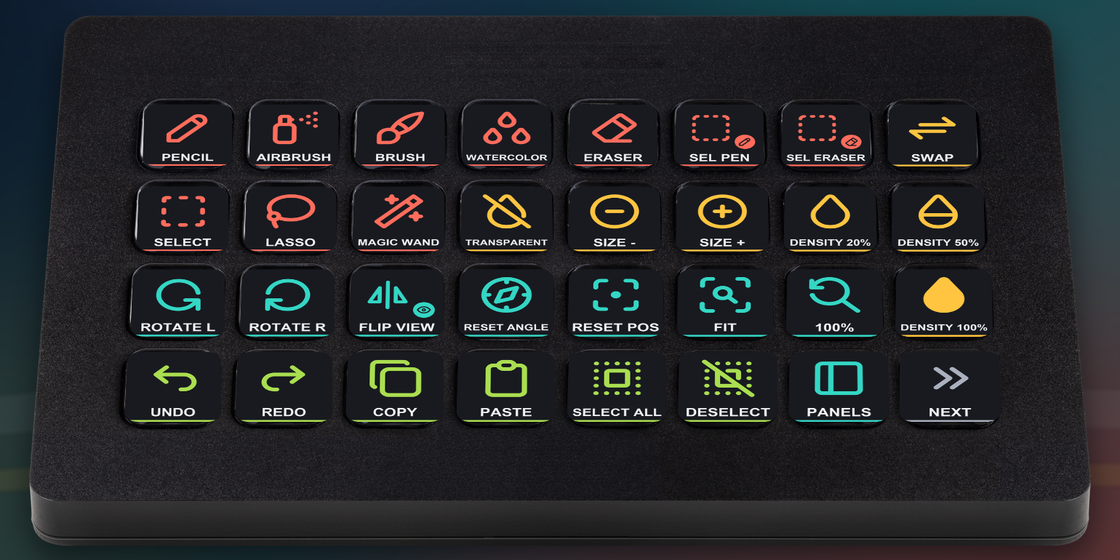
What the pages hold
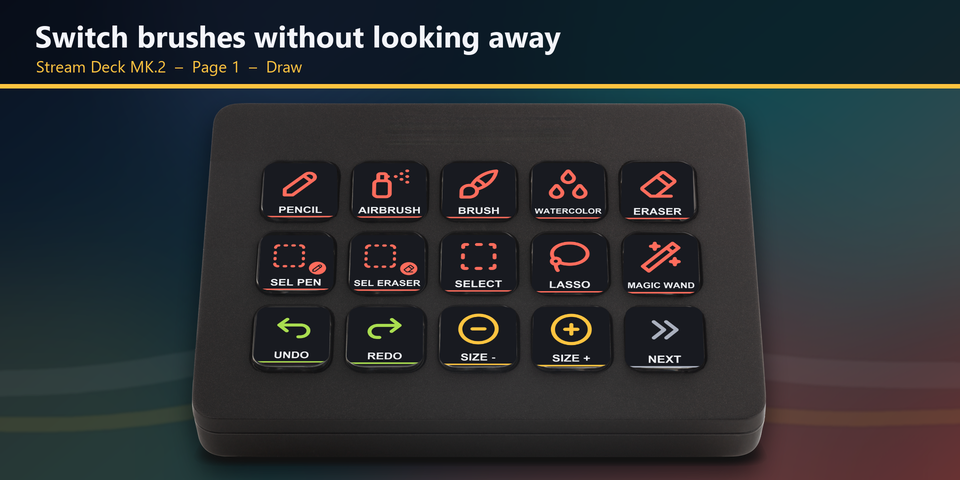
Draw
Pencil, AirBrush, Brush, Water Color, Eraser, SelPen, SelErs, Selection, Lasso, Magic Wand, Undo, Redo and Brush size down / up.
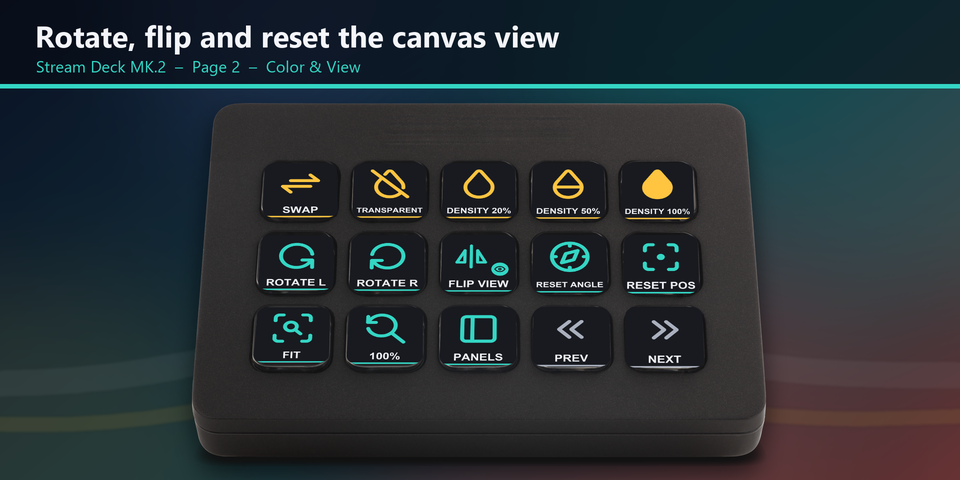
Color & View
Swap primary / secondary color, Transparent color, Density 20%, 50% and 100%, Rotate view left / right, Flip view, Reset angle, Reset position, Fit to window, 100% and Show all panels.
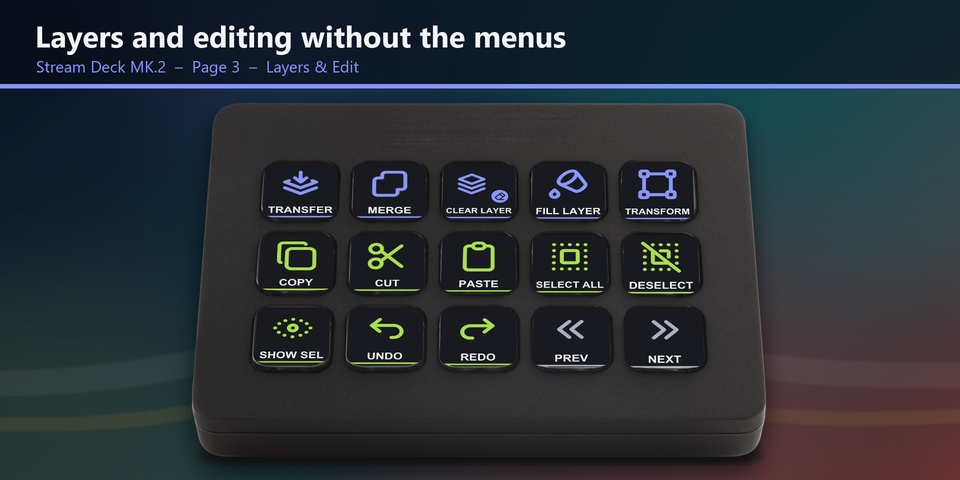
Layers & Edit
Transfer to the layer below, Merge, Clear layer, Fill layer, Transform, Copy, Cut, Paste, Select all, Deselect, Show / hide selection, Undo and Redo.
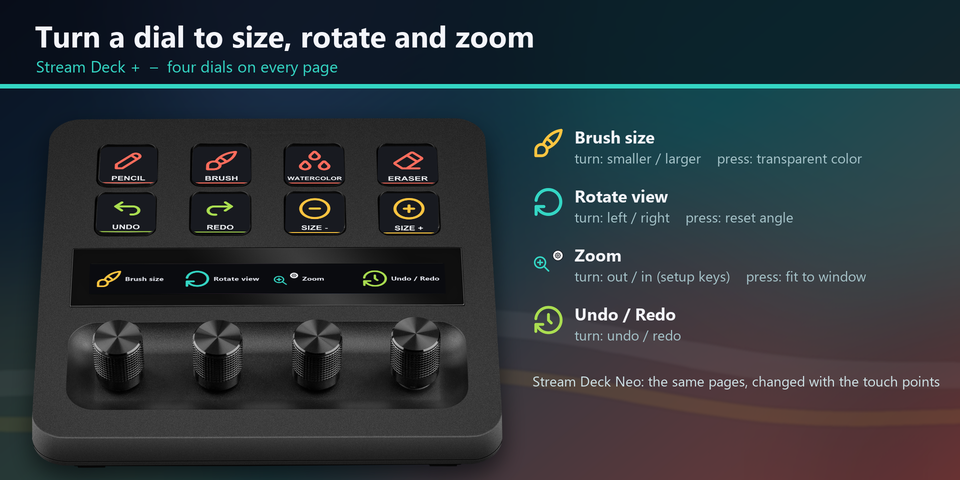
Dials
On Stream Deck + and + XL, turn a dial for brush size (press for transparent color), rotate view (press to reset the angle), zoom (press to fit the window) or undo / redo. The Galleon 100 SD has two dials with two layers each.
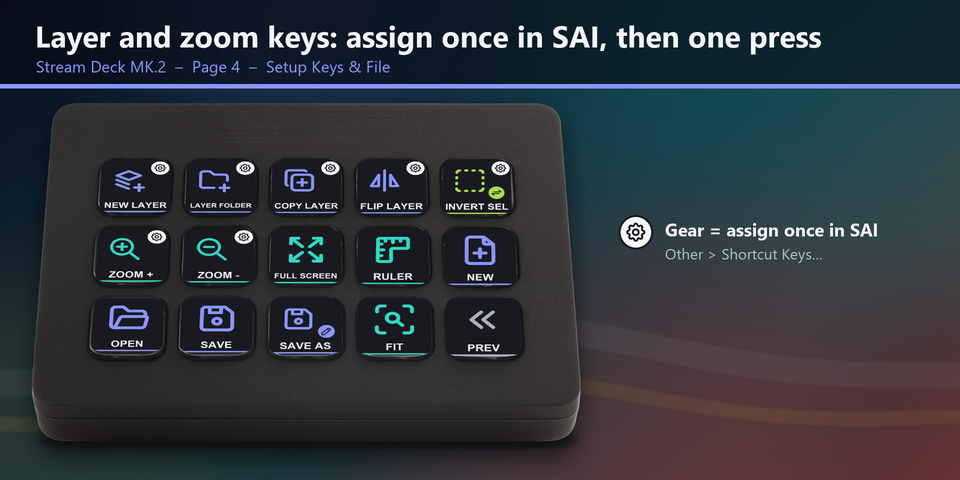
Setup Keys & File
New layer, Layer folder, Copy layer, Flip layer, Invert selection and Zoom in / out (assign each once in SAI, then one press), plus Full screen, Ruler, New, Open, Save and Save as.
A profile for each Stream Deck
The download holds a Windows profile for each of these Stream Deck models, plus a Corsair Galleon 100 SD profile: 12 keys a page on 5 pages, with two dials for brush size / rotate view and zoom / undo-redo. Double-click the one for yours and the Stream Deck app imports it.
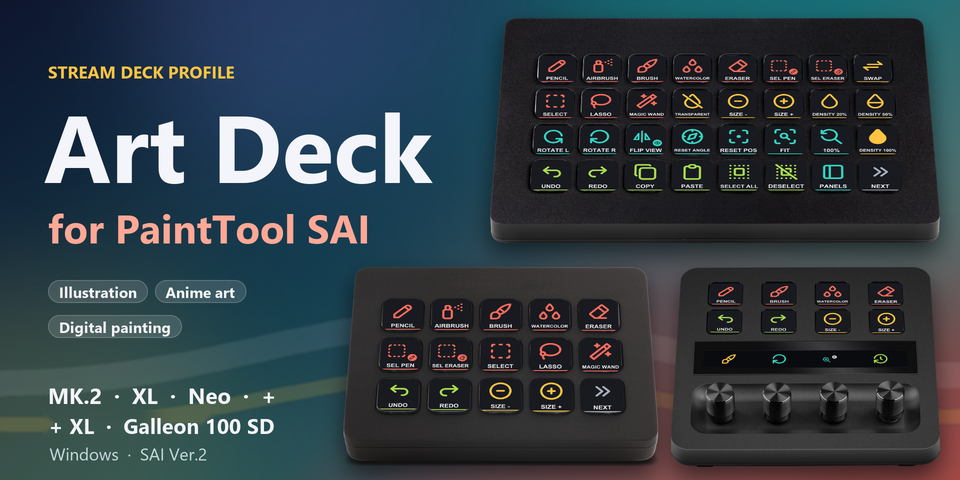
Stream Deck MK.2
15 keys on 4 pages: Draw, Color & View, Layers & Edit, and Setup Keys & File.
Stream Deck XL
32 keys on 2 pages: Draw & View, and Layers & File.
Stream Deck Neo
8 keys a page: tap the touch points to change pages.
Stream Deck +
8 keys a page (swipe the touch strip to change pages) and four dials for brush size, rotate view, zoom and undo / redo.
Stream Deck + XL
The two XL pages with every key in the same place, and the same four dials as the Stream Deck +.
Built on the default shortcuts
Most keys send a default shortcut of PaintTool SAI Ver.2, so they work as soon as the profile is imported.
Seven keys with a small gear in the corner (New layer, Layer folder, Copy layer, Flip layer, Invert selection, Zoom in and Zoom out) are commands SAI has no default shortcut for. Assign each one once in SAI under Other > Shortcut Keys..., using the key in the README, and from then on it is one press.
Keys send letters, digits, [ ] - Tab Delete Home Page Up Page Down F11 with Ctrl, Shift or Alt. No Windows key is used.
If you changed a shortcut in PaintTool SAI, edit that key in the Stream Deck app.
Set up in 3 steps
- Get the profiles from the Elgato Marketplace, or download the zip after buying direct and unzip it.
- Double-click the .streamDeckProfile file for your device. The Stream Deck app imports it.
- Open PaintTool SAI and select the profile on your Stream Deck. Assign the seven gear keys once in SAI, and every key sends its shortcut.
Two places to buy
| Elgato Marketplace | Direct from GRAMSHIFT | |
|---|---|---|
| Amount | Same amount | Same amount, tax added at checkout |
| Checkout | Elgato Marketplace | Stripe (card) |
| How you get it | Installed through the Stream Deck app | A zip with a profile file for each device |
| Devices | MK.2, XL, Neo and + | MK.2, XL, Neo, +, + XL and Corsair Galleon 100 SD |
| Account | Your Elgato account | None needed |
| Key labels | English | English |
Requirements
- Windows 10 or later
- Stream Deck MK.2, XL, Neo, + or + XL, or a Corsair Galleon 100 SD
- Stream Deck app 6.4 or later
- PaintTool SAI Ver.2 for Windows with its default shortcut keys
Questions
How do I put PaintTool SAI shortcuts on a Stream Deck?
Double-click the Art Deck profile file for your Stream Deck. The Stream Deck app imports it. Then open PaintTool SAI and select the profile: each key sends a SAI shortcut, such as Pencil, Brush, undo, brush size or rotate view.
Why do some keys show a small gear?
PaintTool SAI has no default shortcut for those seven commands, so you assign each one once in SAI: Other > Shortcut Keys..., find the command and press the key. New Normal Layer: Ctrl+Shift+N. New Layer Folder: Ctrl+Shift+G. Copy Layer: Ctrl+J. Reverse Layer Horizontal: Ctrl+Shift+H. Invert Selection: Ctrl+Shift+I. Zoom In: Ctrl+Page Up. Zoom Out: Ctrl+Page Down. Every other key works right away.
Does it work with PaintTool SAI Ver.1?
The profile is made for SAI Ver.2. On Ver.1, the brush keys (size, density, swap and transparent color) and seven tool keys (Pencil, AirBrush, Brush, Water Color, Eraser, SelPen and SelErs) match the Ver.1 help. The other keys, such as Selection, Lasso, Magic Wand and the menu keys, are made for Ver.2.
Which Stream Deck models does it support?
Stream Deck MK.2, XL, Neo, + and + XL, and the Corsair Galleon 100 SD, on Windows. The Elgato Marketplace has the MK.2, XL, Neo and + profiles, and the direct download holds all six.
Is there anything to activate after I buy direct?
No. You download a zip with the profile files and a README. There is nothing to activate and no account to make.
How do I get the files again?
Email contact@gramshift.com from the address you paid with, and include your order number, or the date and amount you paid. We check the purchase and reply with a new link to your download page.
Can I get a refund?
Yes, for a direct purchase. If the profiles do not work with your Stream Deck and PaintTool SAI, email us within 14 days of purchase and we refund the full amount. The download closes after the refund.
Direct purchase details
- Price
- ¥1,200, the same amount as on the Elgato Marketplace. Tax for your country is added at checkout.
- Payment
- Handled by Stripe through Link, Stripe's checkout service. Link appears as the seller on your receipt and card statement, and your card number never reaches GRAMSHIFT.
- Delivery
- A download link appears right after payment, and the receipt arrives by email. You get the profile files and a README: there is nothing to activate.
- Refunds
- If the profiles do not work with your Stream Deck and PaintTool SAI, email us within 14 days of purchase for a full refund. You can also ask Link support. The download closes after a refund.
- Use
- For your own use. Please do not share, resell or upload the files.
- Countries
- The direct checkout is not offered in Ascension Island, China, Cuba, Iran, Kosovo, North Korea, Russia, Syria or Tristan da Cunha.
- Seller
- GRAMSHIFT, Tokyo, Japan. Contact: contact@gramshift.com
Limitations
- Seven keys (marked with a small gear) are commands that PaintTool SAI has no default shortcut for. Assign each one once in SAI under Other > Shortcut Keys...; the keys are listed in the README and in the questions above.
- Not included: Close View (Ctrl+W) and Create Canvas from Clipboard (Ctrl+B), left out so a stray press cannot close or open a canvas, and tools that have no default key in SAI (for example Bucket, Move, Hand, Syringe and Text).
- Made for PaintTool SAI Ver.2. On Ver.1, the brush keys and the Pencil, AirBrush, Brush, Water Color, Eraser, SelPen and SelErs keys match the Ver.1 help; the other keys are made for Ver.2.
- Keys send the default shortcuts. A shortcut you changed in PaintTool SAI needs the same change on its key in the Stream Deck app.
- For PaintTool SAI on Windows. The density keys are 20%, 50% and 100%.
- Key labels are in English.