Stream Deck profile for Windows
Cubase key commands on your Stream Deck
Put Cubase key commands on labeled Stream Deck keys and record, edit and arrange with one press each.
Editing Keys gives you play, record, cycle, locators, markers 1 to 9, split, quantize, the edit tools, track mute, solo and record enable, zoom and the MixConsole on 10 pages.
Profiles for Stream Deck MK.2, XL, Neo and + on Windows. Every command key sends one of Cubase's own default key commands, so it works with Cubase as it comes and your Cubase settings stay as they are.
- Transport and locators
- Markers 1 to 9
- Edit and split
- Tools and snap
- Tracks and versions
- Dials for zoom, tracks, cursor and undo
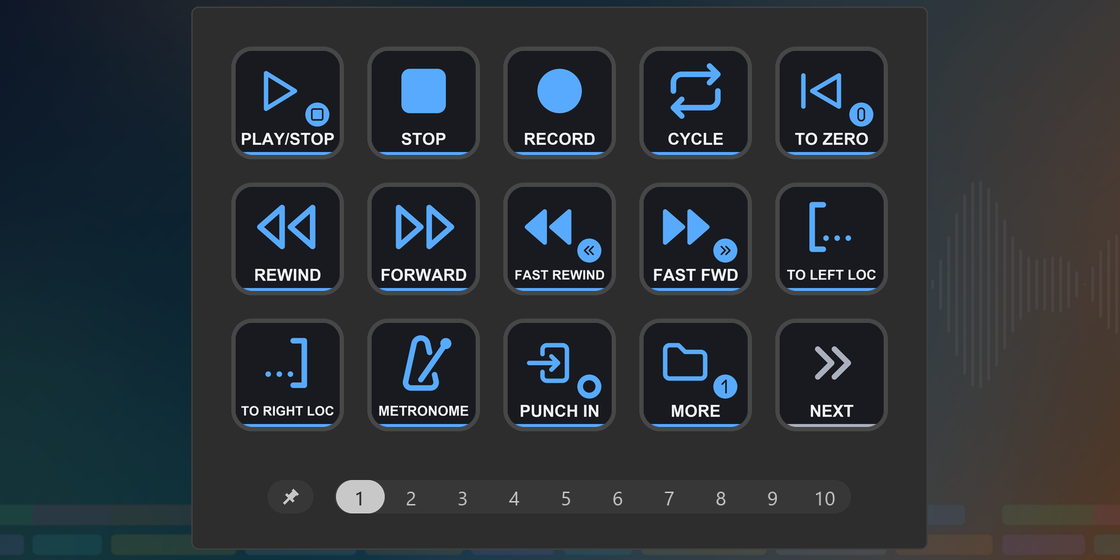
What the pages hold
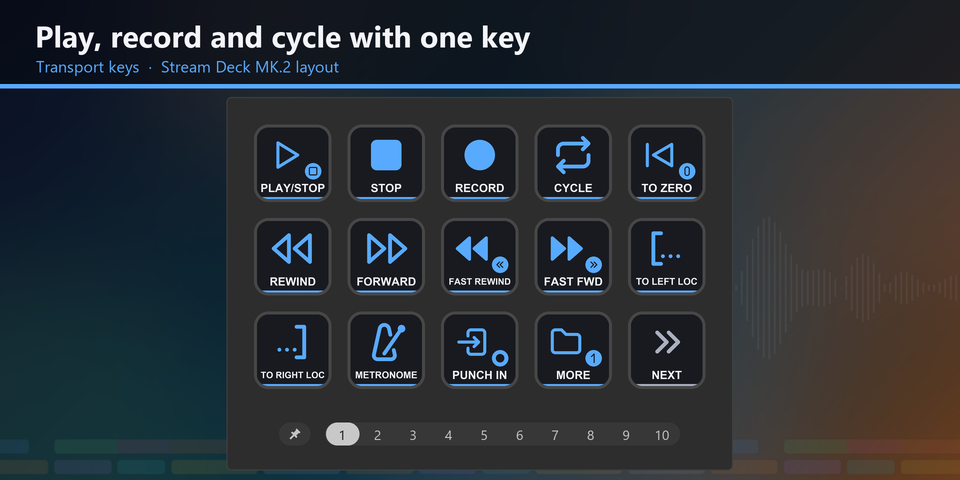
Transport
Play/Stop, Stop, Record, Cycle, To zero, Rewind, Forward, Fast rewind / forward, To left / right locator, Metronome and Punch in. MORE adds Punch out, Retro record, Play range, Locate, Loop selection, Nudge, Prev / next event and Tap tempo.
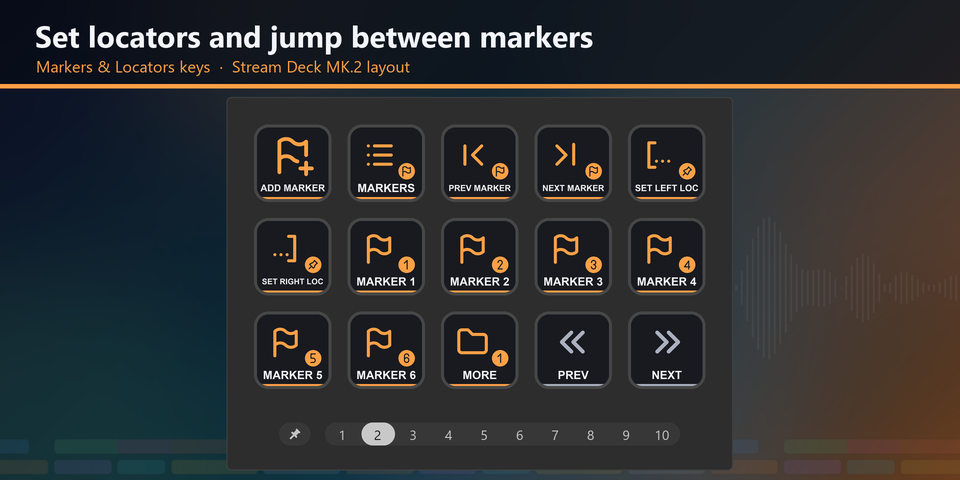
Markers & Locators
Add marker, the Markers window, Prev / next marker, Set left / right locator and Marker 1 to 9 to jump. MORE also holds Set marker 1 to 9.
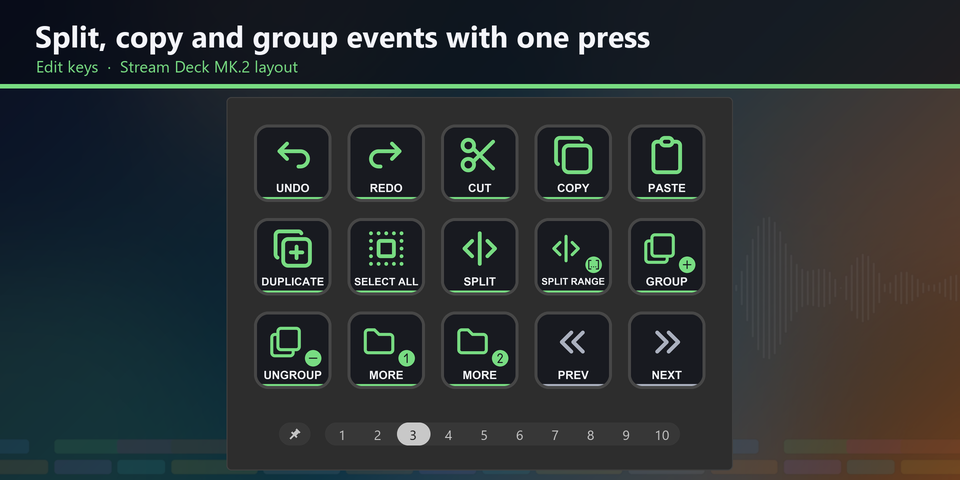
Edit
Undo, Redo, Cut, Copy, Paste, Duplicate, Repeat, Select all, Split, Split range, Group, Ungroup, Select none, Invert selection, Lock, Unlock, To cursor, Insert silence, Paste time and Mute objects. Delete, Cut time and Delete time sit apart in red.
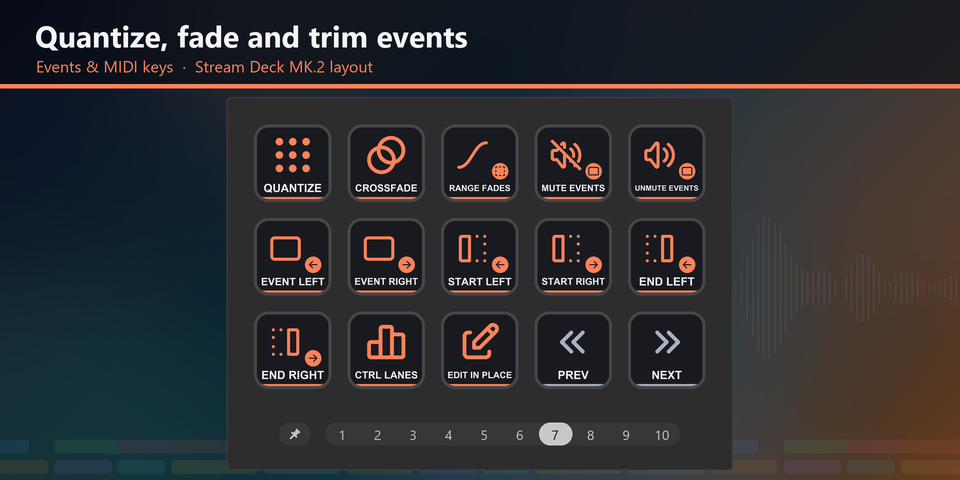
Events & MIDI
Quantize, Crossfade, Range fades, Mute / unmute events, move an event, its start or its end left / right, Controller lanes and Edit in place.
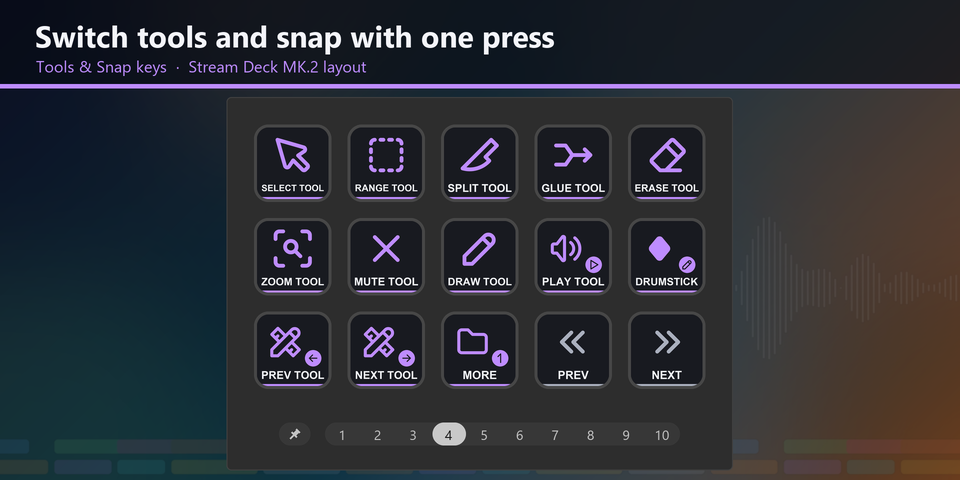
Tools & Snap
Select, Range, Split, Glue, Erase, Zoom, Mute, Draw, Play and Drumstick tools and Prev / next tool. MORE adds Combine tools, Snap, Auto-grid, Autoscroll, Static cursor and Selection start / end.
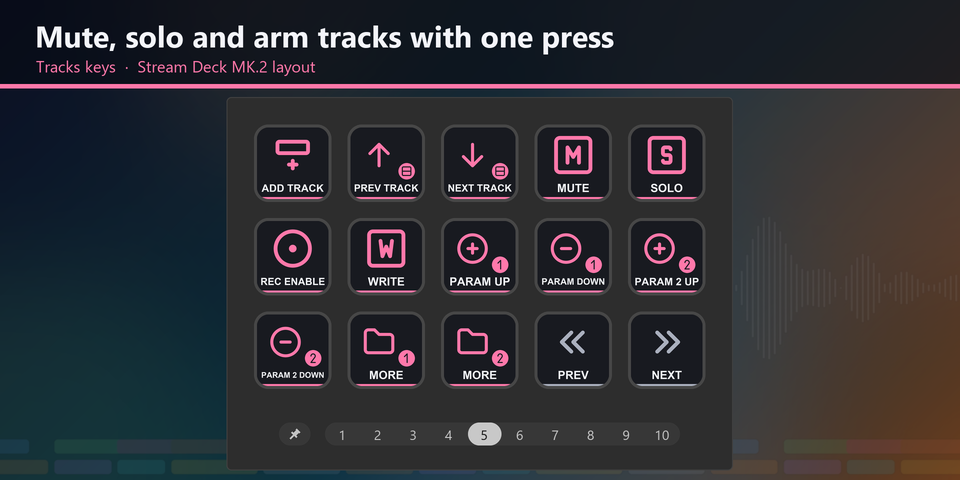
Tracks
Add track, Prev / next track, Mute, Solo, Record enable, Write, Param up / down for two parameters, Read all, Write all, Rename, Find track, Track color, Group tracks and track versions. Remove track sits apart in red.
A profile for each Stream Deck
The download holds a Windows profile for each of these Stream Deck models, each with the same 10 pages: Transport, Markers & Locators, Edit, Tools & Snap, Tracks, Zoom, Events & MIDI, Windows, Zones & Workspaces, and File & Project. Double-click the one for yours and the Stream Deck app imports it.
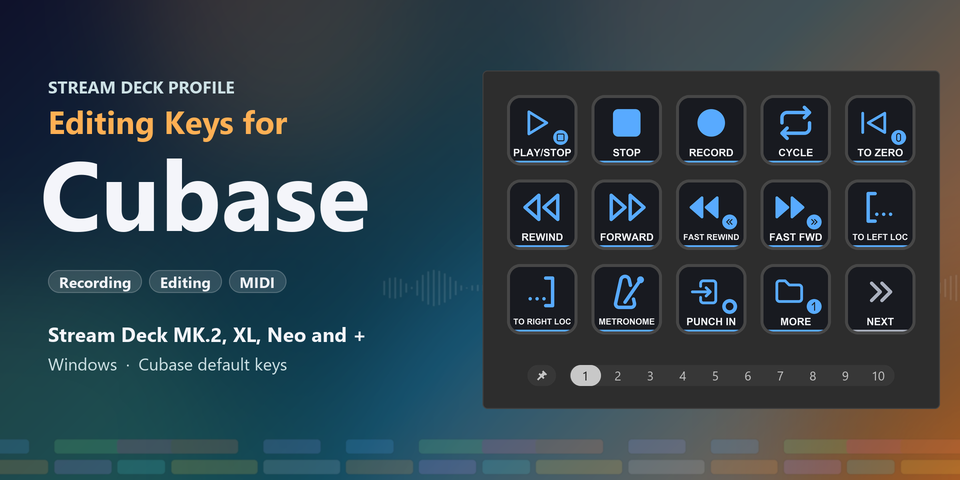
Stream Deck MK.2
15 keys a page: PREV and NEXT change the 10 pages, and MORE opens the rest of a bigger page.
Stream Deck XL
32 keys: every key of a page on one screen.
Stream Deck Neo
8 keys a page: tap the touch points to change pages. MORE opens the rest of a page.
Stream Deck +
8 keys a page (swipe the touch strip to change pages) and four dials on every page: zoom (press for zoom full), tracks (press for the MixConsole), cursor (press for play / stop) and undo / redo (press to save).
Built on Cubase's default key commands
Every command key sends one of Cubase's default key commands, so the profile works as soon as it is imported. Nothing is added to Cubase: no key commands file, no plugin and no MIDI Remote script.
Keep the Cubase Project window in front: Cubase sends a key command to the window that has the focus. If a key does nothing, click the Project window once.
Keys that delete (Delete, Cut time, Delete time and Remove track) are red, with empty keys around them: in MORE folders on the MK.2, Neo and +, and on the bottom row of the page on the XL. Undo is on the Edit page.
If you changed a key command in Cubase (Studio > Key Commands), edit that key's Hotkey in the Stream Deck app.
Set up in 3 steps
- Get the profiles from the Elgato Marketplace, or download the zip after buying direct and unzip it.
- Double-click the .streamDeckProfile file for your Stream Deck. The Stream Deck app imports it.
- Open Cubase, select the profile on your Stream Deck and keep the Cubase window in front. Every command key sends its key command.
Two places to buy
| Elgato Marketplace | Direct from GRAMSHIFT | |
|---|---|---|
| Amount | Same amount | Same amount, tax added at checkout |
| Checkout | Elgato Marketplace | Stripe (card) |
| How you get it | Installed through the Stream Deck app | A zip with a profile file for each device |
| Devices | MK.2, XL, Neo and + | MK.2, XL, Neo and + |
| Account | Your Elgato account | None needed |
| Key labels | English | English |
Requirements
- Windows 10 or later
- Stream Deck MK.2, XL, Neo or +
- Stream Deck app 6.4 or later
- Cubase for Windows with its default key commands (the keys were taken from Cubase Pro 15.0.30)
Questions
How do I use a Stream Deck with Cubase?
Double-click the Editing Keys profile file for your Stream Deck and the Stream Deck app imports it. Select the profile, keep Cubase in front and press a key: each key sends a Cubase default key command, such as play, record, split, quantize or jump to a marker.
Do I need to import a key commands file into Cubase?
No. Every command key uses Cubase's default key commands, so nothing is imported into Cubase: no key commands file, no plugin and no MIDI Remote script. If you changed a key command, edit that key's Hotkey in the Stream Deck app.
Does it work with Cubase Artist or Elements?
The keys send Cubase's default key commands, taken from Cubase Pro 15.0.30. In Cubase Artist or Elements, a key for a window or feature your edition does not have does nothing.
Which Stream Deck models does it support?
Stream Deck MK.2, XL, Neo and +, on Windows. The download holds a profile for each of them. On the +, the four dials zoom, move between tracks, move the project cursor and undo or redo.
How do I reach the rest of a big page?
On the MK.2, Neo and +, a bigger page has a MORE key that opens a folder, and BACK at the top left returns. On the XL, every key of a page is on one screen. PREV and NEXT at the bottom right move between the 10 pages.
Is there anything to activate after I buy direct?
No. You download a zip with the profile files and a README. There is nothing to activate and no account to make.
How do I get the files again?
Email contact@gramshift.com from the address you paid with, and include your order number, or the date and amount you paid. We check the purchase and reply with a new link to your download page.
Can I get a refund?
Yes, for a direct purchase. If the profiles do not work with your Stream Deck and Cubase, email us within 14 days of purchase and we refund the full amount. The download closes after the refund.
Direct purchase details
- Price
- ¥2,400, the same amount as on the Elgato Marketplace. Tax for your country is added at checkout.
- Payment
- Handled by Stripe through Link, Stripe's checkout service. Link appears as the seller on your receipt and card statement, and your card number never reaches GRAMSHIFT.
- Delivery
- A download link appears right after payment, and the receipt arrives by email. You get the profile files and a README: there is nothing to activate.
- Refunds
- If the profiles do not work with your Stream Deck and Cubase, email us within 14 days of purchase for a full refund. You can also ask Link support. The download closes after a refund.
- Use
- For your own use. Please do not share, resell or upload the files.
- Countries
- The direct checkout is not offered in Ascension Island, China, Cuba, Iran, Kosovo, North Korea, Russia, Syria or Tristan da Cunha.
- Seller
- GRAMSHIFT, Tokyo, Japan. Contact: contact@gramshift.com
Limitations
- Made for Cubase on Windows with its default key commands, taken from Cubase Pro 15.0.30. A key command you changed in Cubase needs the same change on its key's Hotkey in the Stream Deck app.
- In Cubase Artist or Elements, a key for a window or feature your edition does not have does nothing.
- Keys go to the window that has the focus. Keep the Project window in front, and click it once if a key does nothing.
- Workspace 1 to 9 open workspaces you saved with New Workspace (on the Zones & Workspaces page).
- Not included: commands with no default key command, commands on symbol keys that sit on different keys on Japanese, US and European keyboards, Close and Quit, commands that only work inside an editor or the MediaBay, and commands that put the text cursor into a transport field.
- Key labels are in English.