Stream Deck profile for Windows
Farming Simulator 25 on your Stream Deck
A Stream Deck profile for Farming Simulator 25 (FS25 / LS25) on Windows: drive, light and work your farm from keys set to the game's default controls.
One purchase covers Stream Deck MK.2, XL, Neo and +, with English or Japanese key labels.
Start the engine, switch on cruise control, attach, lower and turn on your tools, open the pipe and unload with one press each. On Stream Deck +, four dials set cruise speed, time scale, vehicle and radio.
- Engine, cruise and gears
- Lights and signals
- Attach, lower, fold
- Pipe, unload, belts
- Shop, time and radio
- Dials on Stream Deck +
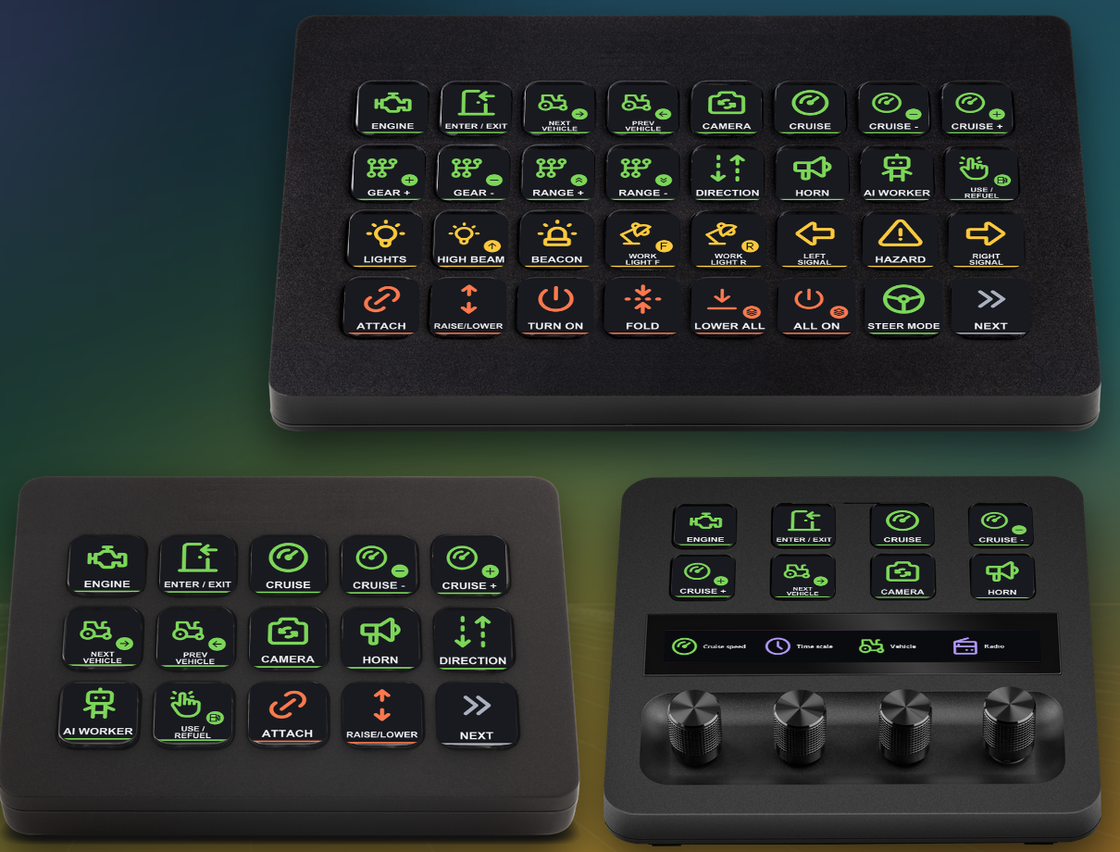
What the keys do
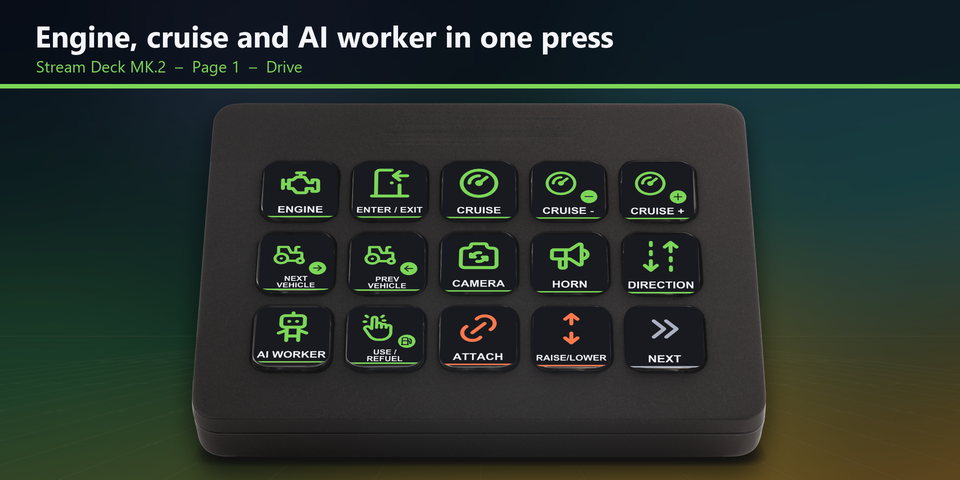
Drive with one press
Engine, enter and exit, next and previous vehicle, camera, cruise control and its speed, direction, horn, gears and ranges, the AI worker and use / refuel each have a key.
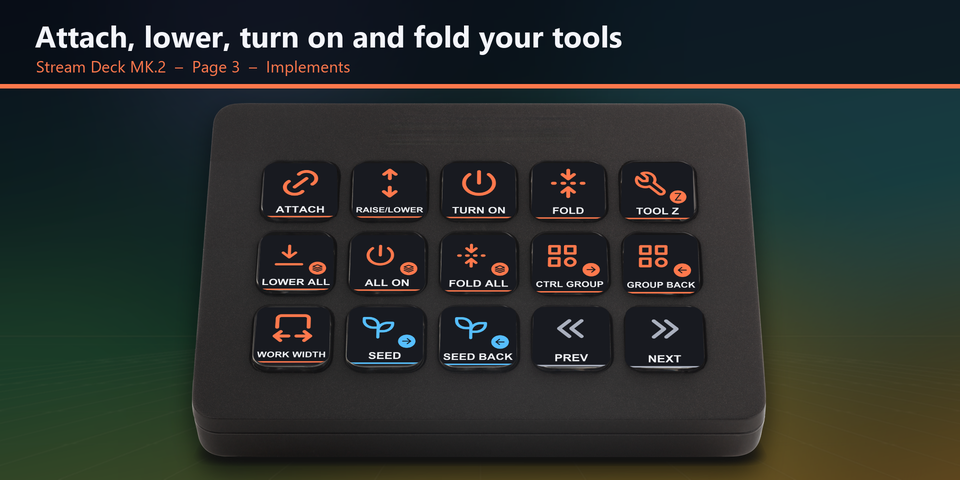
Work your tools
Attach and detach, raise and lower, turn on and fold one tool, or lower, turn on and fold all of them at once. Tool function, control groups and work width are there too.
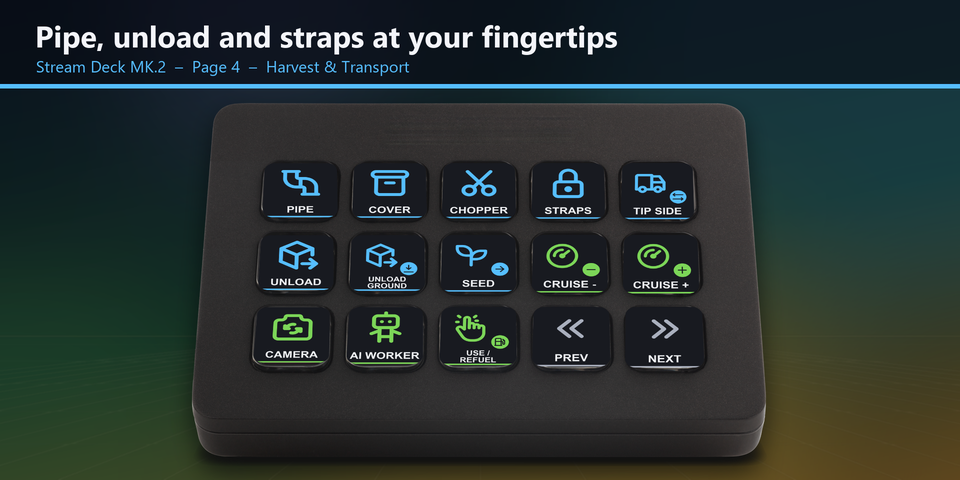
Harvest and transport
Pipe, cover, chopper, unload, unload to ground, tipping side, tension belts and seed selection, next to cruise speed and the AI worker.
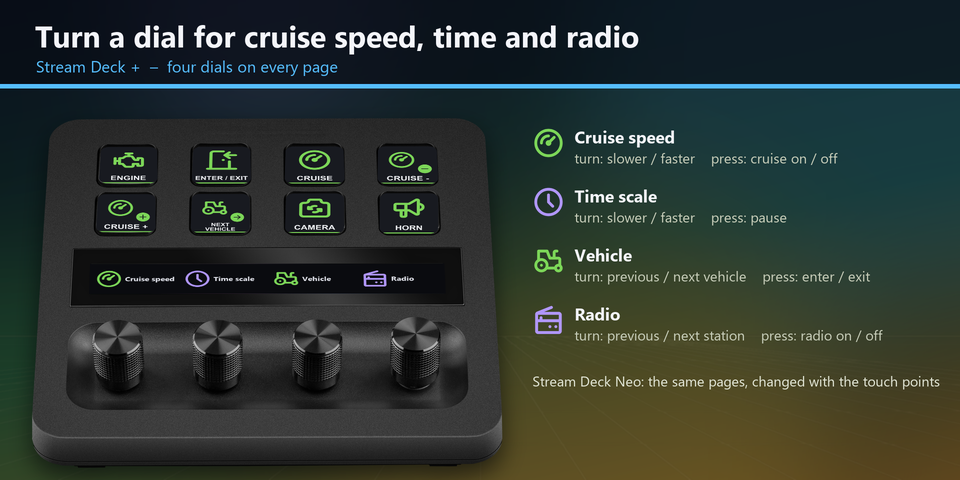
Four dials on Stream Deck +
Turn for cruise speed, time scale, vehicle and radio station, and press to switch cruise control, pause, enter or exit the vehicle and turn the radio on or off. On Stream Deck Neo, the touch points change pages.
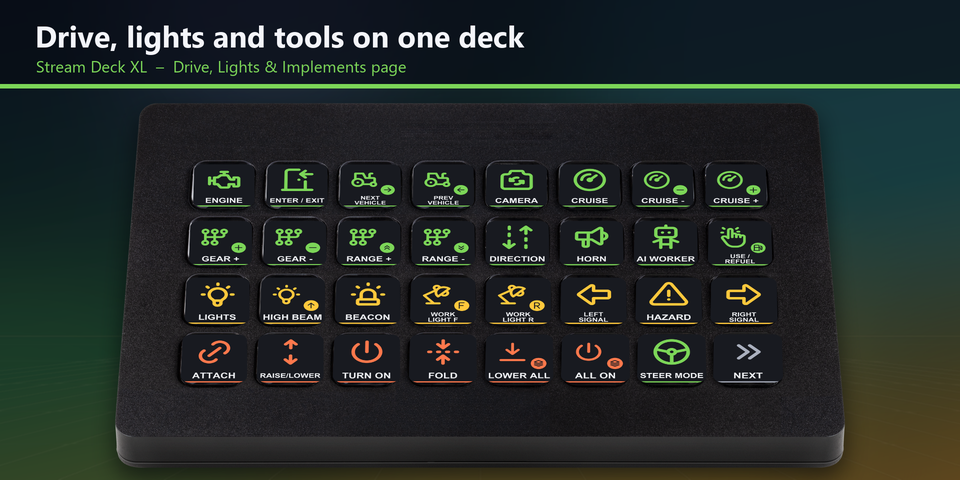
Everything on one XL page
On Stream Deck XL, the first page puts driving, gears, ranges, lights, turn signals, work lights and implements side by side. The second page holds tools, harvest and game keys.
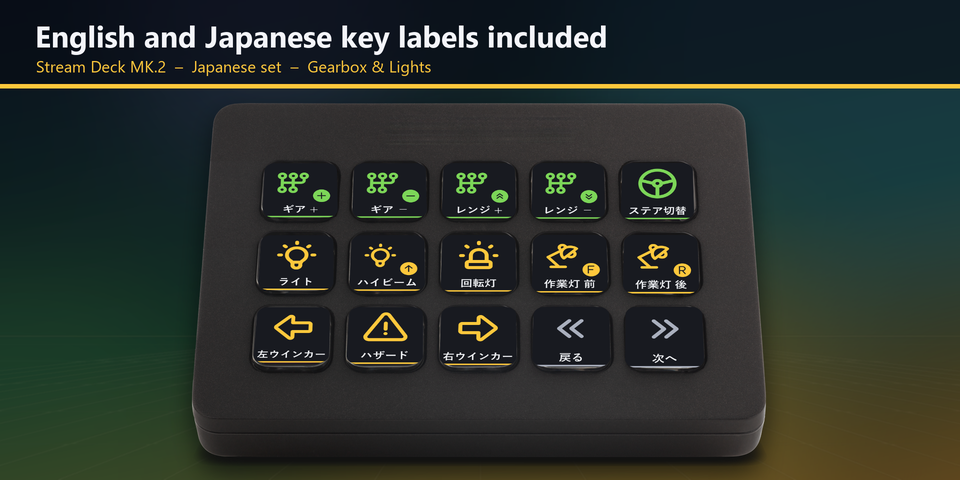
English and Japanese labels
The download holds the same keys twice: once with English labels and once with Japanese labels. Import the set you want.
Profiles for four Stream Deck models
The download holds a profile for each of Stream Deck MK.2, XL, Neo and +, in English and in Japanese. MK.2 has 5 pages of 15 keys and XL 2 pages of 32 keys. Neo and + show 8 keys a page: tap the touch points on Neo, or swipe the touch strip on +, to change pages.
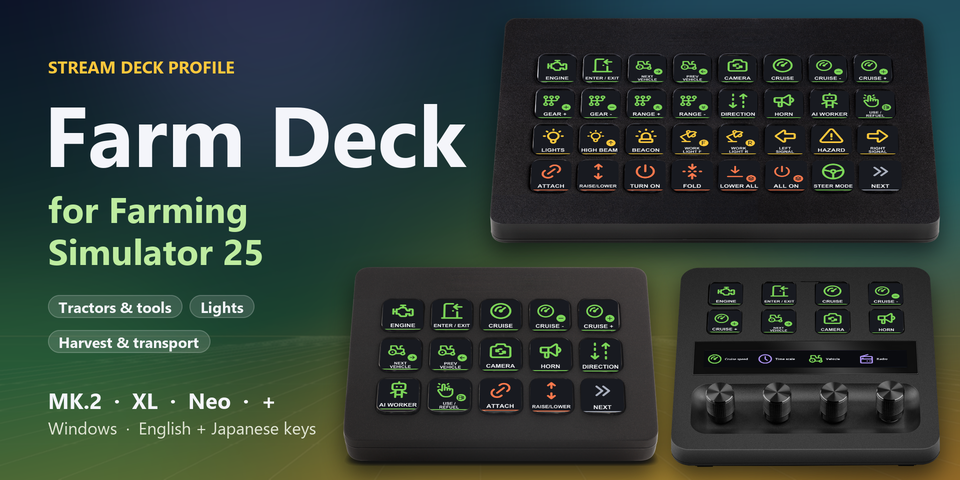
Drive
Engine, enter / exit, next and previous vehicle, camera, cruise and speed, direction, horn, gears, ranges, AI worker, use / refuel, steering mode.
Lights
Lights, high beam, beacon, left and right signal, hazards, front and rear work lights.
Implements
Attach / detach, raise / lower, turn on, fold, lower all, turn on all, fold all, tool function, control groups, work width.
Harvest and transport
Pipe, cover, chopper, unload, unload to ground, tipping side, tension belts, next and previous seed.
Game
Minimap, shop, build mode, menu, pause, time scale, radio, chat, help text, screenshot.
Set to the default controls
Every key sends a default keyboard control of Farming Simulator 25, so the game settings stay as they are.
Keep the game window in front: the keys are sent to the window in front.
Turn Num Lock on. The gear, range, turn signal and work light keys use the number pad.
Changed a control in the game (Settings > Controls)? Edit that key's Hotkey in the Stream Deck app to the same key.
Set up in 3 steps
- Install it from the Elgato Marketplace, or download and unzip the file after buying direct.
- Double-click the .streamDeckProfile file for your Stream Deck. The Stream Deck app imports it.
- Start Farming Simulator 25, select the profile on your Stream Deck and press a key.
Two places to buy
| Elgato Marketplace | Direct from GRAMSHIFT | |
|---|---|---|
| Amount | Same amount | Same amount, tax added at checkout |
| Checkout | Elgato Marketplace | Stripe (card) |
| How you get it | Installed through the Stream Deck app | A zip with the profile files you double-click |
| Account | Your Elgato account | None needed |
| Key labels | English and Japanese | English and Japanese |
Requirements
- Windows 10 or later
- Stream Deck MK.2, XL, Neo or +
- Stream Deck app 6.4 or later
- Farming Simulator 25 for Windows with its default keyboard controls
- Num Lock on
Questions
How do I control Farming Simulator 25 with a Stream Deck?
Double-click the Farm Deck profile file for your Stream Deck and the Stream Deck app imports it. Start the game, select the profile and press a key: the keys send the game's default keyboard controls to drive, light and work your farm.
Do I need to change the game's controls?
No. The keys are set to the default keyboard controls of Farming Simulator 25. If you changed a control in Settings > Controls, edit that key's Hotkey in the Stream Deck app to the same key.
Which Stream Deck is it for?
Stream Deck MK.2, XL, Neo and +, on Windows. One purchase covers all four, with English or Japanese key labels.
What do the dials on Stream Deck + do?
Turn them for cruise speed, time scale, vehicle and radio station. Press them to switch cruise control on or off, pause, enter or exit the vehicle and turn the radio on or off.
Why does a gear or turn signal key do nothing?
Turn Num Lock on. The gear, range, turn signal and work light keys use the number pad. Also keep the game window in front: the keys are sent to the window in front.
Can I steer or accelerate with it?
No. A Stream Deck key sends one short press, so controls you hold down (steering, accelerating and braking, loader arms) stay on your wheel, controller or keyboard.
What do I get when I buy direct?
A zip with the profile files (MK.2, XL, Neo and +, in English and Japanese) and a README. Double-click the profile file for your Stream Deck to import it. No account is needed.
How do I get the file again?
Email contact@gramshift.com from the address you paid with, and include your order number, or the payment date and amount. We check the purchase and send a new link to the download page.
Can I get a refund?
Direct buyers, yes. If the profile does not work with your Stream Deck and Farming Simulator 25, email us within 14 days of purchase for a full refund. The download closes after a refund.
Does it work on a Mac?
No. The keys are made for Farming Simulator 25 on Windows, so it is for Windows only.
Direct purchase details
- Price
- ¥2,300, the same amount as on the Elgato Marketplace. Tax for your country is added at checkout.
- Payment
- Handled by Stripe through Link, Stripe's checkout service. Link appears as the seller on your receipt and card statement, and your card number never reaches GRAMSHIFT.
- Delivery
- A download link appears right after payment, and the receipt arrives by email. You get the profile files and a README.
- Refunds
- If the profile does not work with your Stream Deck and Farming Simulator 25, email us within 14 days of purchase for a full refund. You can also ask Link support. The download closes after a refund.
- Use
- For your own use. Please do not share, resell or upload the file.
- Countries
- The direct checkout is not offered in Ascension Island, China, Cuba, Iran, Kosovo, North Korea, Russia, Syria or Tristan da Cunha.
- Seller
- GRAMSHIFT, Tokyo, Japan. Contact: contact@gramshift.com
Limitations
- For Farming Simulator 25 on Windows, with Stream Deck MK.2, XL, Neo or +. There are no macOS keys.
- Each key sends one short press. Controls you hold down (steering, accelerating and braking, front loader and telescope arms, camera zoom, push-to-talk) stay on your keyboard, wheel or controller.
- Set to the default keyboard controls. After you change a control in the game, edit that key's Hotkey in the Stream Deck app to the same key.
- Made for US and Japanese keyboard layouts. On a German or French layout a few letters are in other places (for example Y and Z). If a key does the wrong thing, edit it in the Stream Deck app, or email contact@gramshift.com and we will help.
- What a tool function key does depends on the vehicle or tool. The game shows it in the help text (F1).