Stream Deck profile for Windows
Age of Empires II on your Stream Deck
A Stream Deck profile for Age of Empires II: Definitive Edition (AoE2 DE) on Windows: find idle villagers, give your army orders and formations, jump to your buildings, build by name and picture, and run your Town Center and Market with one press of a labeled key set to the default hotkeys.
One purchase covers Stream Deck MK.2, XL, Neo and +, with English or Japanese key labels.
The keys send the game's own default hotkeys, so the game stays as installed. On Stream Deck +, four dials change the game speed, find idle units, switch stance and move the camera.
- Idle villagers and army
- Orders and formations
- Go to your buildings
- Build by name
- Town Center and Market
- Dials on Stream Deck +
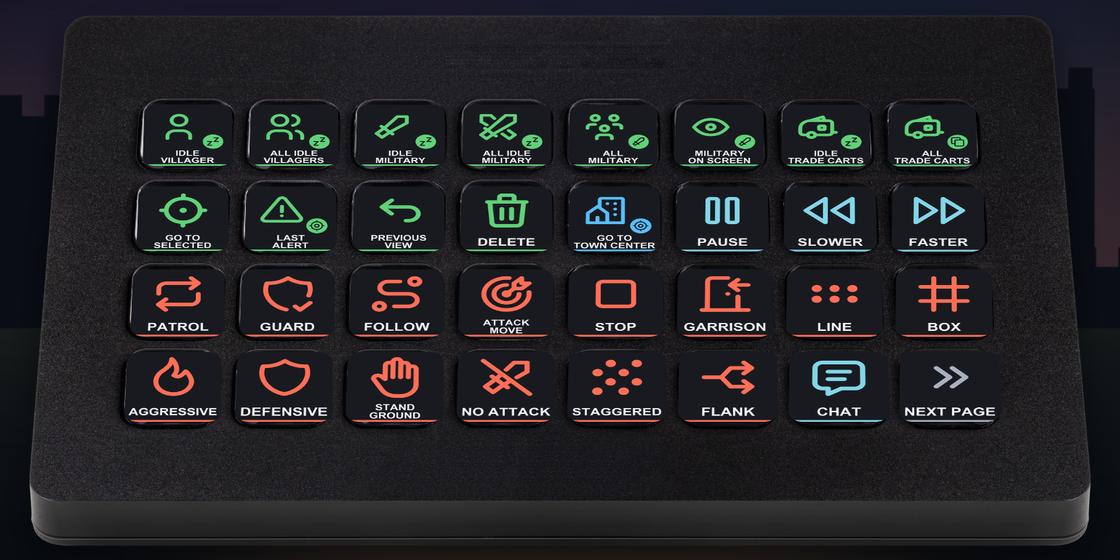
What the keys do
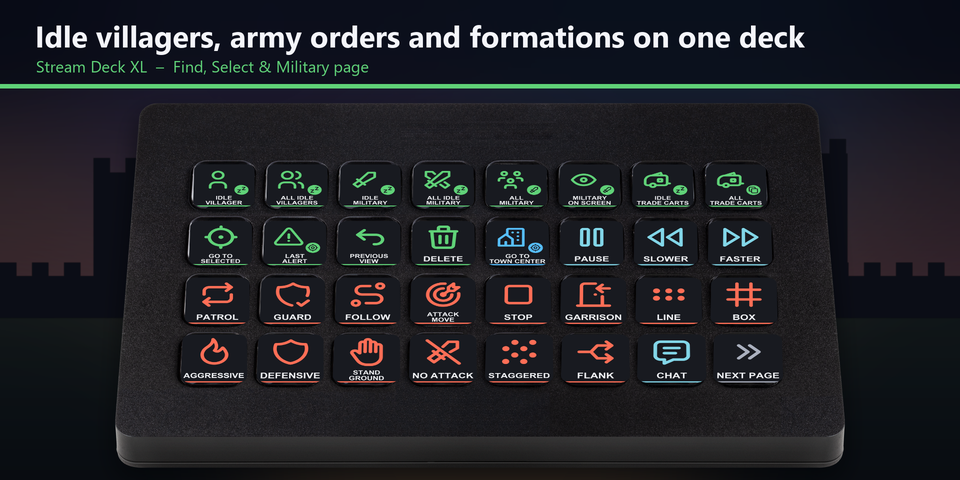
Villagers, army orders and formations on one XL page
On Stream Deck XL, the first page puts idle villagers, your army, orders, stances, formations, game speed and the camera keys side by side.
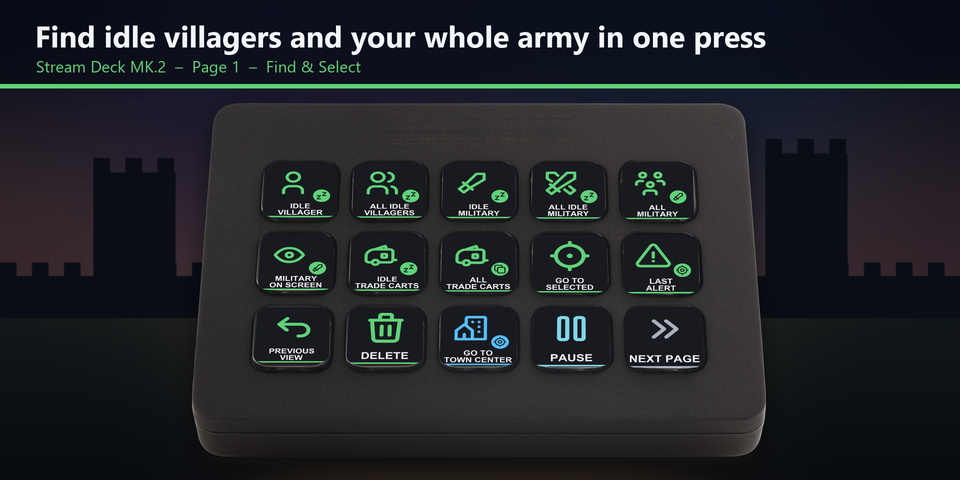
Idle villagers and your whole army in one press
Find the next idle villager or idle military unit, select all of them, select your whole army or the army on screen, find trade carts, and jump to the last alert or back to the previous view.
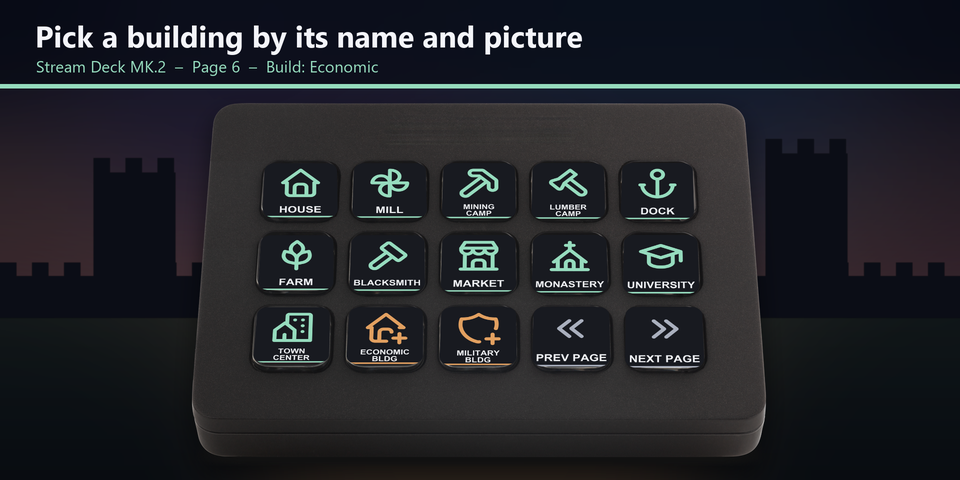
Pick a building by its name and picture
Select villagers, then press the building you want: houses, farms, camps, the Market, Barracks, Castle, walls, towers and gates each have their own key with a name and a picture.
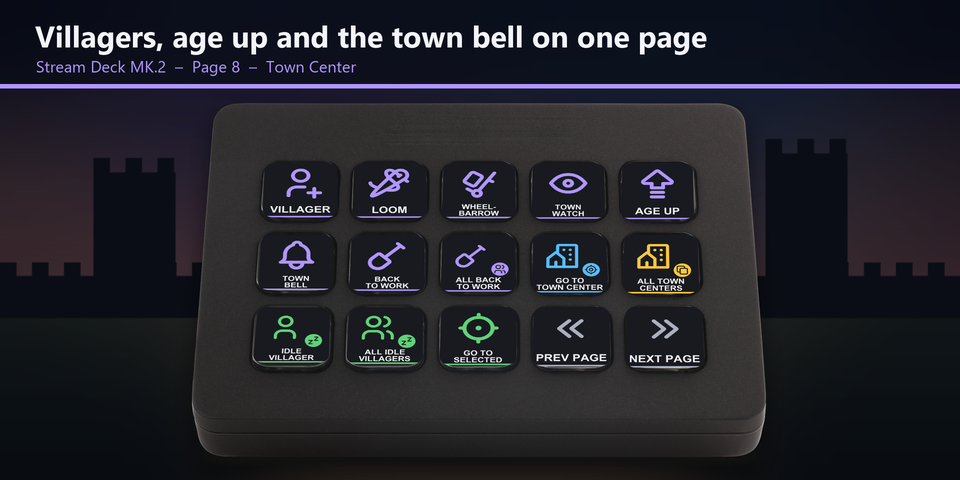
Villagers, age up and the town bell on one page
Train villagers, research Loom, Wheelbarrow and Town Watch, advance to the next age, and ring the town bell or send everyone back to work.
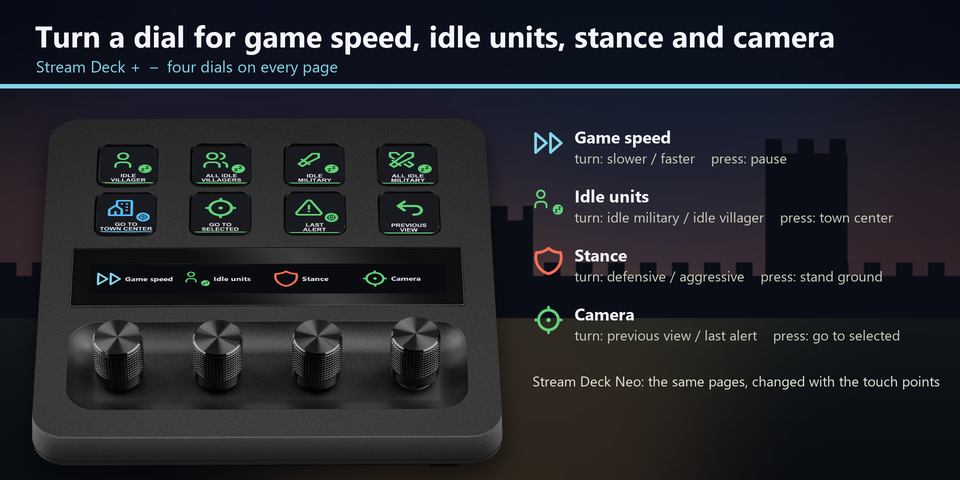
Four dials on Stream Deck +
Turn to change the game speed, find the next idle unit, switch between defensive and aggressive, or move between the previous view and the last alert. Press the dials to pause, go to the Town Center, stand ground or go to your selected units. On Stream Deck Neo, the touch points change pages.
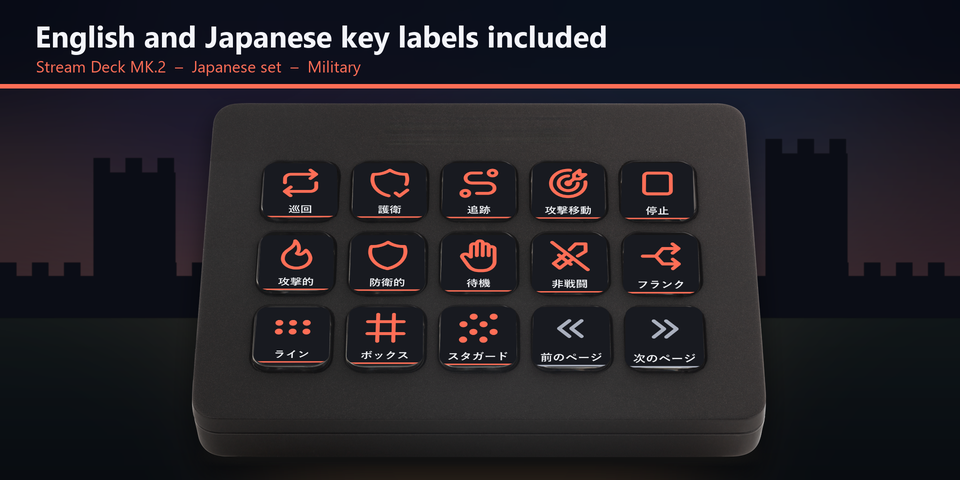
English and Japanese labels
The download holds the same keys twice: once with English labels and once with Japanese labels that use the game's own Japanese names. Import the set you want.
Profiles for four Stream Deck models
The download holds a profile for each of Stream Deck MK.2, XL, Neo and +, in English and in Japanese. MK.2 has one page per group of keys. Neo and + show 8 keys a page: tap the touch points on Neo, or swipe the touch strip on +, to change pages.
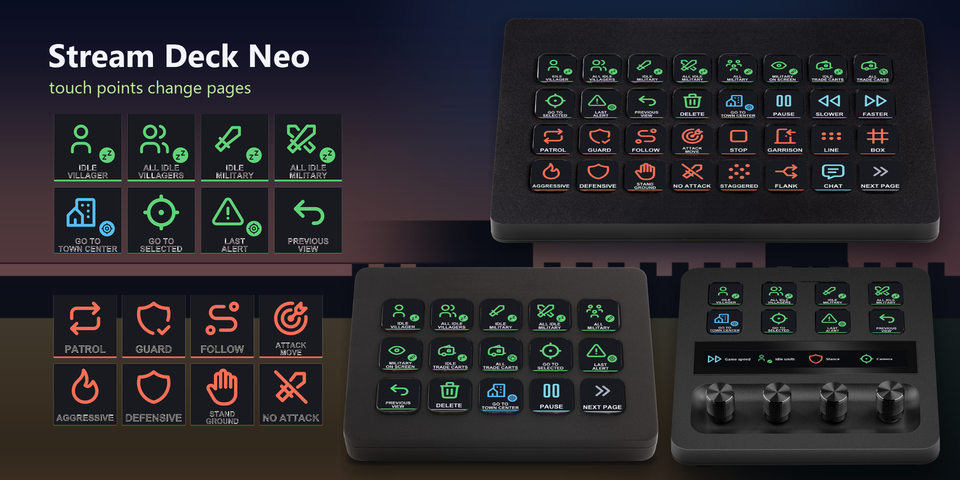
Find and select
Idle villagers, idle military, all military, military on screen, trade carts, go to selected, last alert, previous view and delete.
Military
Patrol, guard, follow, attack move, stop and garrison; aggressive, defensive, stand ground and no attack; line, box, staggered and flank formations.
Buildings
Go to your Town Center, Barracks, Archery Range, Stable, Siege Workshop, Castle, Dock, Monastery, Blacksmith, Market, University or Mill, or select all your Town Centers, military buildings, Barracks, Archery Ranges, Stables, Siege Workshops, Castles, Docks, Monasteries or Markets.
Villagers and building
Economic and military build menus, each building by name and picture, repair, seek shelter and drop off resources.
Town Center and Market
Villager, Loom, Wheelbarrow, Town Watch, age up, town bell and back to work; trade cart, and sell and buy food, wood and stone.
Game
Pause, slower, faster, chat, flare, technology tree, objectives, diplomacy, statistics, game time, menu, save, mini-map modes and control groups.
Set to the default hotkeys
The keys send the default hotkeys of Age of Empires II: Definitive Edition (the "Definitive Edition" hotkey set), so the game stays as it is. Checked in the real Age of Empires II: Definitive Edition with its default hotkeys.
Each page belongs to what you have selected: select villagers for the Villager and Build pages, a Town Center for the Town Center page, and a Market for the Market page. The key colours show which page is which.
Changed a hotkey in the game? Edit that key's Hotkey in the Stream Deck app to the same key.
Set up in 3 steps
- Buy, then download and unzip the file.
- Double-click the .streamDeckProfile file for your Stream Deck. The Stream Deck app imports it.
- Start Age of Empires II: Definitive Edition, select the profile on your Stream Deck and press a key.
Requirements
- Windows 10 or later
- Stream Deck MK.2, XL, Neo or +
- The Stream Deck app
- Age of Empires II: Definitive Edition for Windows (Steam, or Microsoft Store / Xbox app / PC Game Pass) with the default hotkey set "Definitive Edition" (Options > Hotkeys)
Questions
How do I control Age of Empires II with a Stream Deck?
Double-click the RTS Deck profile file for your Stream Deck and the Stream Deck app imports it. Start the game, select the profile and press a key: the keys send the game's default hotkeys to find idle villagers, give army orders, go to your buildings, build and run your Town Center.
Do I need to change the game's hotkeys?
No. The keys are set to the default hotkey set "Definitive Edition" of Age of Empires II: Definitive Edition. If you changed a hotkey in the game, edit that key's Hotkey in the Stream Deck app to the same key.
Which Stream Deck is it for?
Stream Deck MK.2, XL, Neo and +, on Windows. One purchase covers all four, with English or Japanese key labels.
What do the dials on Stream Deck + do?
Game speed (turn: slower / faster, press: pause), idle units (turn: next idle military unit / next idle villager, press: town center), stance (turn: defensive / aggressive, press: stand ground) and camera (turn: previous view / last alert, press: go to selected).
How do I build with the keys?
Select villagers, press ECONOMIC BLDG or MILITARY BLDG, then press the building you want. These keys are on the Build pages, and the game places the building where you click.
Why does a key do nothing?
Keep the game window in front: the keys are sent to the window in front. Use the direct (English) input mode, not Japanese input. Check that the right units or building are selected for that page. If you changed that hotkey in the game, edit its Hotkey in the Stream Deck app to the same key.
What do I get when I buy?
A zip with the profile files (MK.2, XL, Neo and +, in English and Japanese) and a README. Double-click the profile file for your Stream Deck to import it. No account is needed.
How do I get the file again?
Email contact@gramshift.com from the address you paid with, and include your order number, or the payment date and amount. We check the purchase and send a new link to the download page.
Can I get a refund?
Yes. If the profile does not work with your Stream Deck and Age of Empires II: Definitive Edition, email us within 14 days of purchase for a full refund. The download closes after a refund.
Purchase details
- Price
- ¥1,400, paid once. Tax for your country is added at checkout.
- Payment
- Handled by Stripe through Link, Stripe's checkout service. Link appears as the seller on your receipt and card statement, and your card number never reaches GRAMSHIFT.
- Delivery
- A download link appears right after payment, and the receipt arrives by email. You get the profile files and a README.
- Refunds
- If the profile does not work with your Stream Deck and Age of Empires II: Definitive Edition, email us within 14 days of purchase for a full refund. You can also ask Link support. The download closes after a refund.
- Use
- For your own use. Please do not share, resell or upload the file.
- Countries
- Checkout is not offered in Ascension Island, China, Cuba, Iran, Kosovo, North Korea, Russia, Syria or Tristan da Cunha.
- Seller
- GRAMSHIFT, Tokyo, Japan. Contact: contact@gramshift.com
Limitations
- For Age of Empires II: Definitive Edition on Windows, with Stream Deck MK.2, XL, Neo or +. There are no macOS keys.
- Keep the game window in front: the keys go to the window in front.
- Set to the default hotkey set "Definitive Edition". After you change a hotkey in the game, edit that key's Hotkey in the Stream Deck app to the same key.
- Made for the direct (English) input mode of Windows: keep Japanese input (IME) off while you play.
- Made for US and Japanese keyboard layouts. On some other layouts (for example French AZERTY) a few keys are in other places. If a key does the wrong thing, edit it in the Stream Deck app, or email contact@gramshift.com and we will help.
- If another program uses the same key combination as a shortcut across Windows, that key does not reach the game. Change the shortcut in that program.
- Each key sends one short press. Scrolling, zooming and mouse actions stay on your mouse. Hotkeys on the semicolon, slash, minus and equals keys, and control groups 5 to 10, can be added in the Stream Deck app.