Stream Deck profile for Windows
Age of Empires IV on your Stream Deck
A Stream Deck profile for Age of Empires IV on Windows: find idle villagers and idle military, pick gatherers by resource, select your landmarks, capital and building groups, give attack-move, patrol and formation orders, open build menus and train units, each on a labeled key.
One purchase covers Stream Deck MK.2, XL, Neo and +, with English or Japanese key labels.
The keys send the game's default hotkeys (Options > Hotkeys: Grid Keys), so there is nothing to set up in the game. Each page is named for what you have selected: Find & Select, Military, Villager, Build, Town Center, Market, Barracks, Archery & Stable, Siege, Dock & Monastery, Game, Groups and Camera. On Stream Deck +, four dials step through idle units, building groups, formations and camera spots.
- Idle villagers and military
- Landmarks and capital
- Build menus by name and picture
- Train from each building
- Dials on Stream Deck +
- English or Japanese labels
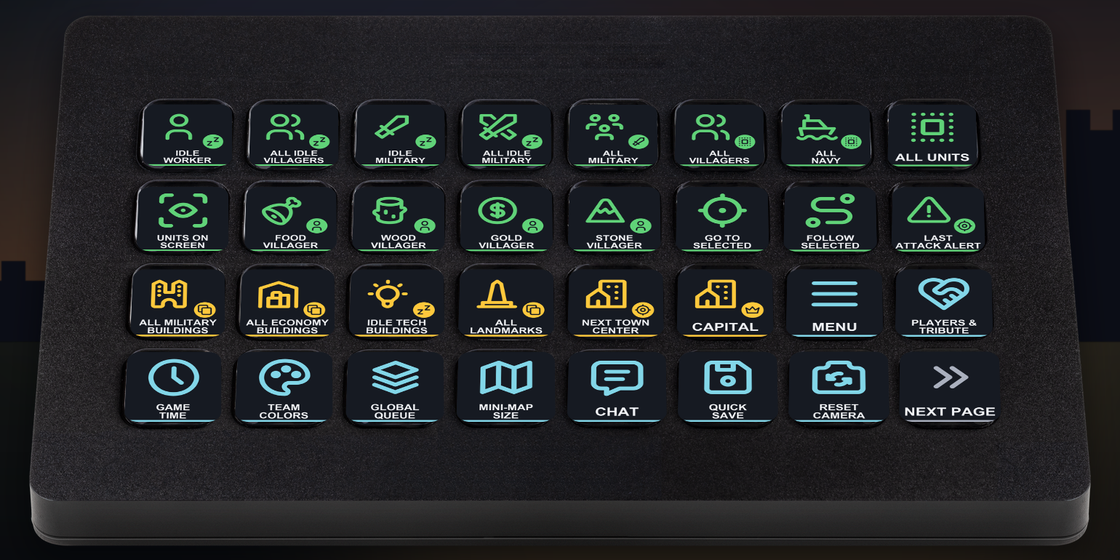
What the keys do
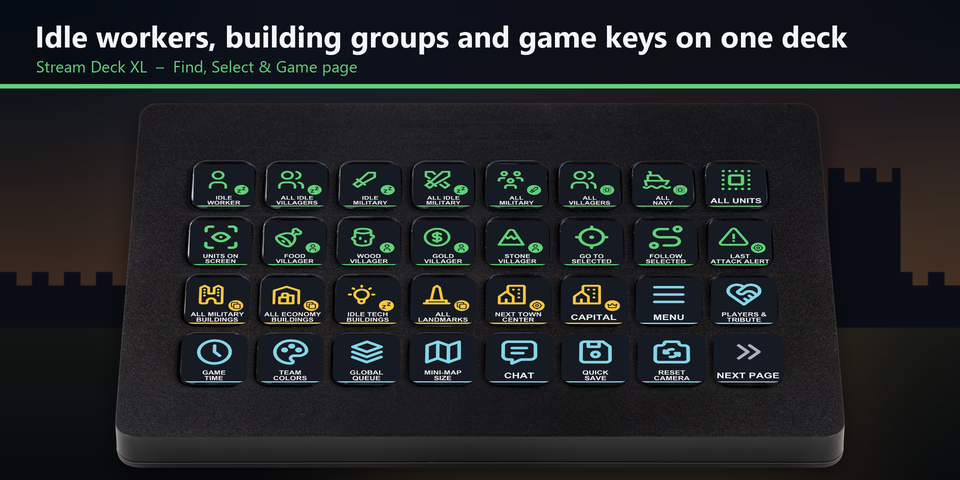
Idle workers, building groups and game keys on one page
Find idle villagers and idle military, pick the next food, wood, gold or stone gatherer, select your landmarks, capital, military or economy buildings, and open tribute or the global queue. On Stream Deck XL these share the first page.
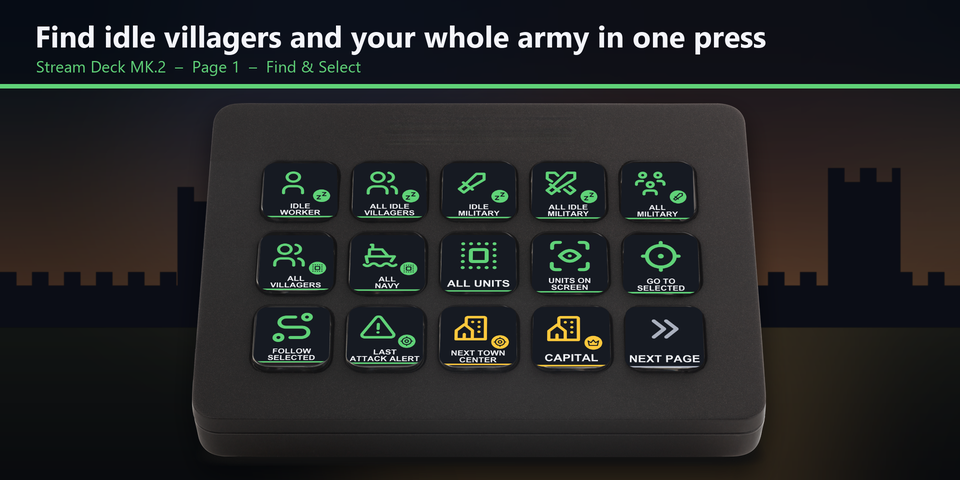
Find idle villagers and your army
Jump to the next idle worker or idle military unit, select all idle villagers, your army, villagers or navy, follow the selected units and go to the last attack alert, so you spend less time hunting across the map.
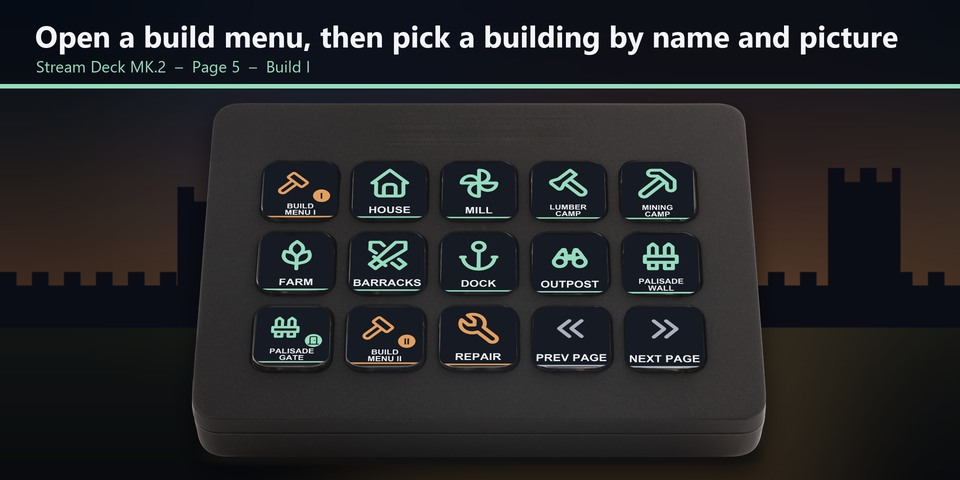
Buildings by name and picture
Select villagers, open build menu I, II, III or IV, then press the building you want: a house, mill, lumber camp, mining camp, farm, barracks, market, keep and more, each named and drawn on its key.
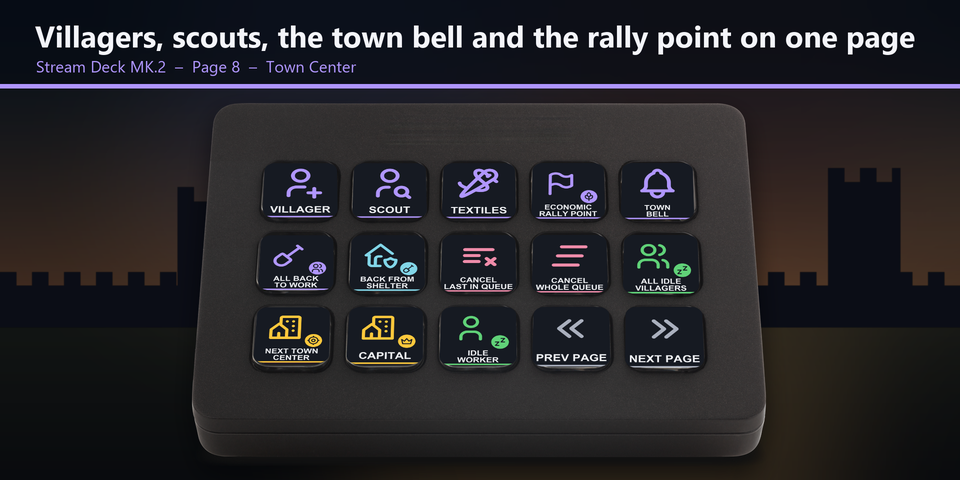
Town Center, Market and training
Train villagers and scouts, set the economic rally point and ring the town bell from the Town Center page. Buy and sell at the market, and train infantry, archers, cavalry, siege, ships and monks from the page for each building.
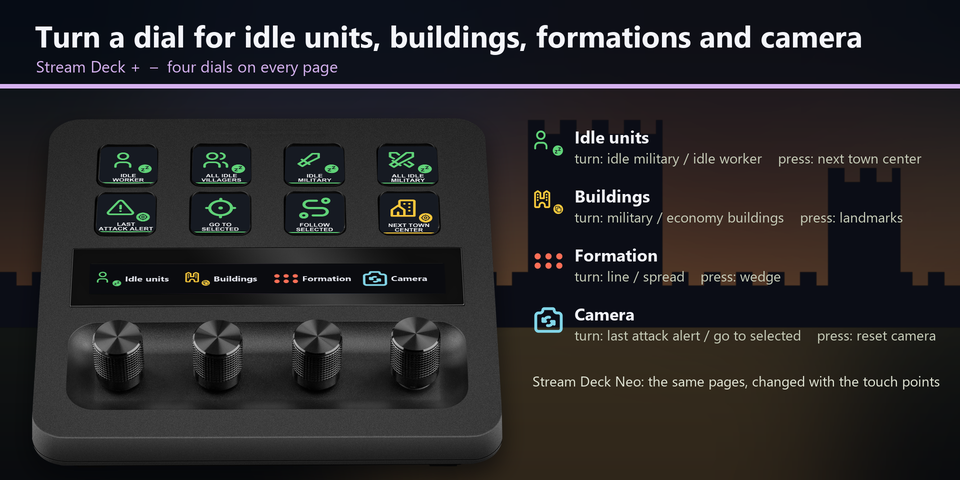
Four dials on Stream Deck +
Turn the dials to step through idle military and idle workers, military and economy buildings, line and spread formations, and the last attack alert. Press them for the next Town Center, your landmarks, the wedge formation and a camera reset. On Stream Deck Neo, the touch points change pages.
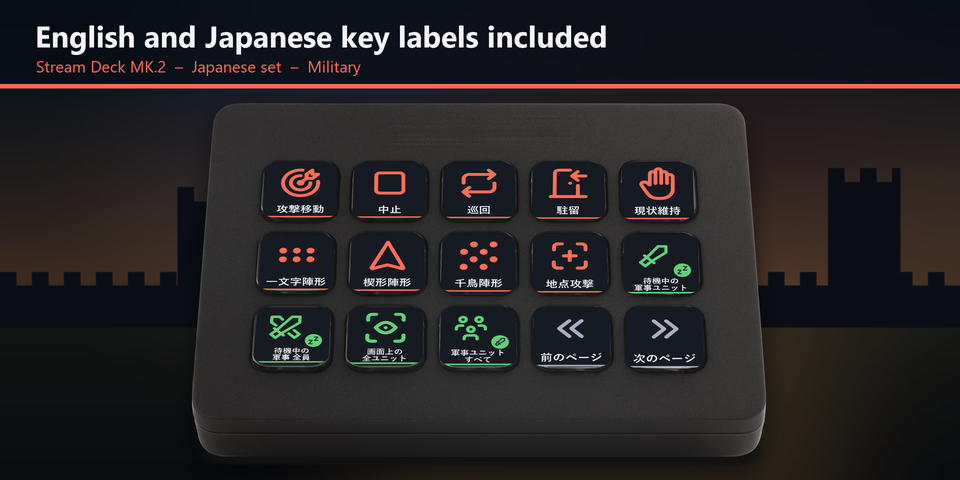
English and Japanese labels
The download holds the same keys twice: once with English labels and once with Japanese labels. Import the set you want.
Profiles for four Stream Deck models
The download holds a profile for each of Stream Deck MK.2, XL, Neo and +, in English and in Japanese. XL puts the most on each page. MK.2, Neo and + split the same keys over pages named for what you have selected. On Neo tap the touch points, and on + swipe the touch strip, to change pages.
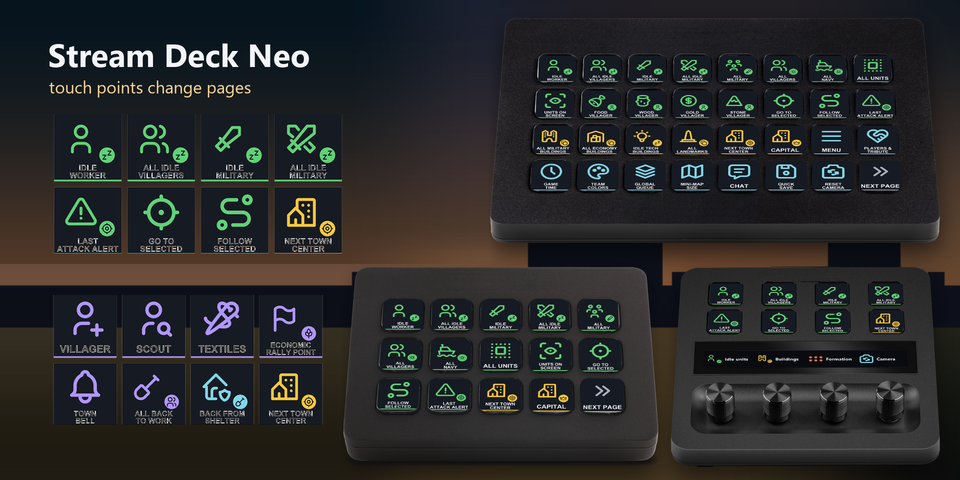
Find & Select
Next idle worker and idle military unit, all idle villagers, gatherers by resource, all military, villagers, navy and units, go to or follow the selected units, and the last attack alert.
Buildings
Military buildings, economy buildings, idle tech buildings, landmarks, the next Town Center and your capital.
Military
Attack move, stop, patrol, garrison, stand ground, attack ground, and the line, wedge and spread formations.
Villager and Build
Build menus I to IV and the shared buildings on them, repair, drop off and seek shelter.
Town Center, Market and production
Villager, scout, textiles, town bell, back to work and rally points. Buy and sell food, wood and stone. Train units at the barracks, archery range, stable, siege workshop, dock and monastery, and cancel the queue.
Game, groups and camera
Menu, players and tribute, game time, team colors, global queue, mini-map size, chat, quick save and pings. Select and set control groups 1 to 4, and save and go to camera positions 1 to 4.
Set to the game's default hotkeys
The keys send the hotkeys Age of Empires IV starts with (Options > Hotkeys: Grid Keys), so the game stays as it is.
The game gives the same letter a different job for each selection, so each page and key color belongs to one selection: select villagers for the Villager and Build pages, a Town Center for the Town Center page, and a building for its own page.
The Find & Select, Buildings, Game, Groups and Camera keys work at any time, so you can always jump back to your villagers, army and base.
Set up in 3 steps
- Buy, then download and unzip the file.
- Double-click the .streamDeckProfile file for your Stream Deck. The Stream Deck app imports it.
- Start Age of Empires IV, select the profile on your Stream Deck and press a key.
Requirements
- Windows 10 or later
- Stream Deck MK.2, XL, Neo or +
- The Stream Deck app
- Age of Empires IV for Windows (Steam, Microsoft Store, Xbox app or PC Game Pass), with the default hotkeys (Grid Keys)
Questions
How do I use a Stream Deck for Age of Empires IV?
Double-click the RTS Deck profile file for your Stream Deck and the Stream Deck app imports it. Start the game, select the profile and press a key: the keys send the game's default hotkeys to find idle villagers, select your army and landmarks, open build menus, train units and open tribute.
Which version of the game is it for?
Age of Empires IV for Windows, from Steam, the Microsoft Store, the Xbox app or PC Game Pass, with the hotkeys it starts with (Options > Hotkeys: Grid Keys).
Do I need to change the game's hotkeys?
No. The keys are set to the Grid Keys hotkeys the game starts with. If you chose Fully Remappable or changed a hotkey in the game, edit that key's Hotkey in the Stream Deck app to the same key.
Which Stream Deck is it for?
Stream Deck MK.2, XL, Neo and +, on Windows. One purchase covers all four, with English or Japanese key labels.
What do the dials on Stream Deck + do?
Idle units (turn: next idle military unit / next idle worker, press: next Town Center), Buildings (turn: military / economy buildings, press: landmarks), Formation (turn: line / spread, press: wedge) and Camera (turn: last attack alert / go to selected, press: reset camera).
Why does a building key do nothing?
Select villagers and open the build menu first: the building keys work from the build menu, as on your keyboard. A building or unit that your civilization or age does not have yet does nothing.
Why does the same key do something else?
Age of Empires IV gives the same letter a different job for villagers, military units and each building. Each page belongs to one selection, so select what the page is named for, then press its keys.
Does it work with my keyboard layout?
It is made for US and Japanese keyboard layouts. On some other layouts a few keys are in other places; if a key does the wrong thing, edit it in the Stream Deck app.
Why does a key do nothing?
Keep the game window in front: the keys are sent to the window in front. If you changed that hotkey in the game, edit its Hotkey in the Stream Deck app to the same key. If another program uses the same key as a shortcut across Windows, change the shortcut in that program.
What do I get when I buy?
A zip with the profile files (MK.2, XL, Neo and +, in English and Japanese) and a README. Double-click the profile file for your Stream Deck to import it. No account is needed.
How do I get the file again?
Email contact@gramshift.com from the address you paid with, and include your order number, or the payment date and amount. We check the purchase and send a new link to the download page.
Can I get a refund?
Yes. If the profile does not work with your Stream Deck and Age of Empires IV, email us within 14 days of purchase for a full refund. The download closes after a refund.
Purchase details
- Price
- ¥1,500, paid once. Tax for your country is added at checkout.
- Payment
- Handled by Stripe through Link, Stripe's checkout service. Link appears as the seller on your receipt and card statement, and your card number never reaches GRAMSHIFT.
- Delivery
- A download link appears right after payment, and the receipt arrives by email. You get the profile files and a README.
- Refunds
- If the profile does not work with your Stream Deck and Age of Empires IV, email us within 14 days of purchase for a full refund. You can also ask Link support. The download closes after a refund.
- Use
- For your own use. Please do not share, resell or upload the file.
- Countries
- Checkout is not offered in Ascension Island, China, Cuba, Iran, Kosovo, North Korea, Russia, Syria or Tristan da Cunha.
- Seller
- GRAMSHIFT, Tokyo, Japan. Contact: contact@gramshift.com
Limitations
- For Age of Empires IV on Windows, with Stream Deck MK.2, XL, Neo or +. There are no macOS keys.
- Keep the game window in front: the keys go to the window in front.
- Set to the default hotkeys (Grid Keys). With Fully Remappable or a changed hotkey, edit that key's Hotkey in the Stream Deck app to the same key.
- Made for US and Japanese keyboard layouts. On some other layouts, edit a key that lands in another place.
- The Military, Villager, Build, Town Center and building pages work while that unit or building is selected.
- Scrolling, zooming and mouse actions stay on your mouse.
- If another program uses the same key as a shortcut across Windows, that key does not reach the game. Change the shortcut in that program.