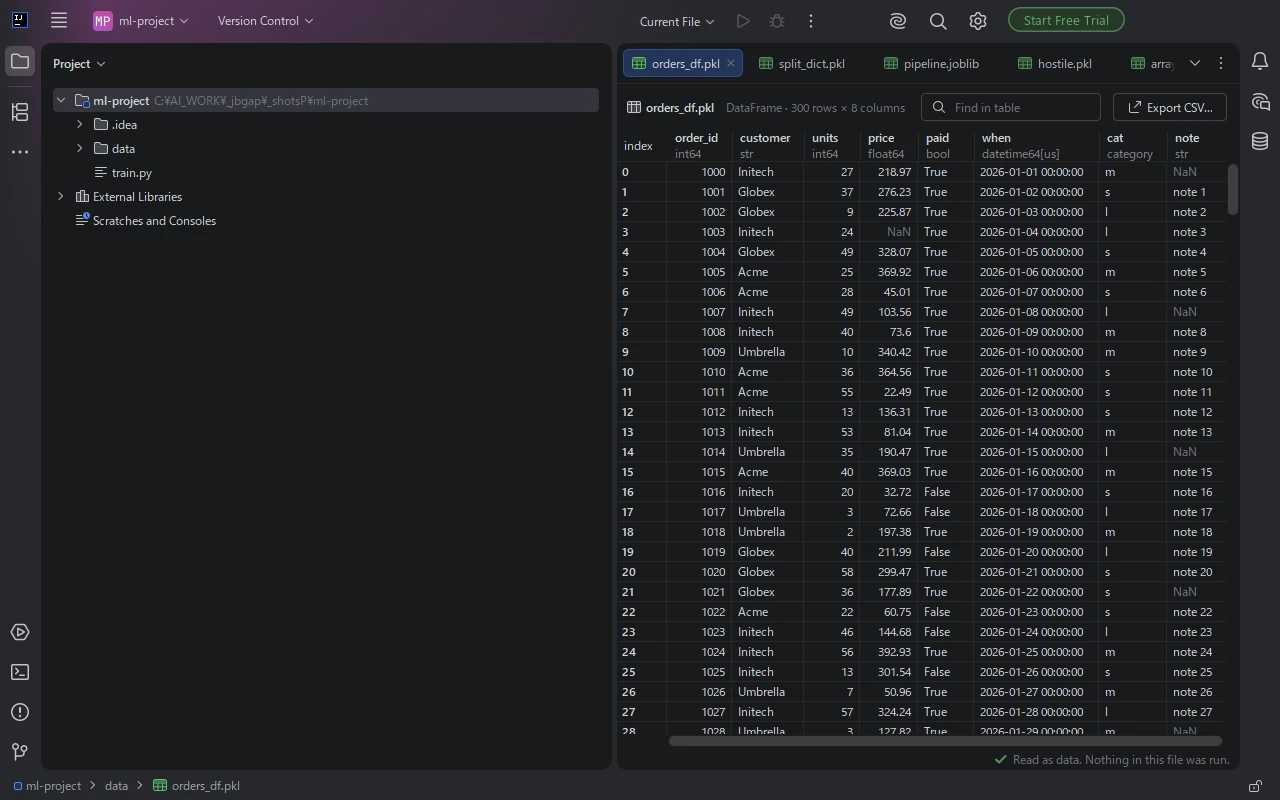
The table, straight away
Column names, the type of every column and the index. Find a value, copy cells, or save the table with Export CSV.
JetBrains IDE plugin
Click a .pkl or .joblib file and see what is inside. A pandas DataFrame shows as a table, a NumPy array as a grid, a model as its fields. The file is read as data and is not run, and no Python is needed.
Free trial with every feature.
Column names, the type of every column and the index. Find a value, copy cells, or save the table with Export CSV.
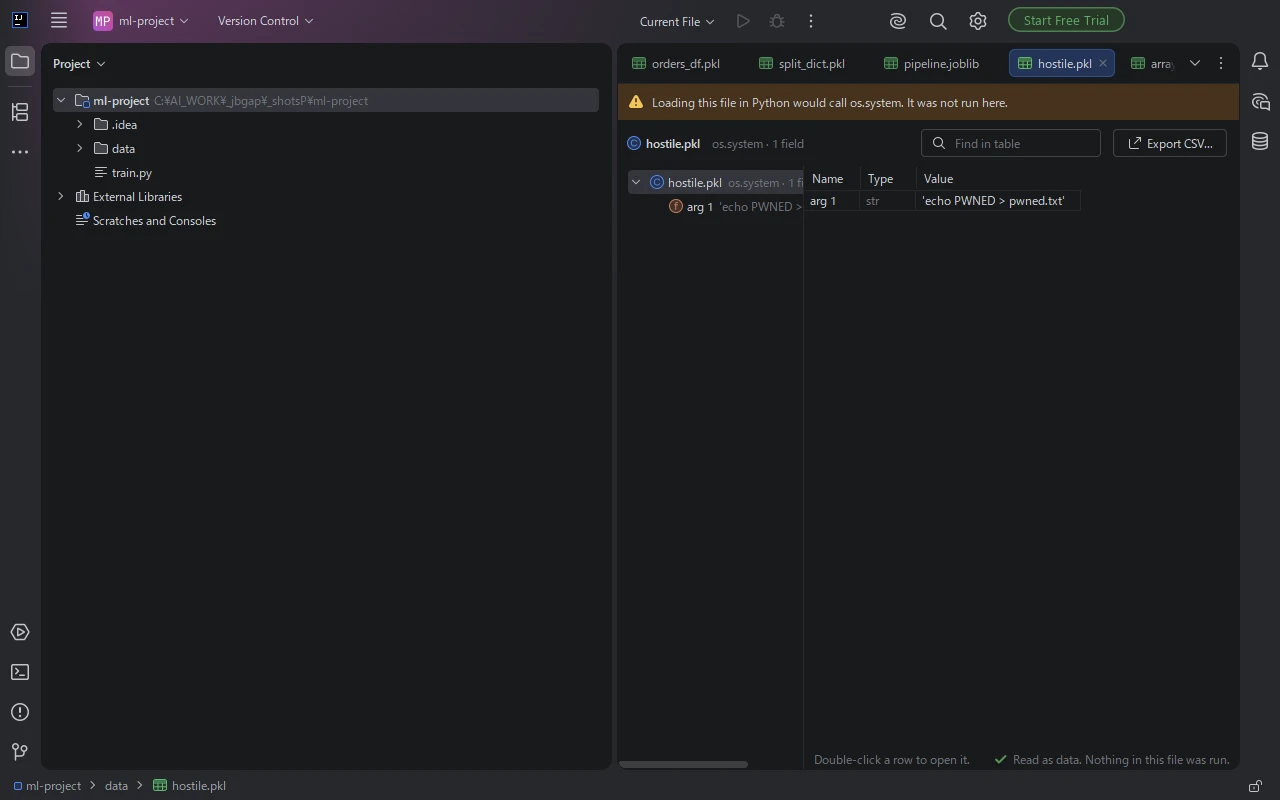
The file is read as data. If loading it in Python would call a function that does more than put its data back together, such as os.system, a yellow bar names the call, and the entry for that call lists what would have been passed to it.
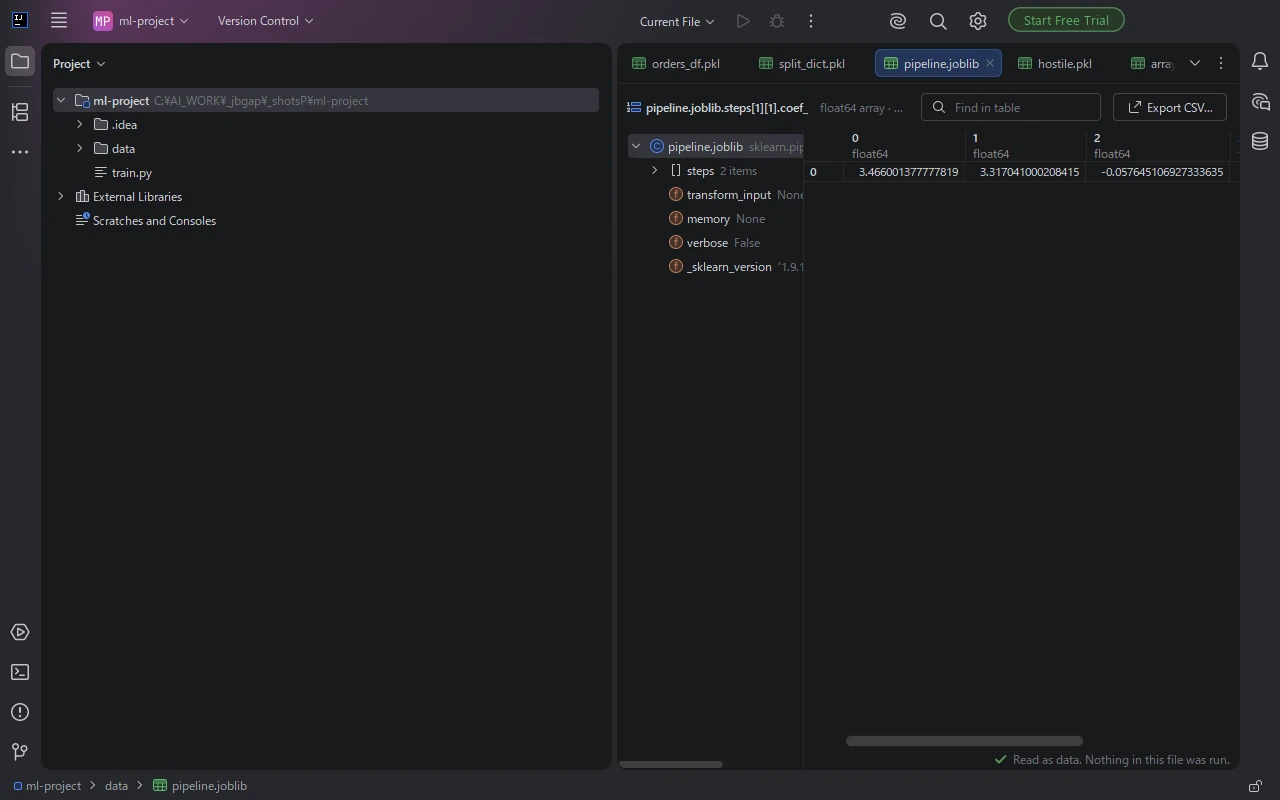
The class name and the saved fields of a model, down to the arrays of weights. Double-click a row to go into it.
Dates, time zones, categories, missing values, periods, intervals, time spans and sparse columns, shown the way pandas prints them.
A grid with the shape and the element type. Arrays with three or more dimensions are shown as rows of their last axis, each labelled with its position.
Names, types and values. A dictionary of tables opens on the first table, with the others one click away.
A scikit-learn pipeline, a saved configuration object or a result from your own code: its saved fields, by name.
.pkl, .pickle or .joblib file in the Project view. It opens in an editor tab.When the file changes on disk, for example after your script writes it again, the tab shows the new content.
Install Pickle Viewer for PKL & Joblib from Settings | Plugins | Marketplace, then click the .pkl file in the Project view. It opens in an editor tab: a pandas DataFrame shows as a table with column names and types, a NumPy array as a grid, and a model or dictionary as a list of its fields that you can open one by one. The same works for .pickle and .joblib files, and in IntelliJ IDEA, DataSpell and other JetBrains IDEs.
Loading a pickle in Python can run code that is stored in the file. Pickle Viewer does not load the file in Python: it reads it as data and shows the content, and it does not start Python, import a module or call anything the file names. If the file would call a function that does more than put its data back together, such as os.system, when loaded, a yellow bar above the table names the call, and the entry for that call lists what would have been passed to it, so you can decide before you load the file in your own code.
Yes. Pickle Viewer works in a project with no Python interpreter set up and on a machine without pandas or NumPy. It also shows files written by a different version of pandas than the one you have installed.
Click the .joblib file in the Project view. Pickle Viewer shows the class name of the model and its saved fields, for example the steps of a scikit-learn pipeline and the arrays of coefficients, and you can double-click a field to open it. joblib files compressed with zlib or gzip open the same way.
Yes. Open the file and click Export CSV. The table that is showing is saved as a CSV file with the index and the column names. You can also select cells and copy them into a spreadsheet.
No. The contents of the files you open stay on your computer and no account is needed. If an error occurs inside the plugin, the IDE may offer to send an error report to JetBrains Marketplace, as it does for other plugins.
PyCharm, DataSpell, IntelliJ IDEA, WebStorm, GoLand, CLion, Rider, RubyMine and PhpStorm, version 2025.2 and later, on Windows, macOS and Linux. Files written by pickle protocols 0 to 5 open, and so do joblib files, including ones compressed with zlib or gzip.
No account is needed. The contents of the files you open stay on your computer. If an error occurs inside the plugin, the IDE may offer to send an error report to JetBrains Marketplace. See the privacy policy.
If something does not work as expected, or a kind of file you need is missing, email contact
The viewer shows files; it does not change them. Files too large for the memory the IDE has free are not opened, and the tab says so. Tables show up to 2,000 columns; Export CSV writes every column. Values kept outside the pickle file itself are shown as a reference.
See what a pickle holds before you load it.
Get Pickle Viewer