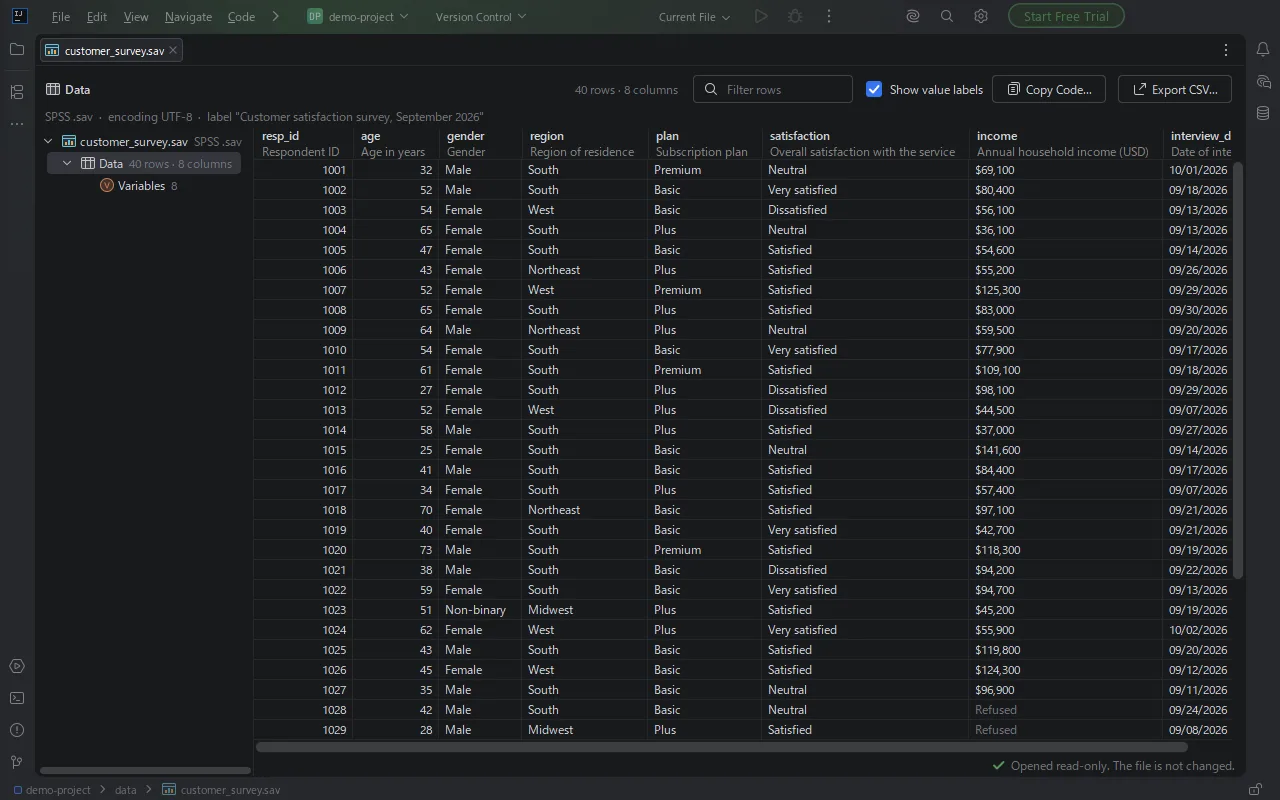
Labels, not just codes
Each column shows the variable name and its label. One switch shows "Very satisfied" instead of 5, or the codes again. Missing-value codes are greyed out.
JetBrains IDE plugin
Click a .sav, .dta, .sas7bdat or .RData file and see every variable. Variable labels, value labels, missing values and dates, with filter, sort, copy and CSV export. On Windows, macOS and Linux, with no SPSS, Stata, SAS or R installed.
Free trial with every feature.
Each column shows the variable name and its label. One switch shows "Very satisfied" instead of 5, or the codes again. Missing-value codes are greyed out.
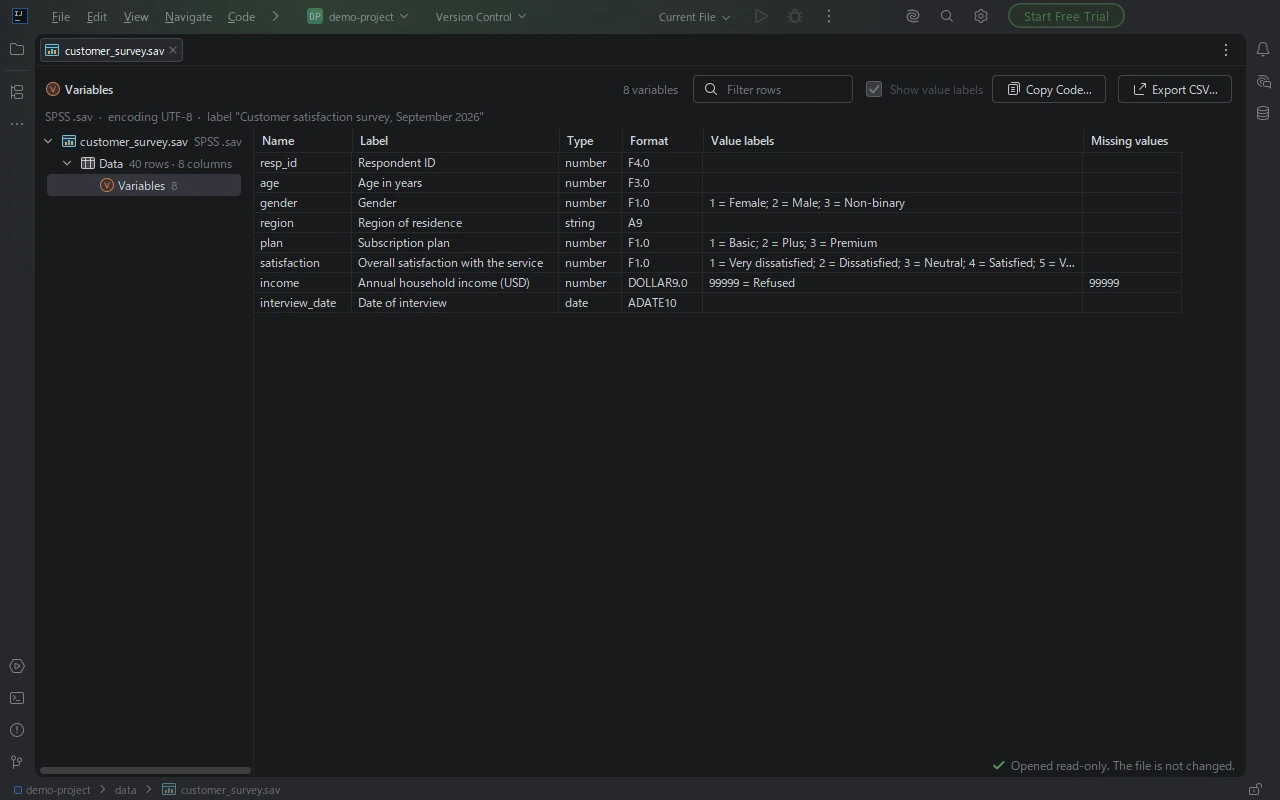
Every variable with its label, type, display format, value labels and missing-value definition, like the Variable View in SPSS.
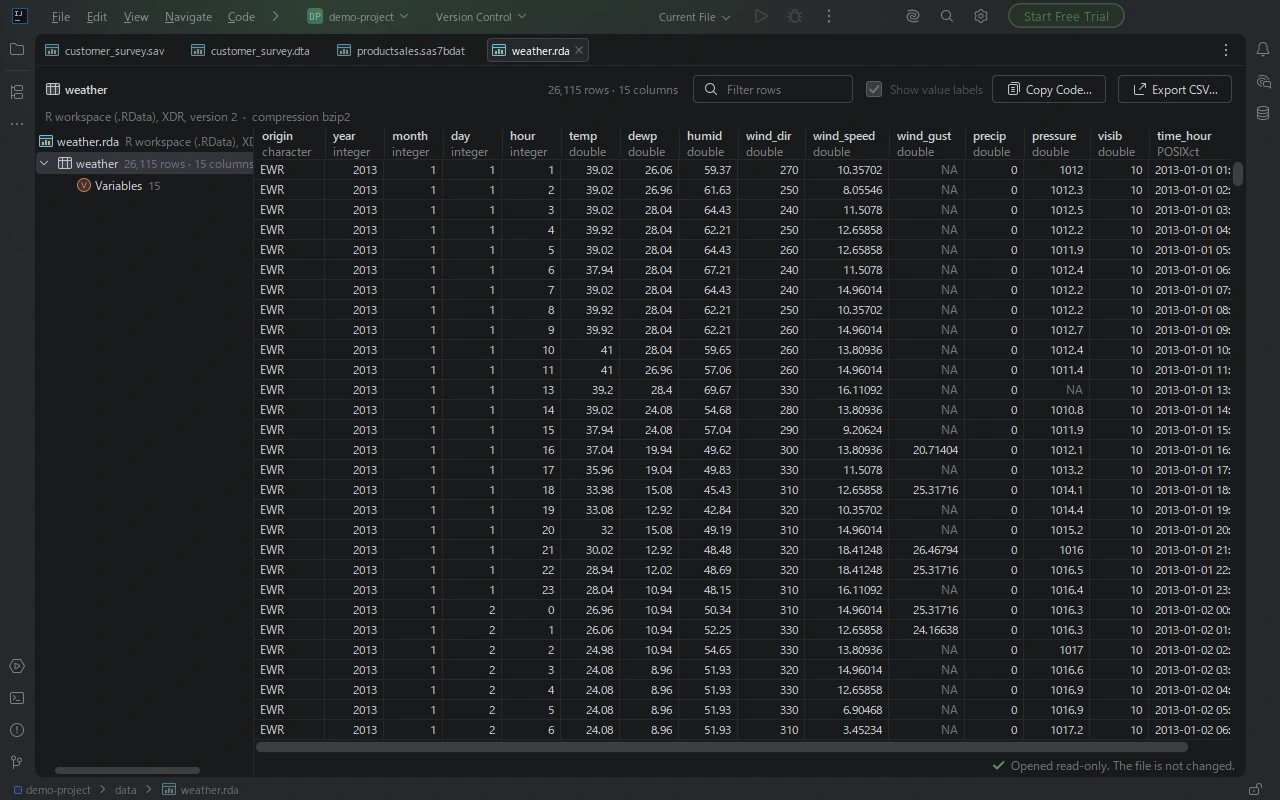
An .RData workspace lists every object it holds. Data frames and tibbles open as tables with their factors, dates and NA. Nothing in the file is run.
.sav (compressed and uncompressed) and .zsav, with variable labels, value labels, user-defined missing values, dates and the file's character encoding.
.dta from Stata 1 to Stata 19 (formats 102 to 119), with value labels, long strings, Unicode text and the missing values . and .a to .z.
.sas7bdat (compressed and uncompressed) and SAS transport .xpt files, with labels and SAS dates and times shown as dates.
.rds, .RData and .rda with gzip, bzip2, xz or zstd compression: data frames, tibbles, factors, dates and lists.
.sav, .zsav, .dta, .sas7bdat, .xpt, .rds, .RData or .rda file in the Project view. It opens in an editor tab.The file is opened read-only and is never changed.
Install SPSS, Stata, SAS & R Viewer in PyCharm, DataSpell, IntelliJ IDEA or another JetBrains IDE from Settings | Plugins | Marketplace, then click the .sav or .zsav file in the Project view. It opens in an editor tab with every variable, its label and its value labels. SPSS, Python packages and R are not needed.
Click the .dta file in the Project view of a JetBrains IDE with SPSS, Stata, SAS & R Viewer installed. Files from Stata 1 to Stata 19 (formats 102 to 119) open with their variable labels, value labels and the missing values . and .a to .z.
Click the .sas7bdat or .xpt file in the Project view. The viewer reads compressed and uncompressed SAS data sets and SAS transport files itself, and shows SAS dates and times as dates.
Click the .RData, .rda or .rds file in the Project view. An .RData workspace lists every object it holds; data frames and tibbles open as tables with their factors, dates and NA, and other objects as a tree. The file is read, and nothing in it is run.
Open the file and click Export CSV…. The rows that are shown are saved as a UTF-8 CSV file, with an optional byte order mark so accented and non-Latin text displays correctly in Excel, ready for pandas, a spreadsheet or a database import. You can also select cells and copy them.
No. The contents of the files you open stay on your computer. If an error occurs inside the plugin, the IDE may offer to send an error report to JetBrains Marketplace, as it does for other plugins.
PyCharm, DataSpell, IntelliJ IDEA, DataGrip, WebStorm, Rider, GoLand, PhpStorm, RubyMine and CLion, version 2025.2 and later, on Windows, macOS and Linux.
The contents of the files you open stay on your computer. If an error occurs inside the plugin, the IDE may offer to send an error report to JetBrains Marketplace. See the privacy policy.
If something does not work as expected, or something you need from your data files is missing, email gramshift.official
Annual or monthly subscription, with a free trial that has every feature. An annual subscription includes a perpetual fallback license, so you keep a working version even if you stop subscribing.
The viewer shows the data; it does not change it. The grid lists up to the first 100,000 rows of a file (fewer when it has many columns) and Export CSV writes the rows that are shown. Stata files saved with alias variables (formats 120 and 121), SPSS portable files (.por) and SAS format catalogs (.sas7bcat) are not opened.
See what a statistics data file holds, before you write a line of code.
Get SPSS, Stata, SAS & R Viewer