Wear OS · Car dashboard watch faceOverdrive
 US$2.49 · One-time purchase · Wear OS 4+
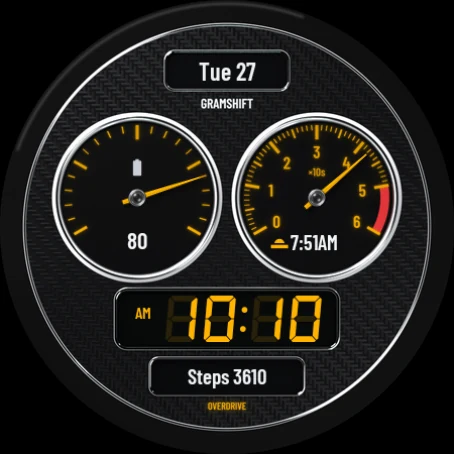
The left needle shows a value such as battery, the right needle sweeps the seconds like a rev counter into the red line, and the time glows on a seven-segment LCD that follows your 12 or 24-hour setting. A date window sits on top and an odometer line at the bottom.
Colors
4 dial finishes and 6 backlight colors to combine on the watch, in Customize. Four of them are shown here.
GRAMSHIFT ART / Overdrive
Overdrive: Car Dashboard Face
Overdrive is a car dashboard watch face for Wear OS: two chrome-ringed gauges like a sports car's instrument cluster, a backlit seven-segment LCD with the digital time, a date window on top and an odometer line at the bottom.
One-time purchase. No in-app purchases, no subscription and no phone app to install.
WHAT YOU GET
- Two gauges with chrome rings: the left needle shows your battery or another value with a range, the right needle sweeps the seconds like a rev counter, into the red line
- Seven-segment LCD with the digital time and an AM/PM mark. It follows your watch's 12/24-hour setting
- 4 dial finishes: Carbon, Graphite, Titanium, Crimson
- 6 backlight colors for the gauge marks, the needles and the LCD digits: Amber, Red, Cyan, White, Green, Blue
- 4 complication slots you can change: the window on top, the left gauge, the readout under the right gauge and the odometer line. The window shows the day and date until you pick something else for it
- Starts with the day and date, battery, sunrise or sunset and steps
- Day and date in your watch's language or, if you prefer, in English
- Always-on mode: the date, the dimmed LCD time with AM/PM, and the outlines of the gauges with their main marks and the LCD
HOW TO INSTALL
Buy it in Play Store on your phone and choose your watch in the install menu, or open Play Store on your watch. It can take a few minutes to arrive on the watch. Then touch and hold your current watch face, swipe to the end and tap + to add Overdrive. On a Galaxy Watch you can also choose it in the Galaxy Wearable app on your phone, under Watch faces.
HOW TO CUSTOMIZE
- Touch and hold the watch face.
- Tap Customize (the gear or pencil icon).
- Swipe to Dial, Backlight, Date language or Complications and pick what you want.
COMPATIBILITY
Made with the Watch Face Format for watches on Wear OS 4 or later (for example Pixel Watch and Galaxy Watch4 or newer). The design is round: on a square screen it shows as a circle with black corners.
LIMITATIONS
- What each complication shows (weather, steps, heart rate and so on) comes from your watch and the apps installed on it. If a data source is missing on your watch, choose another one in Customize.
- The left needle moves only for battery and other values with a range. A plain number, such as a step count, shows as text inside the gauge.
- Text from complications, such as Steps or a data source you pick for the window, follows your watch's language. Only the face's own date has an English option.
- Wear OS 3 and older watches cannot install it.
If something does not work as expected, write to contact
US$2.49 · One-time purchase · Wear OS 4+The collection
Faces worth a second look, every time you check the time
Hearth and Lap Ring run here the way they do on the watch, at your current time. Arcline, Overdrive, Cathode, Reefline and Selenis are shown as they look on the watch.
Hearth
The look of a fine mechanical watch: a sunburst dial, polished hands and an open window onto a turning tourbillon.
Explore Digital · SportLap Ring
Big time you can read on a run, with a ring that fills as the seconds pass. Choose the color that suits you.
Explore Hybrid · Sport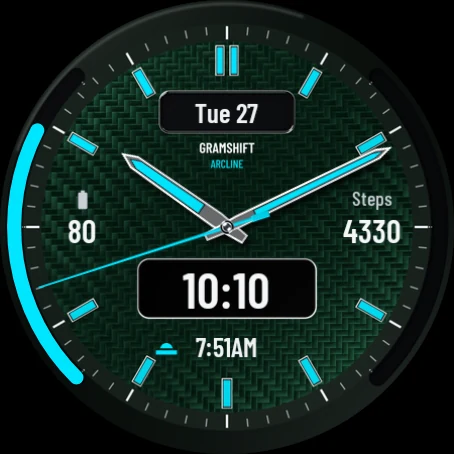
Arcline
Steel hands on a carbon-look dial, the digital time below the center, and two edge arcs that fill like gauges with your battery or goals.
Explore Digital · Nixie tube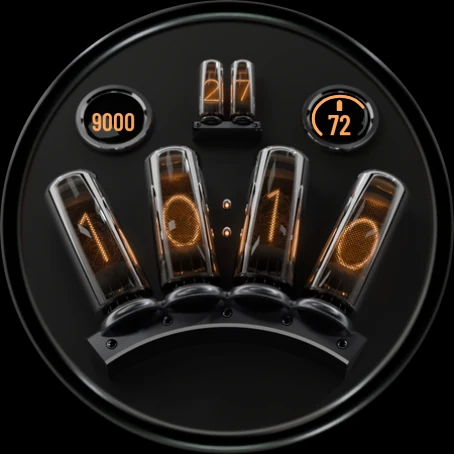
Cathode
Four glass tubes on a black stand light up the hours and minutes in warm, glowing digits, with the unlit digits faintly visible behind them.
Explore Analog · Diver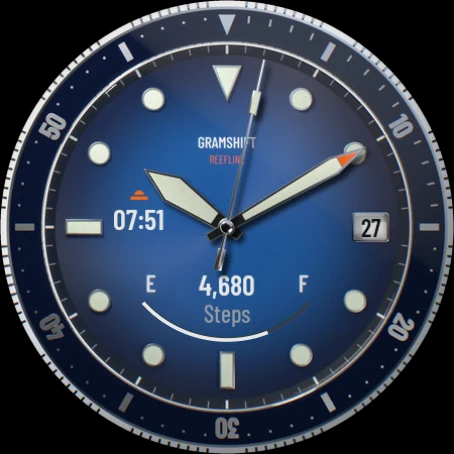
Reefline
The bold look of a classic dive watch: a minute-scale bezel, cream lume-style markers, a date window and a battery gauge that fills from E to F.
Explore Analog · Moon phase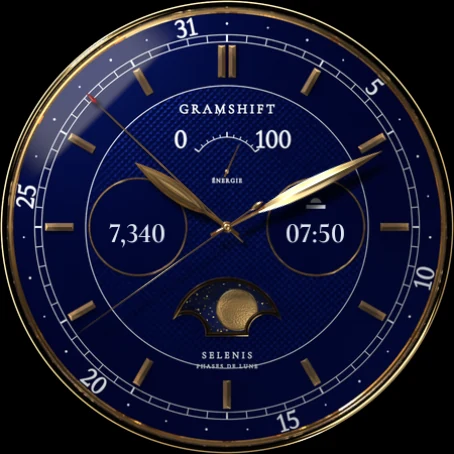
Selenis
A classic moon phase dress watch: a gold moon crosses a starry window, a pointer hand shows the date on the outer ring and a small gauge under 12 shows the battery.
Explore