Corsair Galleon 100 SD profile, included in the plugin
Train Sim World on your Corsair Galleon 100 SD
Yes, Cab Deck for Train Sim World works on the Corsair Galleon 100 SD, and the plugin comes with a profile laid out for it.
The keys show your speed against the limit, the next speed limit, the next signal and the next station live while you drive, and the cab keys sound the horn, acknowledge the AWS or pull the emergency brake.
After you install the plugin, pick "Cab Deck for Train Sim World, Galleon 100 SD" in the Stream Deck app's profile list. It has two pages for the display keys, Drive and Cab Controls, with Previous and Next page keys, and leaves the two dials free for you to set.
- Comes with the plugin
- Two pages for the display keys
- Speed, limit and signal
- Horn, AWS and sander
- Emergency brake and release
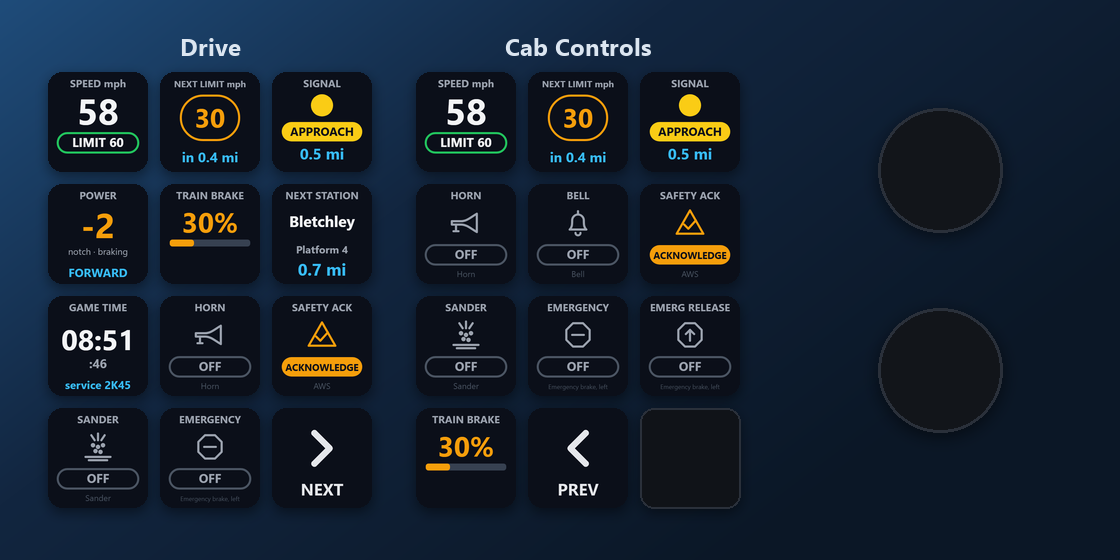
What is on each Galleon 100 SD page?
The profile has two pages for the display keys. The bottom-right keys turn the pages: Next page on Drive, and Previous page on Cab Controls.
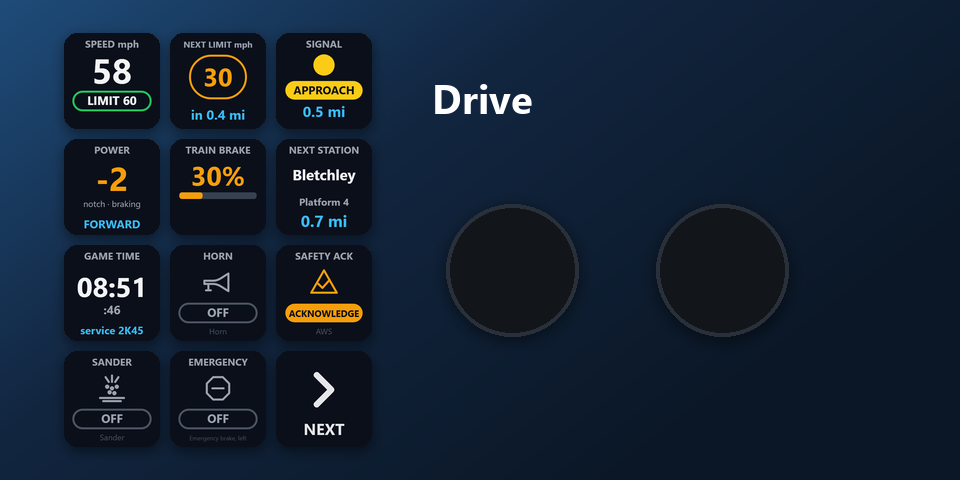
Drive
Speed and limit, next speed limit, next signal, power handle, train brake, next station, game time with your service, horn, AWS acknowledge, sander, emergency brake.
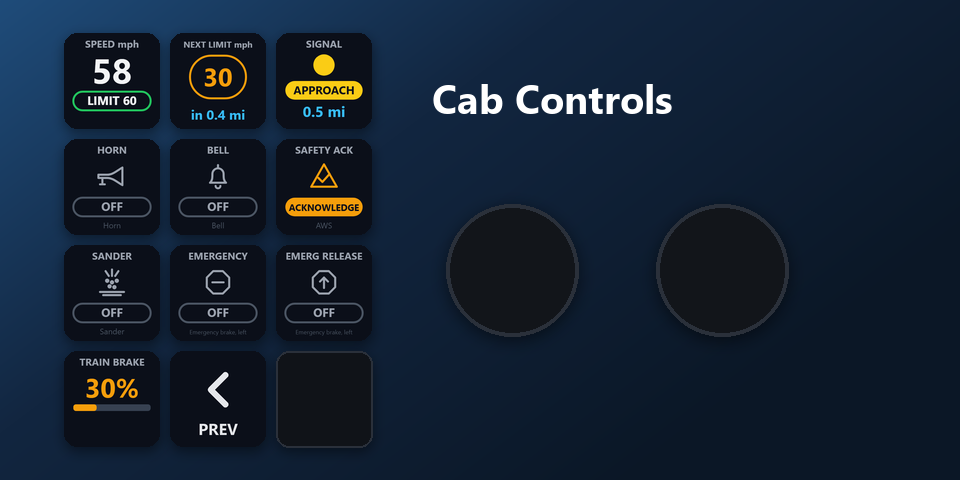
Cab Controls
Speed and limit, next speed limit and next signal on top, then horn, bell, AWS acknowledge, sander, emergency brake, emergency brake release and train brake.
What about the Galleon 100 SD dials?
Both dials: yours to set
The profile leaves the left and right dials free. Set them in the Stream Deck app as you like, the same way as on any other Galleon 100 SD profile.
Everything Cab Deck shows and does is on the display keys, so the profile works in full with the dials left as they are.
How do I set it up on the Galleon 100 SD?
- Open the plugin file you download after buying. The Stream Deck app installs it, with its profile.
- In the Stream Deck app, pick "Cab Deck for Train Sim World, Galleon 100 SD" in the profile list for your Galleon 100 SD. Your current profiles stay as they are.
- Enter your license key once in a key's settings.
- In Steam, right-click Train Sim World, open Properties and add -HTTPAPI to Launch Options (on Epic: additional command line arguments). Start the game and get in the cab: the keys connect by themselves and show your train.
Requirements
- Corsair Galleon 100 SD
- Train Sim World 6 or 7 on PC, started with -HTTPAPI
- The free Stream Deck app 6.9 or later, where the Galleon 100 SD's display keys are set up
- Windows 10 or later, on the same PC as the game
Questions about the Galleon 100 SD
Is there a Train Sim World profile for the Corsair Galleon 100 SD?
Yes. Cab Deck for Train Sim World comes with a profile laid out for the Galleon 100 SD: two pages on the display keys, Drive and Cab Controls. It is part of the plugin, so there is nothing else to buy.
How do I get the Cab Deck profile on the Galleon 100 SD?
Install the plugin, then pick "Cab Deck for Train Sim World, Galleon 100 SD" in the Stream Deck app's profile list for your Galleon 100 SD. Enter your license key once, start Train Sim World with -HTTPAPI and get in the cab.
What do the Galleon 100 SD dials do with Cab Deck?
The profile leaves both dials free, so you can set them in the Stream Deck app as you like. Everything Cab Deck shows and does is on the display keys.
How do I change pages on the Galleon 100 SD?
Press Next page at the bottom right of Drive to open Cab Controls, and Previous page on Cab Controls to go back.
Can I change what is on the keys?
Yes. Every key can be moved or changed in the Stream Deck app like any other key. The key settings pick mph or km/h, bar or psi, and the Cab Button's control: horn, AWS, sander, emergency brake, emergency brake release or bell. A Custom Control key can work any control of your train.
Direct purchase: details, refunds and seller
- Price
- ¥1,980. Tax for your country is added at checkout.
- Payment
- Handled by Stripe through Link, Stripe's checkout service. Link appears as the seller on your receipt and card statement, and your card number never reaches GRAMSHIFT.
- Delivery
- Your license key and download link appear right after payment, and the receipt arrives by email.
- Refunds
- If the plugin does not work on your PC or with your train, email us within 14 days of purchase for a full refund. You can also ask Link support. The license key stops working after a refund.
- License
- One key for your own use on up to 3 PCs.
- Countries
- The direct checkout is not offered in Ascension Island, China, Cuba, Iran, Kosovo, North Korea, Russia, Syria or Tristan da Cunha.
- Seller
- GRAMSHIFT, Tokyo, Japan. Contact: contact@gramshift.com
More about Cab Deck for Train Sim World
- All models and details of Cab Deck for Train Sim World
- More Corsair Galleon 100 SD game and app profiles
Limitations
- Windows only, with the game and your Stream Deck on the same PC. Not for Xbox or PlayStation.
- Trains report different values: some have no brake gauge, no next speed limit or no acknowledge request. If a Cab Button says "not on this train", choose the control with a Custom Control key.
- The profile's page names are in English. Key labels follow your Stream Deck app: English or Japanese.
- The direct version checks its license key with our server when you activate it, each time the plugin starts, and about once a day while it runs. If it cannot reach the server, it keeps working for up to 44 days after the last successful check.
- If something does not work, email contact@gramshift.com and we will help.