Stream Deck MK.2 profile for Windows
DaVinci Resolve shortcuts on your Stream Deck
A Stream Deck profile for DaVinci Resolve on Windows: 167 labeled keys on 10 pages put Resolve's default shortcuts for the Edit and Color pages on a Stream Deck MK.2 (15 keys). Install it, keep Resolve in front and press a key.
Split clips, add nodes and grab stills with one press each. Made for video editing and color grading in Resolve's Edit and Color pages. Your Resolve settings stay as they are.
- Playback and marks
- Trim, blade and split
- Insert and overwrite
- Color nodes
- Stills and versions
- Jump between pages
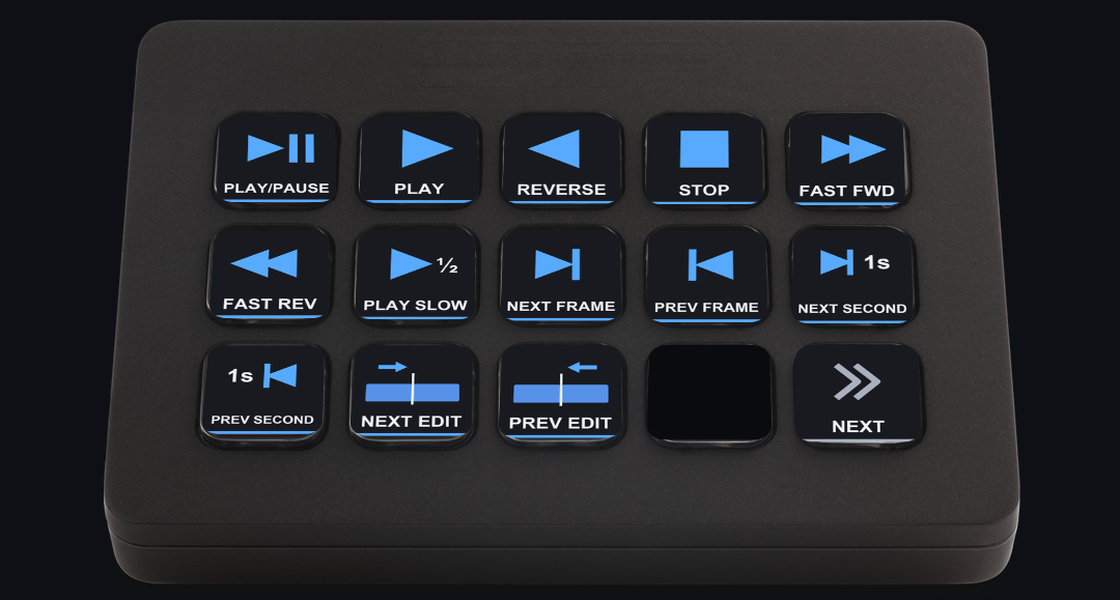
What the keys do
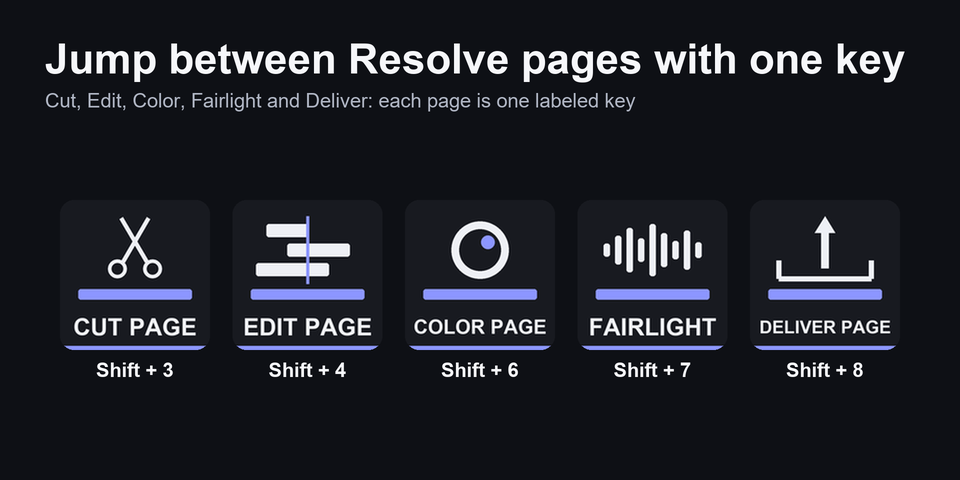
Jump between Resolve pages
One key for each page from Media to Deliver, and keys that put the focus on a panel. The TIMELINE key gives the timeline the focus.
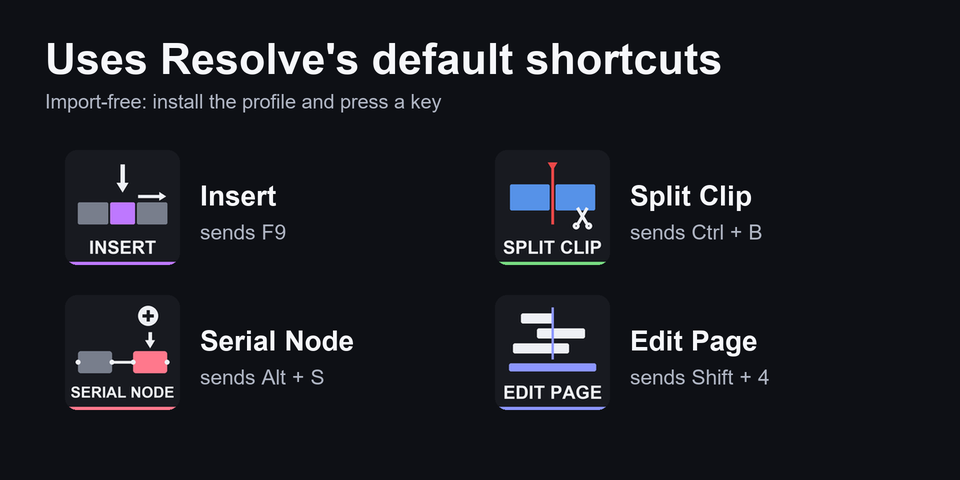
Resolve's default shortcuts
Every shortcut key sends one Resolve already knows, such as Insert (F9), Split Clip (Ctrl+B) and Serial Node (Alt+S). There is nothing to import into Resolve.
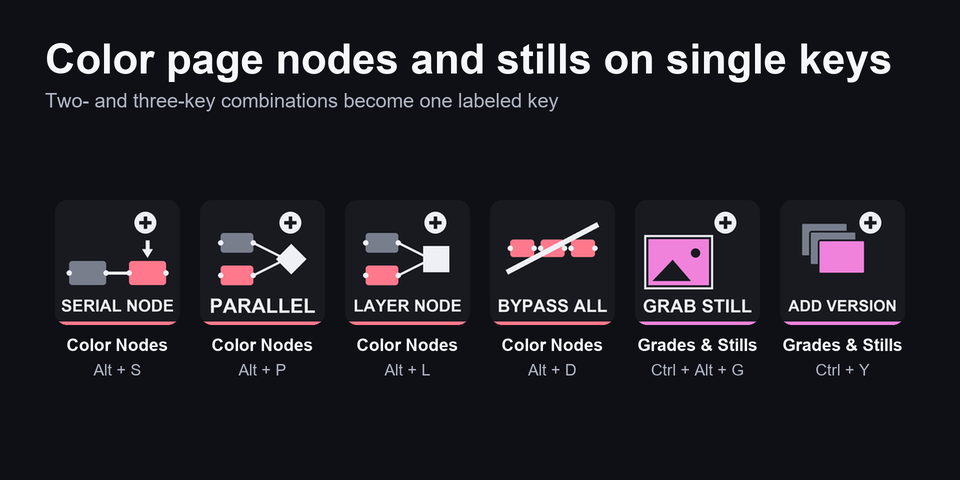
Color nodes and stills
Serial, parallel and layer nodes, windows and bypass on one page. Stills, wipe, versions and memories on the next.
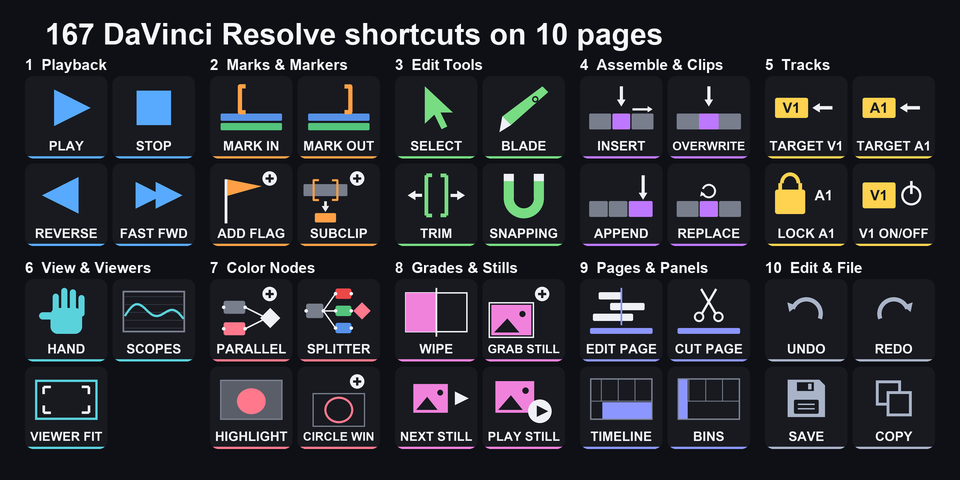
167 keys on 10 pages
Every key carries a label, so you can see what it does before you press it. PREV and NEXT at the bottom right move between the pages.
The 10 pages on your Stream Deck MK.2
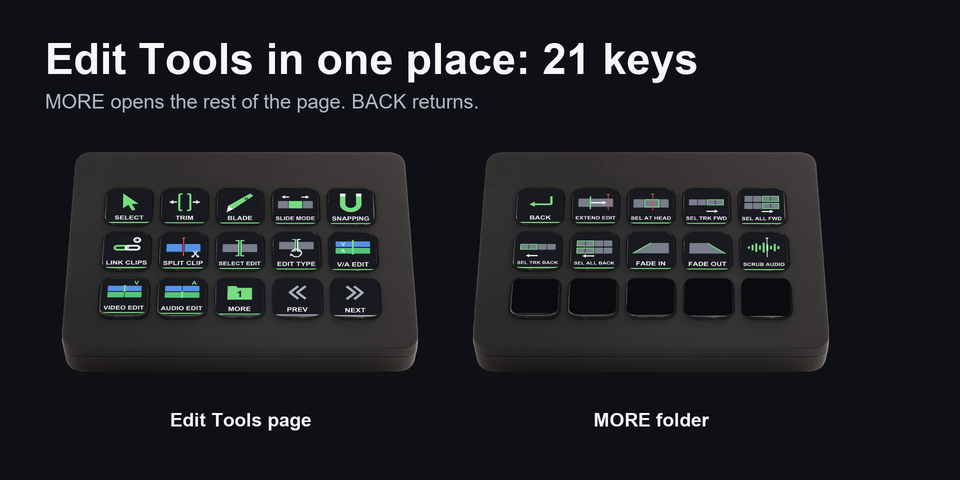
The download holds one profile for Stream Deck MK.2 (15 keys). Bigger pages open a MORE folder, and BACK returns.
Playback
Play, stop, reverse, frame and edit steps.
Marks & Markers
In/out, mark clip, markers, flags.
Edit Tools
Select, trim, blade, snapping, split, fades.
Assemble & Clips
Insert, overwrite, append, transitions, retime.
Tracks
Target, auto select, lock.
View & Viewers
Zoom to fit, cinema viewer, scopes.
Color Nodes
Serial, parallel, layer, windows, bypass.
Grades & Stills
Stills, wipe, versions, memories.
Pages & Panels
Media to Deliver, focus a panel.
Edit & File
Undo, copy, paste, save, import.
Built on the default shortcuts
Every shortcut key sends a default shortcut of DaVinci Resolve 21, so your Resolve settings stay as they are.
Keep Resolve in front, on the page the key is for (Edit or Color). If another panel has the focus, click the timeline once or press TIMELINE on Pages & Panels.
Delete and Ripple Cut are red keys, set apart on Assemble & Clips. Undo is on Edit & File.
Changed a shortcut in Resolve? Edit that key's Hotkey in the Stream Deck app.
Set up in 3 steps
- Install it from the Elgato Marketplace, or download and unzip the file after buying direct.
- Double-click the .streamDeckProfile file. The Stream Deck app imports it.
- Select the profile on your Stream Deck, keep DaVinci Resolve in front and press a key.
Two places to buy
| Elgato Marketplace | Direct from GRAMSHIFT | |
|---|---|---|
| Amount | Same amount | Same amount, tax added at checkout |
| Checkout | Elgato Marketplace | Stripe (card) |
| How you get it | Installed through the Stream Deck app | A zip with the profile file you double-click |
| Account | Your Elgato account | None needed |
| Key labels | English | English |
Requirements
- Windows 10 or later
- Stream Deck MK.2 (15 keys)
- Stream Deck app 6.4 or later
- DaVinci Resolve 21 with its default keyboard preset
Questions
How do I put DaVinci Resolve shortcuts on a Stream Deck?
Double-click the Cutline profile file and the Stream Deck app imports it. Select the profile, keep Resolve in front and press a key: 167 labeled keys on 10 pages send Resolve's default shortcuts for the Edit and Color pages.
Do I need to import a keyboard preset into DaVinci Resolve?
No. Every shortcut key uses Resolve's default keyboard preset, so your Resolve settings stay as they are. If you changed a shortcut, edit that key's Hotkey in the Stream Deck app.
Which Stream Deck is it for?
Stream Deck MK.2 (15 keys), on Windows. The download holds the profile for that model.
Why does a key act on the wrong panel?
Resolve sends a shortcut to the panel that has the focus. Click the timeline once, or press the TIMELINE key on Pages & Panels. Keep Resolve on the page the key is for (Edit or Color).
How do I reach the rest of a big page?
Bigger pages have a MORE key that opens a folder, and BACK at the top left returns. PREV and NEXT at the bottom right move between the 10 pages.
Is there anything to activate after buying direct?
No. You download a zip with the profile file and a README. There is nothing to activate and no account to create.
How do I get the file again?
Email contact@gramshift.com from the address you paid with, and include your order number, or the payment date and amount. We check the purchase and send a new link to the download page.
Can I get a refund?
Direct buyers, yes. If the profile does not work with your Stream Deck and DaVinci Resolve, email us within 14 days of purchase for a full refund. The download closes after a refund.
Does it work on a Mac?
No. The keys send the Windows shortcuts of DaVinci Resolve, so it is for Windows only.
Direct purchase details
- Price
- ¥2,400, the same amount as on the Elgato Marketplace. Tax for your country is added at checkout.
- Payment
- Handled by Stripe through Link, Stripe's checkout service. Link appears as the seller on your receipt and card statement, and your card number never reaches GRAMSHIFT.
- Delivery
- A download link appears right after payment, and the receipt arrives by email. You get the profile file only: there is nothing to activate.
- Refunds
- If the profile does not work with your Stream Deck and DaVinci Resolve, email us within 14 days of purchase for a full refund. You can also ask Link support. The download closes after a refund.
- Use
- For your own use. Please do not share the file.
- Countries
- The direct checkout is not offered in Ascension Island, China, Cuba, Iran, Kosovo, North Korea, Russia, Syria or Tristan da Cunha.
- Seller
- GRAMSHIFT, Tokyo, Japan. Contact: contact@gramshift.com
Limitations
- For Stream Deck MK.2 (15 keys) on Windows. There are no profiles for other Stream Deck models, and no macOS keys.
- Made for DaVinci Resolve 21 with its default keyboard preset. Changed a shortcut in Resolve? Edit that key's Hotkey in the Stream Deck app.
- Shortcuts only on symbol keys ([ ] , . / ; ' - =) or on Home, End and the Delete key are left out. To delete a clip, the Delete key on the deck sends Backspace.
- Also left out: shortcuts that mean different things on the two Resolve pages a profile page is made for, film scanner keys, Quit and Alt+F4. There are no multicam keys, though Alt+1 to 4 also switch angles in a multicam clip.
- Tested with a Japanese keyboard layout. German and French layouts may move letter keys. If a key does not act as labeled, email contact@gramshift.com and we will help.
- Keys work on the Resolve page they are for, mainly Edit and Color.
- Key labels are in English.