Virtual Stream Deck profile for Windows
Krita on your Virtual Stream Deck
Yes, Brushwork Keys is a Krita profile for Virtual Stream Deck, which the Corsair NIGHTSWORD v2 WIRELESS SD and XENEON EDGE also use.
It comes in 5 x 3 with the MK.2 pages and in 8 x 4 with the XL pages.
On 5 x 3 the keys are on the Tools, Color & Brush, Brush Blending, Layers, Select & Fill, Edit & Adjust, View, File, Ten Brushes and Ten Scripts pages, and the bottom-right keys turn the pages. In the Virtual Stream Deck settings, set the grid to 5 x 3 or 8 x 4 to match the profile you import.
- Tools in one press
- 26 brush blending modes
- Layers and selections
- 5 x 3 and 8 x 4 grids
What is on each Virtual Stream Deck page?
The bottom-right keys turn the pages: Next page on Tools, Previous and Next page on the pages between, and Previous page on Ten Scripts. The 8 x 4 profile has the same pages, with the keys of the XL. Virtual Stream Deck has no dials, so the dial pages do not appear there.
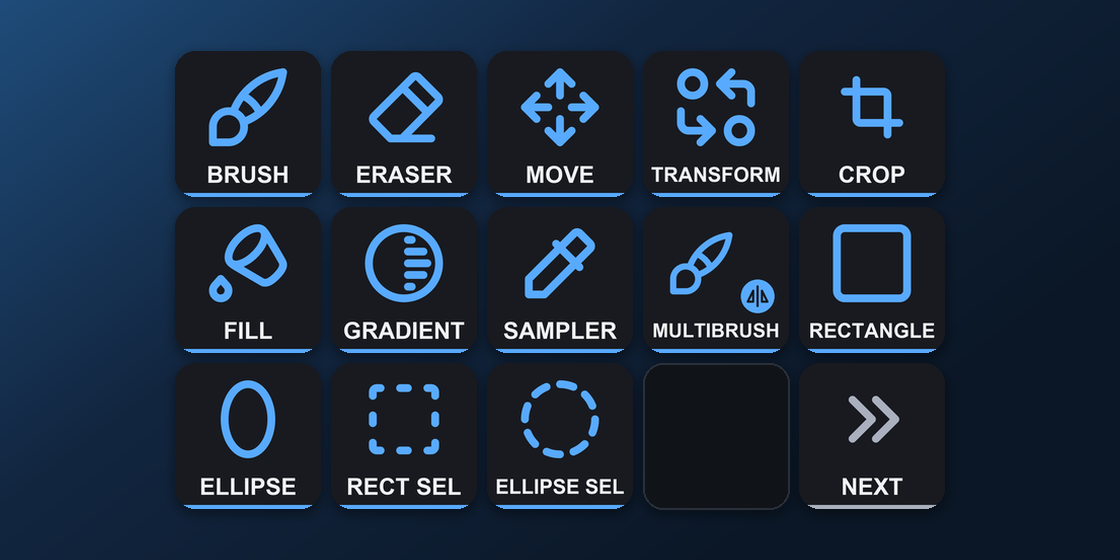
Tools
Brush, eraser mode, move, transform, crop, fill, gradient, color sampler, multibrush, rectangle, ellipse, rectangular and elliptical selection.
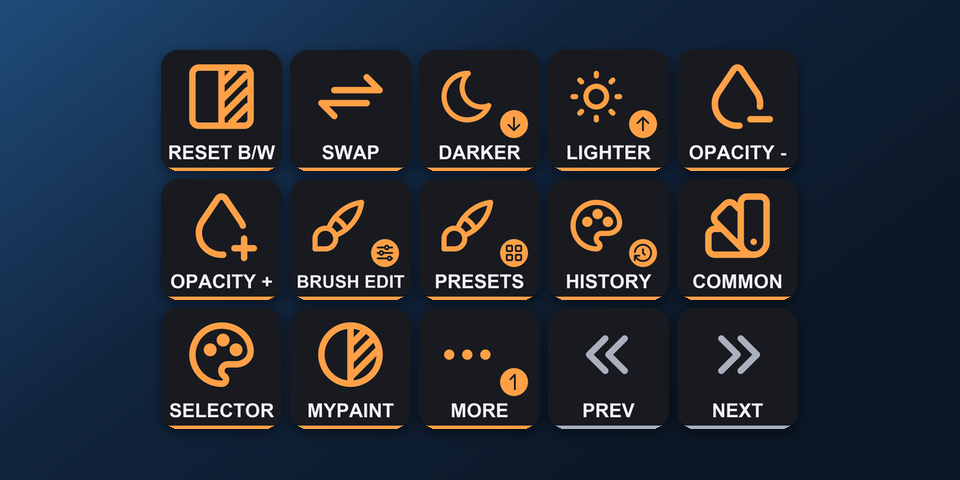
Color & Brush
Reset and swap colors, darker, lighter, opacity, brush editor, presets, color history, common colors, color selectors.
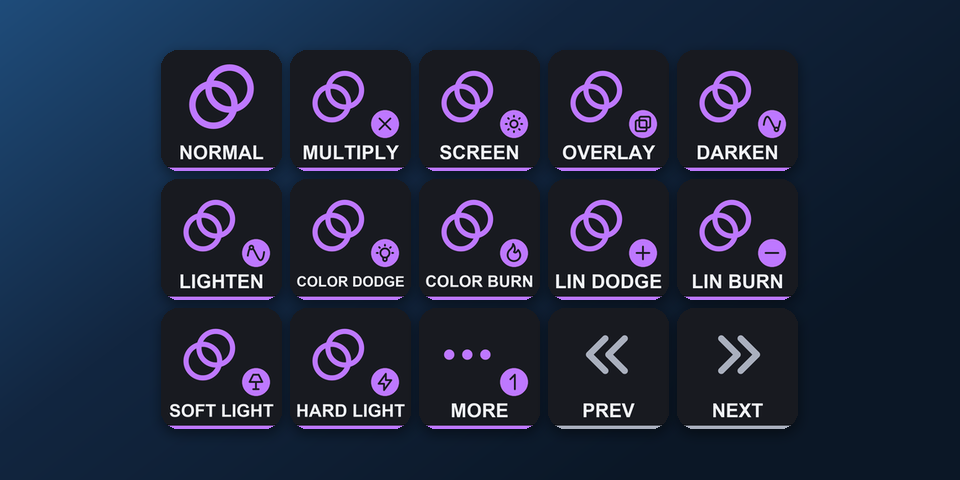
Brush Blending
blending modes of the current brush: Normal, Multiply, Screen, Overlay, Soft Light, Hard Light, Color Dodge, Color Burn and more.
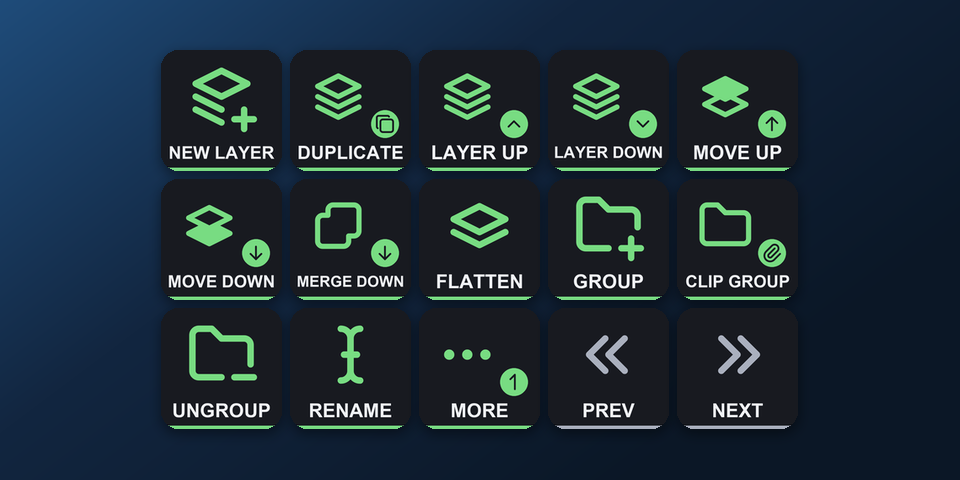
Layers
New layer, duplicate, next and previous layer, move up and down, merge down, flatten, group, clipping group, ungroup, rename, properties, copy or cut the selection to a layer.
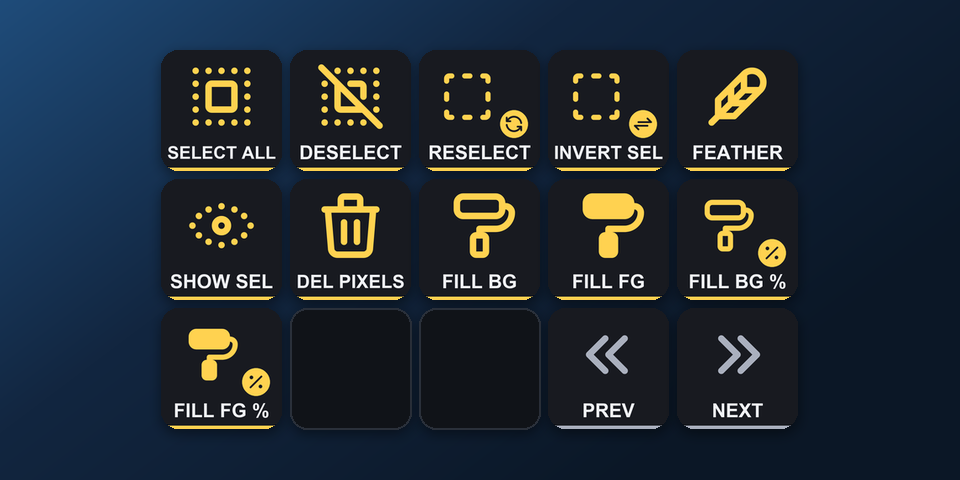
Select & Fill
Select all, deselect, reselect, invert, feather, show selection, clear, fill with the foreground or background color.
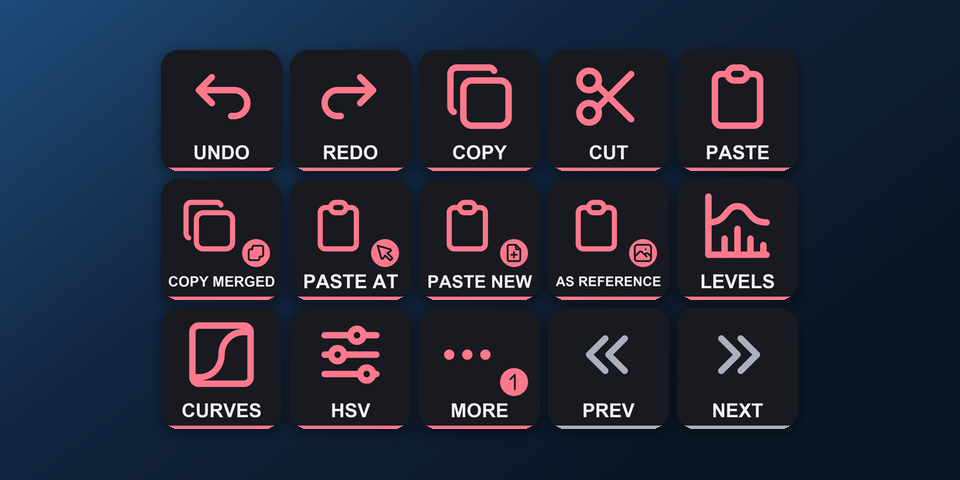
Edit & Adjust
Undo, redo, copy, cut, paste, copy merged, paste at cursor, paste into a new image, paste as reference, levels, curves, HSV, color balance, desaturate, invert, apply filter again, image size, canvas size.
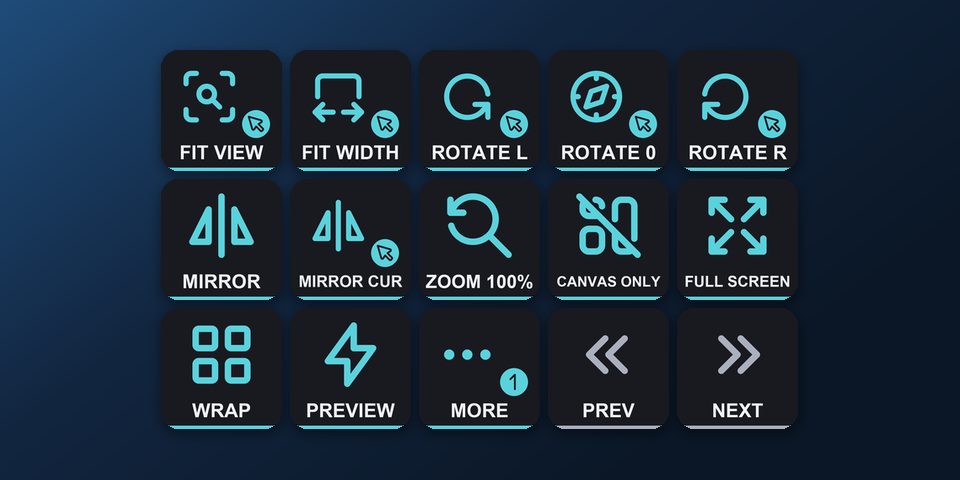
View
Fit to view, fit width, rotate, mirror, zoom 100%, canvas only, full screen, wrap around, instant preview, snap options, soft proofing, gamut warnings.
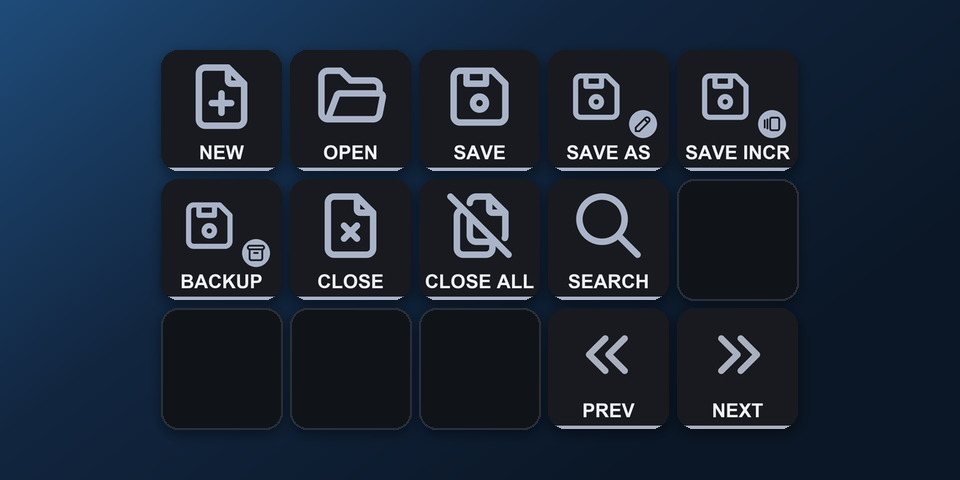
File
New, open, save, save as, incremental version, incremental backup, close, close all, search actions.
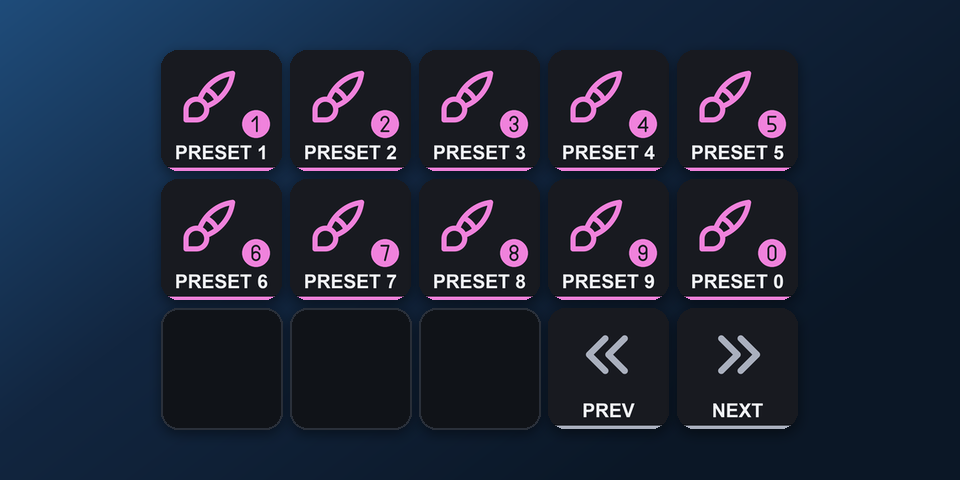
Ten Brushes
Brush presets 1-9 and 0: the brush presets you assign in Krita.
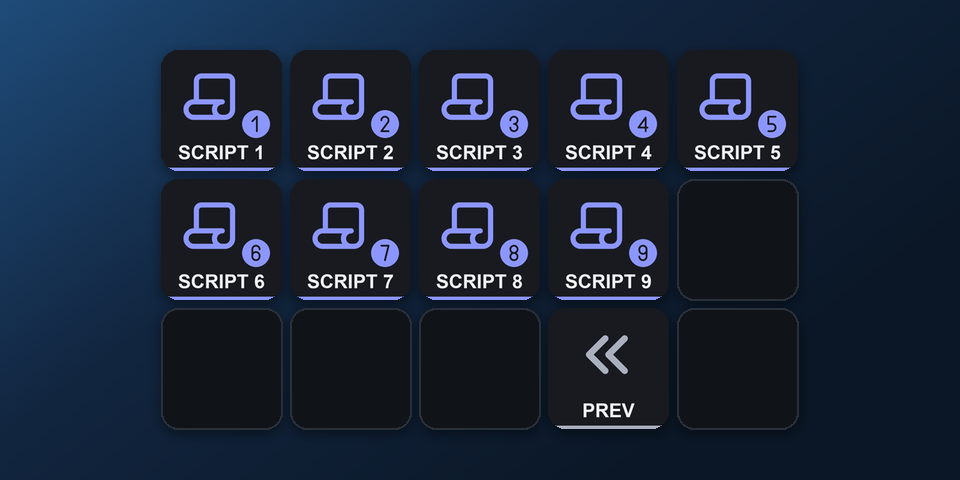
Ten Scripts
Scripts 1-9: the scripts you assign in Krita under Tools > Scripts.
How do I set it up on Virtual Stream Deck?
- Buy, then download and unzip the file.
- In the Virtual Stream Deck settings in the Stream Deck app, set the grid to 5 x 3 or 8 x 4.
- Double-click "Brushwork Keys for Krita, Virtual Stream Deck 5x3 (Windows).streamDeckProfile" (or the 8 x 4 file). The Stream Deck app imports it.
- Select the profile for Virtual Stream Deck in the Stream Deck app, start Krita and press a key.
Requirements
- Windows 10 or later
- Virtual Stream Deck (also used by the Corsair NIGHTSWORD v2 WIRELESS SD and XENEON EDGE) with its grid set to 5 x 3 or 8 x 4
- The Stream Deck app, where Virtual Stream Deck and its grid are set up
- Krita with its default shortcuts (the Krita Default shortcut scheme)
- Ten Brushes and Ten Scripts keys: the presets and scripts you assign in Krita
Questions about Virtual Stream Deck
Is there a Krita profile for Virtual Stream Deck?
Yes. Brushwork Keys for Krita includes Virtual Stream Deck profiles in 5 x 3, with the MK.2 pages (Tools, Color & Brush, Brush Blending, Layers, Select & Fill, Edit & Adjust, View, File, Ten Brushes and Ten Scripts), and in 8 x 4, with the XL pages. Import one in the Stream Deck app and select it for Virtual Stream Deck.
Can I use it on the Corsair NIGHTSWORD v2 WIRELESS SD or XENEON EDGE?
Yes. The Corsair NIGHTSWORD v2 WIRELESS SD opens Virtual Stream Deck with its Stream Deck button, and the XENEON EDGE shows it in the iCUE Stream Deck widget. Import the Virtual Stream Deck profile and select it there.
Which grid should I set on Virtual Stream Deck?
Set the grid to 5 x 3 for the 5 x 3 profile, or 8 x 4 for the 8 x 4 profile, in the Virtual Stream Deck settings in the Stream Deck app. Importing a profile does not change the grid, so set it to match the file you import.
How do I change pages on Virtual Stream Deck?
The bottom-right keys turn the pages: Next page on Tools, Previous and Next page on the pages between, and Previous page on Ten Scripts.
Does Virtual Stream Deck have the Krita dials?
Virtual Stream Deck has no dials, so the dial pages do not appear there. The keys on the pages work as on the other Stream Deck models.
Do I need to buy it again for Virtual Stream Deck?
No. The same download holds the Virtual Stream Deck profiles and the profiles for Stream Deck MK.2, XL, Neo and + (Windows and Mac), and for Stream Deck + XL and Corsair Galleon 100 SD (Windows).
Direct purchase details
- Price
- ¥980. Tax for your country is added at checkout.
- Payment
- Handled by Stripe through Link, Stripe's checkout service. Link appears as the seller on your receipt and card statement, and your card number never reaches GRAMSHIFT.
- Delivery
- A download link appears right after payment, and the receipt arrives by email. You get the profile files and a README: there is nothing to activate.
- Refunds
- If the profile does not work with your Stream Deck and Krita, email us within 14 days of purchase for a full refund. You can also ask Link support. The download closes after a refund.
- Use
- For your own use. Please do not share, resell or upload the file.
- Countries
- The direct checkout is not offered in Ascension Island, China, Cuba, Iran, Kosovo, North Korea, Russia, Syria or Tristan da Cunha.
- Seller
- GRAMSHIFT, Tokyo, Japan. Contact: contact@gramshift.com
More about Brushwork Keys for Krita
- All models and details of Brushwork Keys for Krita
- See this profile for Corsair Galleon 100 SD
- See this profile for Stream Deck + XL
- More Virtual Stream Deck game and app profiles
Limitations
- The Virtual Stream Deck profiles are for Krita on Windows.
- Made for Krita's default shortcuts. Changed a shortcut in Krita? Edit that key's Hotkey in the Stream Deck app.
- A brush or script slot does nothing until you assign a preset or script to it in Krita.
- The fit, rotate and mirror keys act where the mouse pointer is.
- Shortcuts on symbol keys (brush size [ ], zoom) are left out, as these keys sit in different places on US and Japanese keyboards.
- On QWERTZ or AZERTY layouts some letter keys may differ.
- Key labels are in English.
- Virtual Stream Deck has no dials, so the dial pages do not appear there.