Stream Deck plugin for REAPER on Windows and Mac
See what REAPER is doing on your Stream Deck
Play and record keys light up with the time, and track keys show mute, solo, record arm, monitoring and FX with the track's name, color and meter.
Change something in REAPER and the keys follow, so one look tells you which track is armed before you hit record.
Metronome, repeat, snap and ripple editing keys show if they are on, and more keys show the position, tempo and marker. Add any REAPER action, and turn Stream Deck + dials for a track's volume and pan.
- Play and record with the time
- Mute, solo, arm, monitor and FX
- Track name, color and meter
- Metronome, snap and ripple on or off
- Any REAPER action by command ID
- Stream Deck + dials for volume and pan
What the keys do
Transport
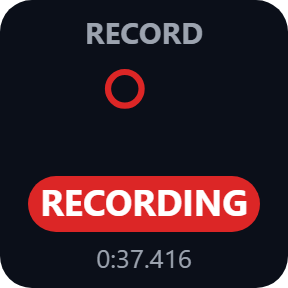
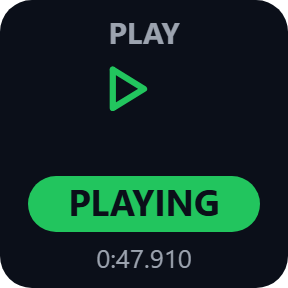
Play, stop, pause, record, or go to the start or end. The key shows REAPER's play state with the time: green while playing, red while recording.
Track
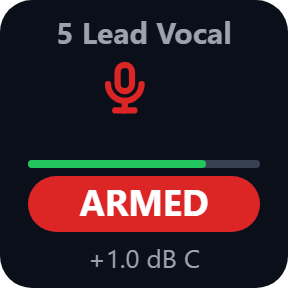
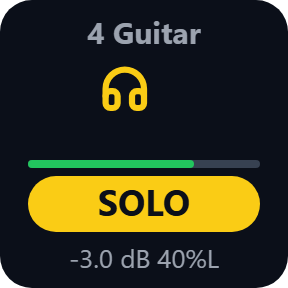
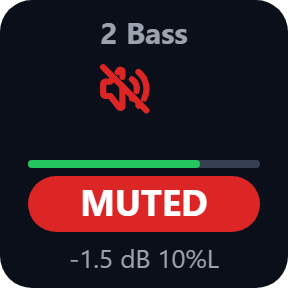
Mute, solo, record arm, monitoring, FX on/off or select for one track, with the track's name, color and meter. Pick a track by number or the selected track, or master for mute and FX.
Toggle
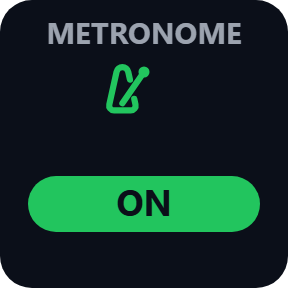
Metronome, repeat and snap light up while on, with REAPER's own on/off state. Ripple editing shows off, per track or all tracks. Press to switch.
Position and Tempo
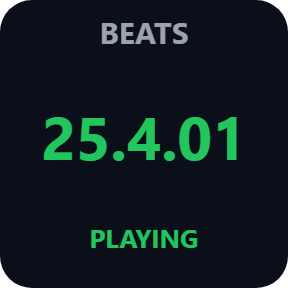
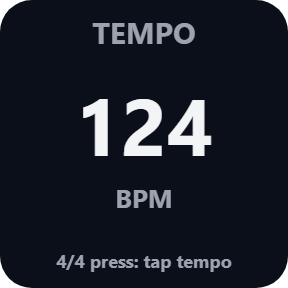
Position shows bars.beats or minutes:seconds. Tempo shows the tempo and time signature at the play position; press it for the metronome or tap tempo.
Marker
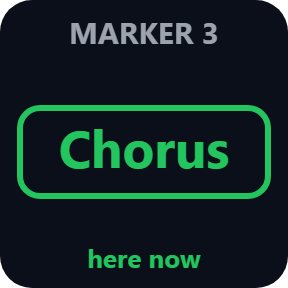
Shows the marker and region at the play position. Press for the next or previous marker, or a marker by its number.
Custom Action
Runs any REAPER action by its command ID, scripts and extensions too. Actions that REAPER marks as on or off light up while on.
Read it at a glance
Green while playing and for what is on, red while recording and for mute and record arm, yellow for solo. Each track key also shows the track's own color and its meter.
Talks only to REAPER on your computer
The keys use REAPER's own web remote on this computer (127.0.0.1). With REAPER closed, one button in the settings turns it on for you and keeps a backup of REAPER's settings file.
When REAPER is closed or a dialog is open, the keys say so instead of showing old values.
What the keys read is never sent anywhere. The only thing that goes online is the license key check.
Set up in 3 steps
- Open the plugin file you download after buying. The Stream Deck app installs it.
- In the Stream Deck app, drag a key such as Transport or Track onto your Stream Deck and enter your license key once in its settings.
- Start REAPER: the keys find its web remote and connect. No web remote yet? Close REAPER and press "Turn on the web remote" in the key's settings.
Two places to buy
| Elgato Marketplace | Direct from GRAMSHIFT | |
|---|---|---|
| Amount | Same amount | Same amount, tax added at checkout |
| Checkout | Elgato Marketplace | Stripe (card) |
| New versions | Installed through the Stream Deck app | Download from your license key page |
| Use on | Your Elgato account | Up to 3 computers per license key |
| Keys and settings | English and Japanese | English and Japanese |
Requirements
- Windows 10 or later, or macOS 12 or later
- Stream Deck app 6.9 or later
- REAPER on the same computer
Questions
How do I see REAPER's record arm, mute and solo on my Stream Deck?
Put Live Keys for REAPER track keys on your Stream Deck. Each one shows mute, solo, record arm, monitoring or FX of a track with its name, color and meter, and follows the changes you make in REAPER, so one look tells you which track is armed.
Do I have to set up REAPER's web remote?
The keys find REAPER's web remote and connect by themselves. If REAPER has none yet, close REAPER and press "Turn on the web remote" in a key's settings: it adds one on a free port and keeps a backup of REAPER's settings file. Or add it in REAPER: Options > Preferences > Control/OSC/web > Add > Web browser interface.
Does it work with a web remote login or portable REAPER?
Yes. Enter the login in the key settings as user:password. For portable REAPER, enter the port of its web remote in the key settings.
Can a key run my own REAPER actions and scripts?
Yes. The Custom Action key runs any REAPER action by its command ID, scripts and extensions too, and lights up while on for actions that REAPER marks as on or off.
Can I use the Stream Deck + dials?
Yes. Turn the Track Fader dial for a track's volume or pan, with its meter on the touch strip. Push the dial or tap the strip for mute or center.
Does it send what I do in REAPER anywhere?
No. The keys talk only to REAPER on this computer, and what they read is never sent anywhere. The only thing the direct version sends online is its license key check.
How many computers can I use with one license key?
Up to 3 of your own computers, Windows or Mac. If you replace a computer, write to us and we free up a place for the new one.
How do I get new versions if I buy direct?
Download the latest version from your thank-you page or the license key page you received. Your license key keeps working. If you cannot open your license key page, email us as the "Recover your license key" page explains.
What if I lose my license key?
Email contact@gramshift.com from the address you paid with, and include your order number, or the date and amount you paid. We check the purchase and reply with a link to your license key page.
Can I get a refund?
Yes, for a direct purchase. If the plugin does not work on your computer, email us within 14 days of purchase and we refund the full amount. The license key stops working after the refund.
Direct purchase: details, refunds and seller
- Price
- ¥1,980, the same amount as on the Elgato Marketplace. Tax for your country is added at checkout.
- Payment
- Handled by Stripe through Link, Stripe's checkout service. Link appears as the seller on your receipt and card statement, and your card number never reaches GRAMSHIFT.
- Delivery
- Your license key and download link appear right after payment, and the receipt arrives by email.
- Refunds
- If the plugin does not work on your computer, email us within 14 days of purchase for a full refund. You can also ask Link support. The license key stops working after a refund.
- License
- One key for your own use on up to 3 computers.
- Countries
- The direct checkout is not offered in Ascension Island, China, Cuba, Iran, Kosovo, North Korea, Russia, Syria or Tristan da Cunha.
- Seller
- GRAMSHIFT, Tokyo, Japan. Contact: contact@gramshift.com
Limits
- While a dialog is open in REAPER, REAPER does not answer: the keys show REAPER BUSY and presses are not sent until it is closed.
- A track key follows the track number, so moving tracks changes which track it shows.
- Custom Action shows on/off only for actions that REAPER marks as on or off.
- The Track Fader is for the dials of Stream Deck +; the other keys work on any Stream Deck with keys.
- The direct version checks its license key with our server when you activate it, each time the plugin starts, and about once a day while it runs. If it cannot reach the server, it keeps working for up to 44 days after the last successful check.
- If something does not work, email contact@gramshift.com and we will help.