OpenDeck plugin for Windows and Mac
See what holds a port, and stop it from your OpenDeck keys
Port 3000 already in use?
Put the port on a key of your Ajazz or Mirabox deck in OpenDeck. It shows which program holds the port, with its name and PID, and two presses stop that program and everything it started.
It clears EADDRINUSE for Node.js, Vite, Python, Java or any other local dev server, without netstat, lsof, Task Manager or Activity Monitor. System processes of Windows and macOS are never stopped.
- Program name and PID
- Two presses to stop
- Stops the whole process tree
- System processes protected
- Dev Ports: how many are in use


What the keys do
Port Watch
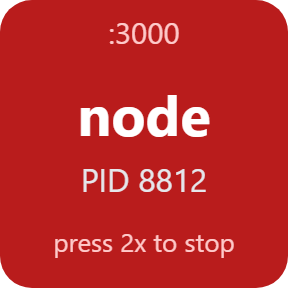
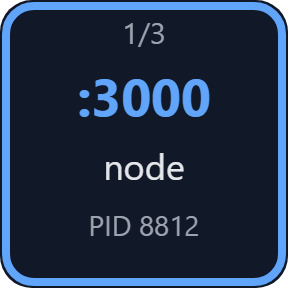
One key per port. Green with FREE when the port is free; red with the program's name and PID when something is listening on it, over IPv4 or IPv6.
Two presses to stop
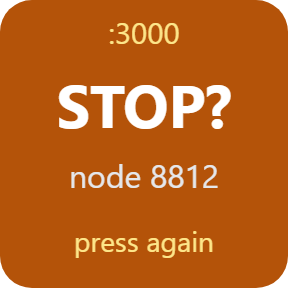
The first press asks STOP?, and a second press within 2 seconds confirms. A single press never stops anything.
The whole process tree
Stops the program and every program it started, so watchers and child processes cannot keep holding the port. The key turns green when the port is free again.
System processes protected
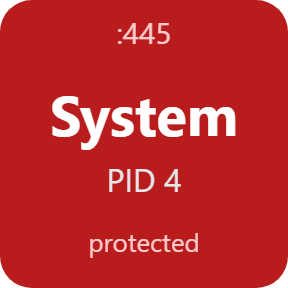
Never stops system processes (on Windows System, svchost, services, lsass, wininit, csrss, smss and others; on a Mac launchd, WindowServer, ControlCenter, mDNSResponder and others) or itself. Just before stopping, it checks the port again and stops nothing if another program has taken it.
Name each key
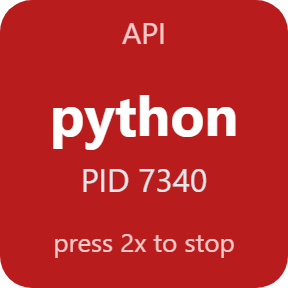
Give a key a label such as API or Web, so you see which server is which. Empty, the key shows the port number.
Dev Ports
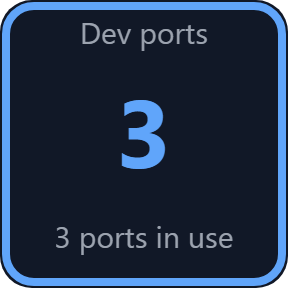
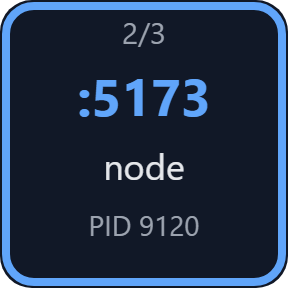
Shows how many of your dev ports are in use: by default 3000-3010, 4200, 5000, 5173, 8000, 8080 and 8888, or your own list. Press to step through them with program and PID. It never stops anything.
Install in OpenDeck
In OpenDeck, open the Plugins tab, install the .streamDeckPlugin file you downloaded, then enter your license key once in a key's settings.
Requirements
- Windows 10 or later, or macOS 13 or later (Apple silicon or Intel)
- OpenDeck 2.14 or later
Questions
How do I see which program is using port 3000 on an Ajazz or Mirabox deck with OpenDeck?
Put a Port Watch key in OpenDeck and enter 3000. The key is green with FREE when nothing listens on the port, or red with the program's name and PID, for example node and PID 8812.
How do I fix EADDRINUSE: address already in use?
A program, often a dev server that is still running in the background, still holds the port. Press the Port Watch key for that port, then press again within 2 seconds: the program and every program it started are stopped, and the key turns green when the port is free.
Can it stop a system process by mistake?
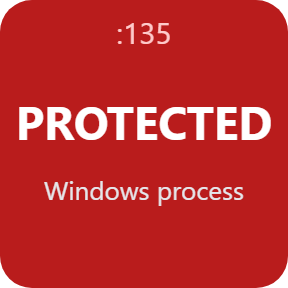
No. Windows system processes such as System and svchost show PROTECTED and are never stopped. On a Mac, system processes such as launchd and WindowServer are never stopped either. A single press never stops anything, and the port is checked again just before stopping.
Purchase details, refunds and seller
- Price
- ¥780, paid once. Tax for your country is added at checkout.
- Payment
- Handled by Stripe through Link, Stripe's checkout service. Link appears as the seller on your receipt and card statement, and your card number never reaches GRAMSHIFT.
- Delivery
- Your license key and download link appear right after payment, and the receipt arrives by email.
- Countries
- The direct checkout is not offered in Ascension Island, China, Cuba, Iran, Kosovo, North Korea, Russia, Syria or Tristan da Cunha.
- Seller
- GRAMSHIFT, Tokyo, Japan. Contact: contact@gramshift.com
- Refunds
- If the plugin fails to run on your PC, email contact@gramshift.com within 14 days of purchase for a full refund. The license key stops working after a refund.
- License
- One key for your own use on up to 3 PCs.
Limits
- TCP ports only.
- On Windows, it never asks for administrator rights, so a program running as administrator can be stopped only when the deck app also runs as administrator.
- On a Mac, a server of another user or one started with sudo is shown with its name and PID, and the key shows NOT STOPPED and "no permission" instead of stopping it. Programs whose name cannot be read are not stopped.
- The direct version checks its license key with our server when you activate it, at each plugin start and about once a day. If the server cannot be reached, it keeps running for up to 44 days after the last successful check.