OpenDeck plugin for Windows
Live Automobilista 2 telemetry on your OpenDeck keys
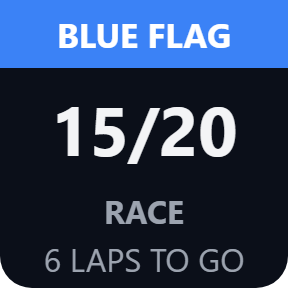
Race Deck: Automobilista 2 shows fuel and laps left, tyre wear, temperature and pressure, your live delta to your best lap, position with the gaps ahead and behind, and flags on the keys of your Ajazz or Mirabox deck in OpenDeck while you drive.
Turn on Shared Memory (Project CARS 2) in the game's System options, and the keys go live. Any key can also fire a game key of your choice, so the deck works as a button box for Automobilista 2 and a dashboard in one.
- Fuel and laps left
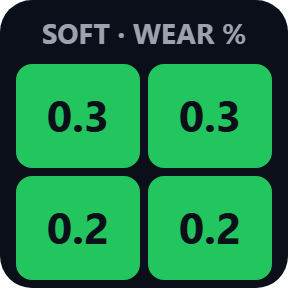
- Tyres
- Lap delta
- Position and gaps
- Flags
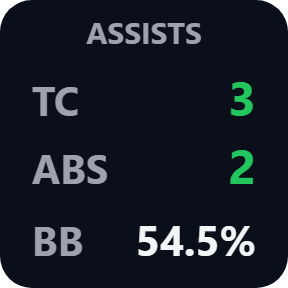
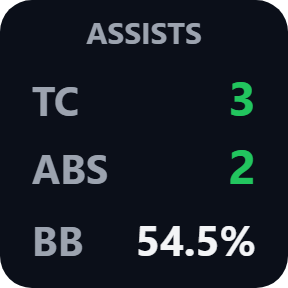
- TC / ABS / Brake bias
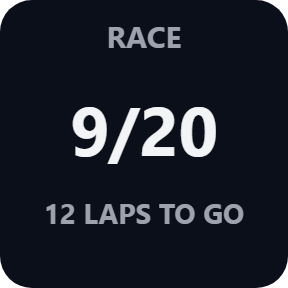
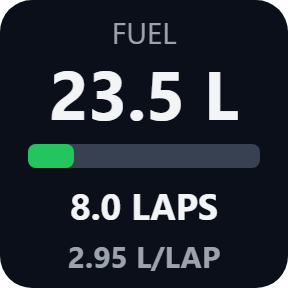
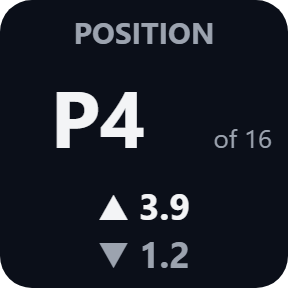
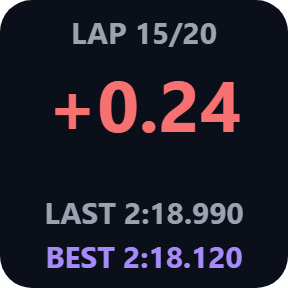
What the keys do
Fuel
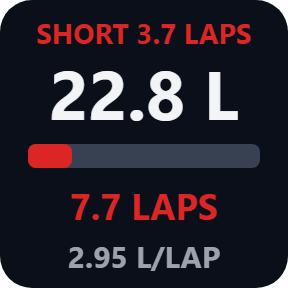
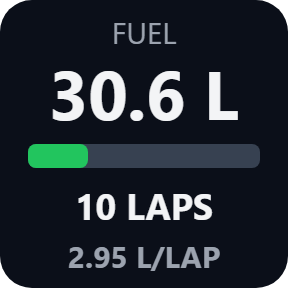
The tank bar in litres or US gallons, plus laps remaining and consumption per lap taken from your latest clean laps. In a race it sets that against the laps to the flag: red SHORT 1.4 LAPS when you cannot make it, yellow when you are less than a lap to spare.
Position and gaps
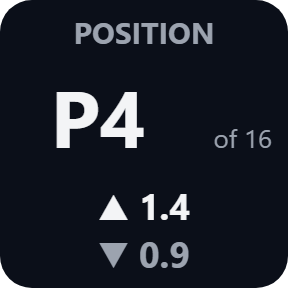
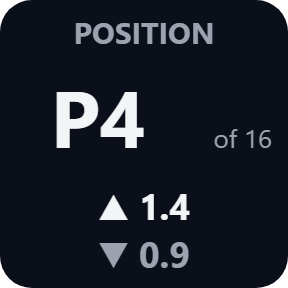
Your place and the number of cars, with the overall race gaps ahead and behind in seconds or laps. A drive-through or stop-and-go penalty shows here too.
Lap Times
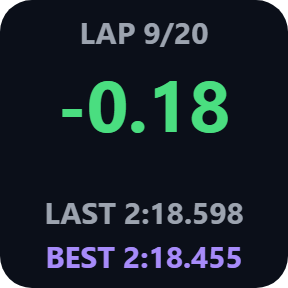
Your gap to the best lap while driving, green when ahead and red when behind, or the running lap time instead. Last lap and best lap sit alongside.
Tyres
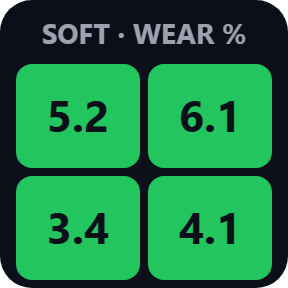
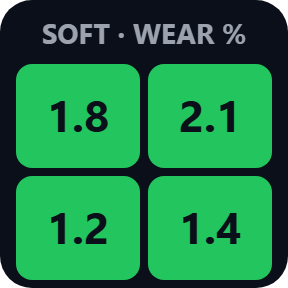
All four tyres drawn at the corners of the car in colour, and the compound when there is room. Choose wear (0 is new), tread temperature or tyre temperature in C or F, or pressure in psi, kPa or bar.
TC / ABS / Brake Bias
Traction control and ABS levels, OFF at 0, and brake bias in percent to the front.
Pit & Stint
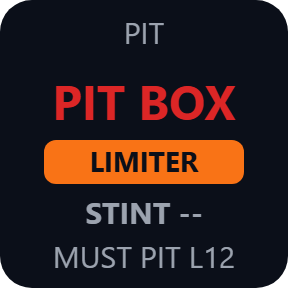
Pit lane, pit box and LIMITER, stint laps and time, your requested stop and the lap of a mandatory stop.
Install in OpenDeck
In OpenDeck, open the Plugins tab, install the .streamDeckPlugin file you downloaded, then enter your license key once in a key's settings.
Requirements
- Windows 10 or later
- Automobilista 2 on PC, on the same PC as the deck app, with Shared Memory set to Project CARS 2
- OpenDeck 2.14 or later
Questions
How do I see Automobilista 2 fuel, tyres and lap delta on an Ajazz or Mirabox deck with OpenDeck?
In the game, open Options > System and set Shared Memory to Project CARS 2. Then place the Fuel, Tyres or Lap Times keys in OpenDeck. Once you are out on track, the values on the keys are those of your own car.
Can a key press send a game key, like a button box?
Yes. Type a shortcut like F13 or Ctrl+Shift+P into the key's settings, then assign that same shortcut to the action in Automobilista 2's controls. The F13 to F24 range is the safe choice because nothing else uses it. Out of the box it only sends while the game window is in front.
Why do the keys say NO GAME?
The game is closed, or Shared Memory is off or set to another mode. In the game, open Options > System and set Shared Memory to Project CARS 2.
Purchase details, refunds and seller
- Price
- ¥980, paid once. Tax for your country is added at checkout.
- Payment
- Handled by Stripe through Link, Stripe's checkout service. Link appears as the seller on your receipt and card statement, and your card number never reaches GRAMSHIFT.
- Delivery
- Your license key and download link appear right after payment, and the receipt arrives by email.
- Countries
- The direct checkout is not offered in Ascension Island, China, Cuba, Iran, Kosovo, North Korea, Russia, Syria or Tristan da Cunha.
- Seller
- GRAMSHIFT, Tokyo, Japan. Contact: contact@gramshift.com
- Refunds
- If the plugin fails to run on your PC, email contact@gramshift.com within 14 days of purchase for a full refund. The license key stops working after a refund.
- License
- One key for your own use on up to 3 PCs.
Limits
- Reads Automobilista 2 only. Project CARS 2 itself and other games that share data the same way show UNSUPPORTED. Gaps are overall, not by class.
- Fuel per lap needs one full lap without a pit visit, and the delta needs one best lap from line to line. Invalid laps do not count, and both start again with a new session.
- If Automobilista 2 runs as administrator, the keys the plugin sends never arrive, so launch it as a normal user. Reading the data for the display keys is not affected.
- The direct version checks its license key with our server when you activate it, at each plugin start and about once a day. If the server cannot be reached, it keeps running for up to 44 days after the last successful check.