Stream Deck plugin for F1 25 and F1 24 on PC
Live F1 25 telemetry on your Stream Deck keys
Race Deck for F1 25 shows ERS, fuel, tyre wear and temperatures, position, gaps, DRS or the 2026 Overtake Mode, flags and the safety car right on your keys while you race, at a glance instead of in the MFD.
Press a key to send a game key such as the pit limiter or the MFD, and your Stream Deck becomes a sim racing button box with a live dashboard. Works with F1 24 too, and with the F1 25 2026 Season Pack.
- ERS & Fuel
- Tyres
- Gaps
- DRS
- Safety car
What the keys show
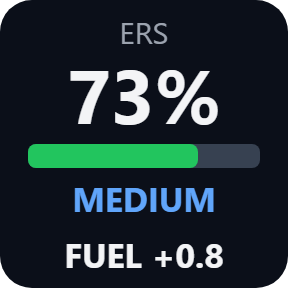
ERS & Fuel
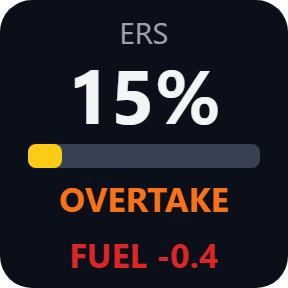
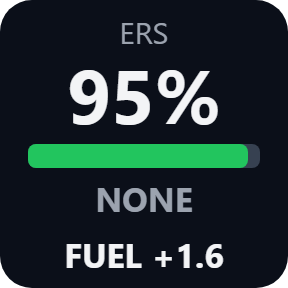
ERS store in percent with a bar, the deployment mode (NONE, MEDIUM, HOTLAP or OVERTAKE) and fuel laps to spare as the MFD gives them, in red when you are short.
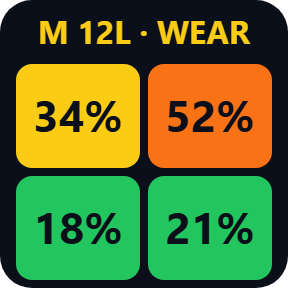
Tyres
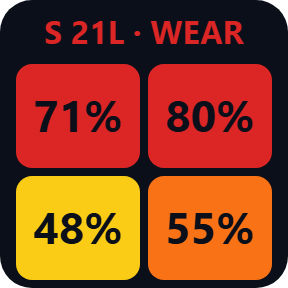
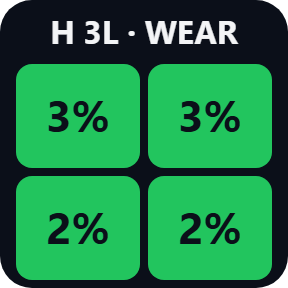
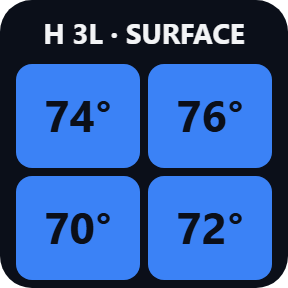
All four tyres as colored cells laid out like the car, front on top, showing wear, plus the compound and how many laps the set has done.
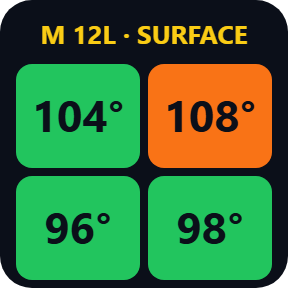
Tyre temperatures
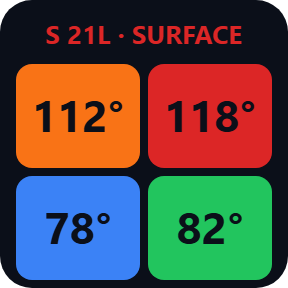
The same Tyres key can show surface or inner temperature instead of wear. You choose it in the key's settings.
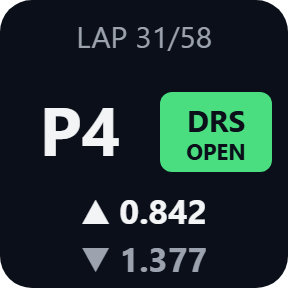
Race Status
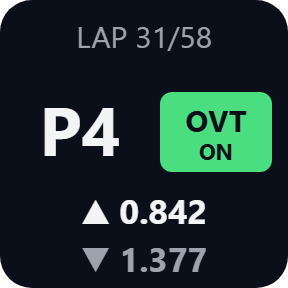
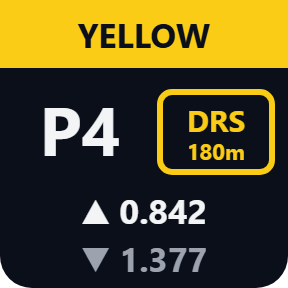
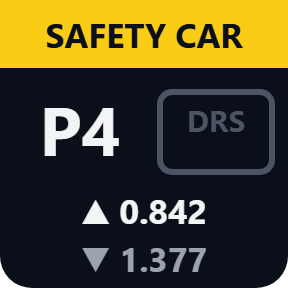
Position, gaps to the cars ahead and behind, lap and DRS: grey when not allowed, a yellow frame with the distance when it is close, green when available, OPEN when in use. In practice, qualifying, sprint shootout and time trial, when no flag is shown, the top line shows the session and your lap (for example Q1 · LAP 3) and the gaps show --, as the game does not send gaps in these sessions.
Flags and safety car
Yellow and blue flags, safety car and VSC appear as a band across the top of Race Status.
2026 Season Pack
For cars on the 2026 rules, the DRS place shows Overtake Mode with the metres until it is available, then green when available and ON while in use. Positions and gaps cover the full 24-car grid.
A button box with a live dashboard
Each key can also send the game key you choose, for example F13 or Ctrl+Shift+E, so a press can work the pit limiter or the MFD. By default it sends only while the game is the active window, so presses stay out of your other windows.
Receives telemetry, shows nothing old
The keys read the UDP telemetry the game sends: from a game on this PC, or from a console or second PC on your network for the display keys.
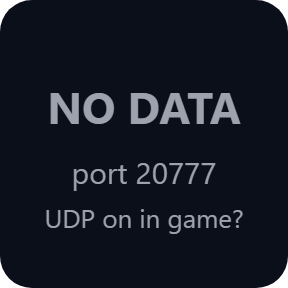
Another UDP format shows UNSUPPORTED, and NO DATA appears when nothing arrives for 3 seconds, instead of old or wrong numbers.
Nothing about your game leaves your PC. The only thing the direct version sends online is its license key check.
Set up in 3 steps
- Open the plugin file you download after buying. The Stream Deck app installs it.
- In F1 25 or F1 24, open Settings, Telemetry Settings and set UDP Telemetry On, IP 127.0.0.1 and port 20777. UDP Format: 2025 in F1 25 (or 2026 with the 2026 Season Pack), 2024 in F1 24.
- In the Stream Deck app, drag ERS & Fuel, Tyres or Race Status onto your keys and enter your license key once in a key's settings. As soon as you are on track, the keys show your car.
Two places to buy
| Elgato Marketplace | Direct from GRAMSHIFT | |
|---|---|---|
| Amount | Same amount | Same amount, tax added at checkout |
| Checkout | Elgato Marketplace | Stripe (card) |
| New versions | Installed through the Stream Deck app | Download from your key page |
| Use on | Your Elgato account | Up to 3 PCs per license key |
| Plugin display | English and Japanese | English and Japanese |
Requirements
- Windows 10 or later
- Stream Deck app 6.9 or later
- F1 25 or F1 24
Questions
How do I see F1 25 telemetry such as ERS, fuel and tyre wear on my Stream Deck?
Turn UDP Telemetry on in the game's Telemetry Settings (IP 127.0.0.1, port 20777), then drag the ERS & Fuel, Tyres or Race Status keys onto your Stream Deck. As soon as you are on track, the keys show your car.
Can a key press send a game key, like a button box?
Yes. Pick a key such as F13 or Ctrl+Shift+E in a key's settings and assign the same key in the game's controls. Keys the game does not otherwise use, such as F13 to F24, avoid clashes. By default it sends only while the game is the active window.
Does it work with F1 24 and the F1 25 2026 Season Pack?
Yes. It reads UDP Format 2024, 2025 and 2026. With the 2026 Season Pack, choose 2026 to see Overtake Mode on Race Status.
Can I use it when the game runs on a console?
The display keys, yes: set the game's UDP IP Address to this PC's address on your network, and in each key's settings choose Receive from: This PC and the network. Sending keys only works for a game on this PC.
How many PCs can I use with one license key?
Up to 3 of your own PCs. If you replace a PC, write to us and we free up a place for the new one.
How do I get new versions if I buy direct?
Download the latest version from your thank-you page or the key page you received. Your license key keeps working. If you cannot open your key page, email us as the "Recover a lost key" page explains.
What if I lose my license key?
Email contact@gramshift.com from the address you paid with, and include your order number, or the date and amount you paid. We check the purchase and reply with a link to your key page.
Can I get a refund?
Yes, for a direct purchase. If the plugin does not work on your PC, email us within 14 days of purchase and we refund the full amount. The license key stops working after the refund.
Direct purchase: details, refunds and seller
- Price
- ¥780, the same amount as on the Elgato Marketplace. Tax for your country is added at checkout.
- Payment
- Handled by Stripe through Link, Stripe's checkout service. Link appears as the seller on your receipt and card statement, and your card number never reaches GRAMSHIFT.
- Delivery
- Your license key and download link appear right after payment, and the receipt arrives by email.
- Refunds
- If the plugin does not work on your PC, email us within 14 days of purchase for a full refund. You can also ask Link support. The license key stops working after a refund.
- License
- One key for your own use on up to 3 PCs.
- Countries
- The direct checkout is not offered in Ascension Island, China, Cuba, Iran, Kosovo, North Korea, Russia, Syria or Tristan da Cunha.
- Seller
- GRAMSHIFT, Tokyo, Japan. Contact: contact@gramshift.com
Limits
- Keys can only be sent to a game on this PC. With a console, the keys show telemetry only.
- Sent keys do not reach a game running as administrator, and anti-cheat software may ignore them. The display keys are not affected.
- Reads UDP Format 2026, 2025 and 2024. Another format shows UNSUPPORTED, and NO DATA appears when nothing arrives for 3 seconds, instead of old or wrong numbers.
- One port serves one program: if another telemetry app already uses it, the keys show PORT BUSY. Use that app's forwarding or another port.
- Windows only: the plugin does not run on a Mac.
- The direct version checks its license key with our server when you activate it, each time the plugin starts, and about once a day while it runs. If it cannot reach the server, it keeps working for up to 44 days after the last successful check.