OpenDeck plugin for Windows and Mac
Live MX Bikes gear, delta and fuel on your OpenDeck keys
Race Deck: MX Bikes shows your gear with a rev bar that turns at the shift point, the delta to your best lap at every split, your position and the gaps around you, the time or laps left, fuel and engine temperature on the keys of your Ajazz or Mirabox deck in OpenDeck.
Every key can also send a game key you choose, so your deck works as a button box for the game. The plugin puts its small plugin file into MX Bikes with one button.
- Gear and rev bar
- Delta at every split
- Position and gaps
- Time or laps left
- Fuel laps left
- Engine temperature
What the keys do
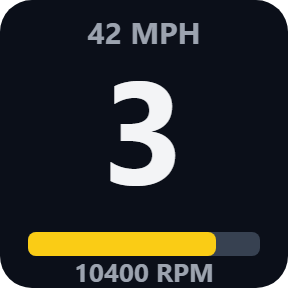
Gear & Revs
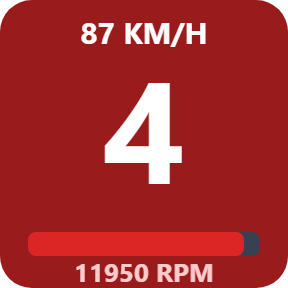
Your gear, N in neutral, and your speed in km/h or mph, with a rev bar that goes from green to yellow to red and flashes at the limiter. The key turns red at the shift point.
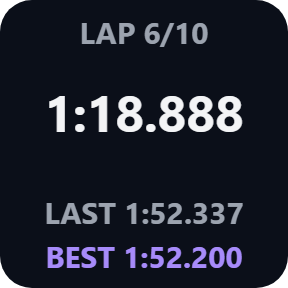
Lap Times
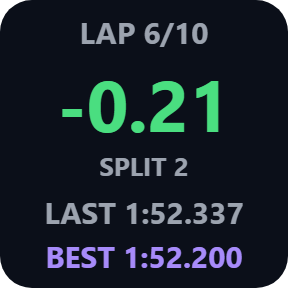
The delta to your best lap at every split, green when you are ahead and red when you are behind, with your last and best laps. After an invalid lap it shows LAST LAP INVALID.
Position
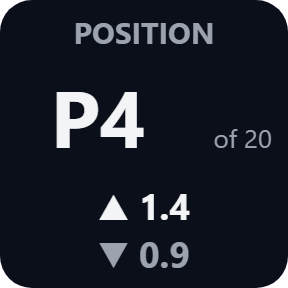
Your place of all riders, and in a race the gaps to the riders ahead and behind. LEADER when you lead; a penalty shows in orange.
Session
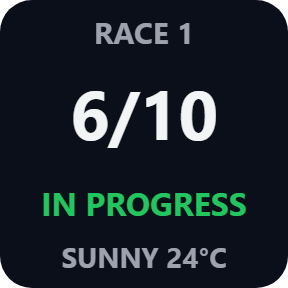
Practice, qualifying, warmup or race 1 and 2, with the time or laps left, the sighting lap and the race start, and the weather with the temperature.
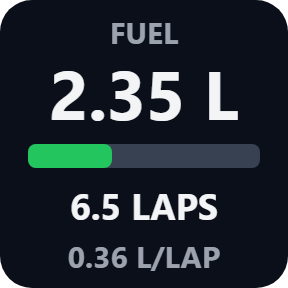
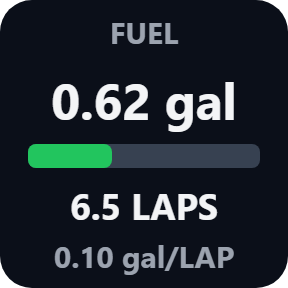
Fuel
Fuel with a bar, the laps it lasts and your use per lap from your last 3 whole laps. In a laps race it turns yellow when less than a lap is spare and red when the fuel will not reach the finish.
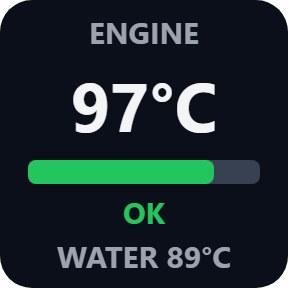
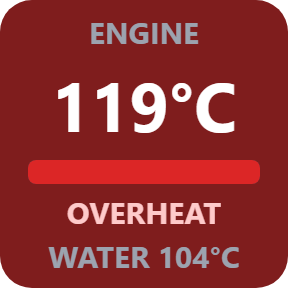
Engine Temp
Engine temperature with a bar against your bike's own limits: COLD, OK, or OVERHEAT on a red key, plus the water temperature, in C or F.
Install in OpenDeck
In OpenDeck, open the Plugins tab, install the .streamDeckPlugin file you downloaded, then enter your license key once in a key's settings.
Requirements
- Windows 10 or later, or macOS 12 or later (the game on a Windows PC in the same network)
- MX Bikes on the same PC, or on a Windows PC in the same network
- OpenDeck 2.14 or later
Questions
How do I get an MX Bikes dashboard on an Ajazz or Mirabox deck with OpenDeck?
Place the Gear & Revs, Lap Times or Position keys in OpenDeck, open a key's settings and press Install with the game closed. Start MX Bikes and ride: the keys show your bike as soon as you are on track.
Can a key press send a game key, like a button box?
Yes. Enter a key such as F13 or Ctrl+Shift+P in a key's settings and give the same key to a control in the game's controls, for example a camera change or a reset. By default it sends only while the game is the window in front.
Why do the keys say NO GAME?
The live data is not there yet: MX Bikes is not running, or the plugin file is not in the game's plugins folder. Press Install in a key's settings, then start the game; the keys find it within about a second.
Purchase details, refunds and seller
- Price
- ¥1,500, paid once. Tax for your country is added at checkout.
- Payment
- Handled by Stripe through Link, Stripe's checkout service. Link appears as the seller on your receipt and card statement, and your card number never reaches GRAMSHIFT.
- Delivery
- Your license key and download link appear right after payment, and the receipt arrives by email.
- Countries
- The direct checkout is not offered in Ascension Island, China, Cuba, Iran, Kosovo, North Korea, Russia, Syria or Tristan da Cunha.
- Seller
- GRAMSHIFT, Tokyo, Japan. Contact: contact@gramshift.com
- Refunds
- If the plugin fails to run on your PC, email contact@gramshift.com within 14 days of purchase for a full refund. The license key stops working after a refund.
- License
- One key for your own use on up to 3 PCs.
Limits
- Install finds MX Bikes in your Steam libraries. For a copy from elsewhere, the key settings show the plugins folder with Open folder: copy the plugin file there once. Press Remove before you uninstall the plugin, so the file leaves the game's folder too.
- With OpenDeck on a Mac or a second PC, MX Bikes runs on a Windows PC in the same network: choose Receive from: This PC and the network and copy the two files into the game's plugins folder there. Game keys go only to MX Bikes on the same Windows PC.
- Fuel per lap appears after a full lap without a refill, and the delta after your first best lap. Sent keys do not reach a game running as administrator: start it normally.
- The direct version checks its license key with our server when you activate it, at each plugin start and about once a day. If the server cannot be reached, it keeps running for up to 44 days after the last successful check.