Stream Deck plugin for Microsoft Flight Simulator 2024 on Windows
Real-world weather for your MSFS 2024 flight on your Stream Deck
To see the weather at your departure and arrival while you fly Microsoft Flight Simulator 2024, put the weather keys on your Stream Deck: each shows the flight category as a color (VFR, MVFR, IFR, LIFR), wind with gusts, visibility and ceiling.
Arrival Weather adds a strip when the TAF turns worse, and Runway Wind shows the headwind and crosswind on the runway most into the wind.
Leave the departure empty and, with MSFS 2024 running and your aircraft on the ground, the key picks the nearest airport with a report. Nothing to install in the sim. Display only.
- Departure and arrival METAR
- TAF warning before you land
- Headwind and crosswind
- Nearest airport picked for you
- Alert when the weather changes
- Settings in English and Japanese
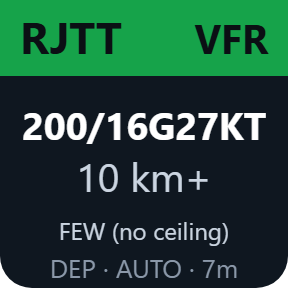
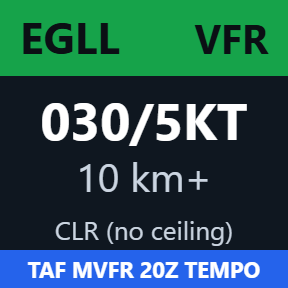
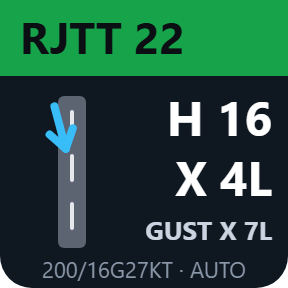
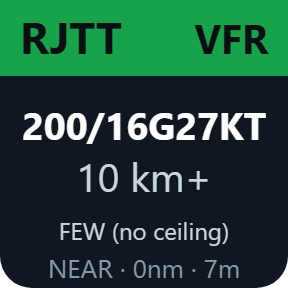
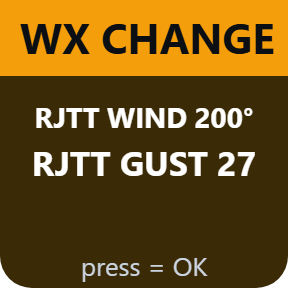
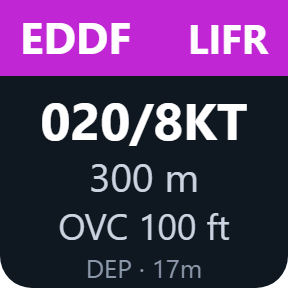
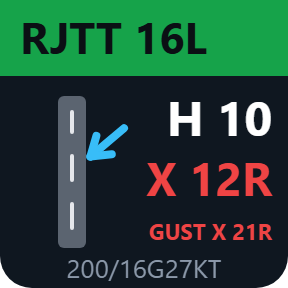
What the keys show
Departure Weather
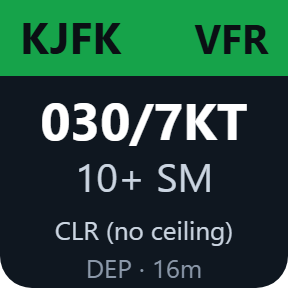
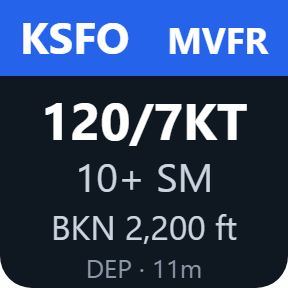
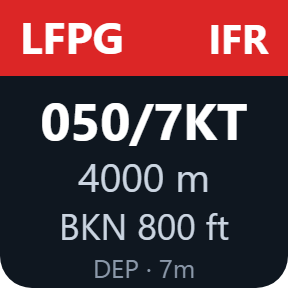
The flight category as a color band, wind with gusts in knots, visibility and ceiling at your departure. Type a code, or leave it empty for the nearest airport.
Arrival Weather
The same for your arrival, plus a strip when the TAF turns worse within 3, 6 or 12 hours, with the time and TEMPO or PROB.
Runway Wind
Headwind or tailwind and crosswind from the left or right, with the gust crosswind, on the runway most into the wind. Type a runway or a heading to choose one. The crosswind turns red above the limit you set (1 to 60 kt). On a Stream Deck +, turn the dial to step through the runways.
Nearest Airport Weather
The closest airport with a current report and its distance, from your aircraft position in MSFS 2024.
Weather Change Alert
Flashes once when the category changes, the wind turns 30 degrees or changes 10 kt, gusts appear or get 10 kt stronger, or the crosswind goes over your limit. Press to mark it as seen.
Read it at a glance
The band on each weather key takes the color of the flight category, so you see the conditions before you read a number. A color-blind safe set of colors is in the settings.
Works beside the sim, on your PC
The plugin runs in the Stream Deck app. There is nothing to install in the sim or the Community folder.
It is display only: it presses no keys in the sim and changes nothing in it.
Weather requests carry only airport codes. Your aircraft position is used on your PC to find the nearest airport and is never sent.
Set up in 3 steps
- Open the plugin file you download after buying. The Stream Deck app installs it.
- In the Stream Deck app, drag the keys you want onto any page. Enter your license key once in the settings of any key, then type your departure and arrival codes (such as KSEA or RJTT).
- Fly. Typed codes work before you start the sim, so you can plan the flight first.
Requirements
- Windows 10 or later
- Stream Deck app 6.9 or later
- An internet connection
- For the nearest airport: Microsoft Flight Simulator 2024 on the same PC
- Any Stream Deck with keys. On a Stream Deck +, Runway Wind also works on a dial
Questions
How do I see the real-world weather for my MSFS 2024 flight on a Stream Deck?
Put the Departure Weather and Arrival Weather keys on your Stream Deck and type the airport codes in the settings of any key. Each key shows the flight category color, wind with gusts, visibility and ceiling from the latest METAR.
How do I check the crosswind on my runway in Microsoft Flight Simulator 2024?
The Runway Wind key shows the headwind or tailwind and the crosswind from the left or right on the runway most into the wind, with the gust crosswind. Type a runway to choose one, and set your crosswind limit: above it the number turns red.
Will I know if the weather at my arrival gets worse?
Yes. Arrival Weather shows a strip when the TAF turns worse within 3, 6 or 12 hours, and the Weather Change Alert key flashes once when a new report changes the category, the wind or the gusts.
Does it show the weather set in the sim?
It shows the real-world reports (METAR and TAF) from public aviation weather sources, not the weather set in the sim.
Do I need the sim running?
Not for typed airport codes: they work before you start the sim. To pick the nearest airport, MSFS 2024 has to run on the same PC with your aircraft on the ground.
Does it change the sim or send my position anywhere?
No. The plugin presses no keys in the sim and changes nothing in it. Weather requests carry only airport codes; your aircraft position stays on your PC. The other thing the plugin sends online is its license key check.
How many PCs can I use with one license key?
Up to 3 of your own PCs. If you replace a PC, write to us and we free up a place for the new one.
How do I get new versions?
Download the latest version from your thank-you page or the license key page you received. Your license key keeps working. If you cannot open your license key page, email us as the "Recover your license key" page explains.
What if I lose my license key?
Email contact@gramshift.com from the address you paid with, and include your order number, or the date and amount you paid. We check the purchase and reply with a link to your license key page.
Can I get a refund?
Yes. If the plugin does not work on your PC, email us within 14 days of purchase and we refund the full amount. The license key stops working after the refund.
Direct purchase: details, refunds and seller
- Price
- ¥980, paid once. Tax for your country is added at checkout.
- Payment
- Handled by Stripe through Link, Stripe's checkout service. Link appears as the seller on your receipt and card statement, and your card number never reaches GRAMSHIFT.
- Delivery
- Your license key and download link appear right after payment, and the receipt arrives by email.
- Refunds
- If the plugin does not work on your PC, email us within 14 days of purchase for a full refund. You can also ask Link support. The license key stops working after a refund.
- License
- One key for your own use on up to 3 PCs.
- Countries
- Checkout is not offered in Ascension Island, China, Cuba, Iran, Kosovo, North Korea, Russia, Syria or Tristan da Cunha.
- Seller
- GRAMSHIFT, Tokyo, Japan. Contact: contact@gramshift.com
Limits
- Windows only; the sim on an Xbox console is not supported.
- The keys show the real-world reports, not the weather set in the sim. Airports without a published report show "No report".
- When the weather service does not answer, the keys show no weather rather than an old report. A report older than two hours is grayed out.
- One departure and one arrival airport at a time, shared by all keys.
- For flight simulation only; not for real-world navigation or flight planning.
- The plugin checks its license key with our server when you activate it, each time the plugin starts, and about once a day while it runs. If it cannot reach the server, it keeps working for up to 44 days after the last successful check.
- If something does not work, email contact@gramshift.com and we will help. Tell us what you would like next: we add the most-requested features in the next version.