OpenDeck plugin for Windows and Mac
Top CPU and Memory App on Ajazz and Mirabox with OpenDeck
Computer slow?
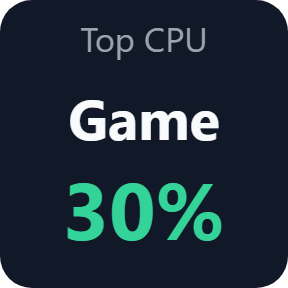
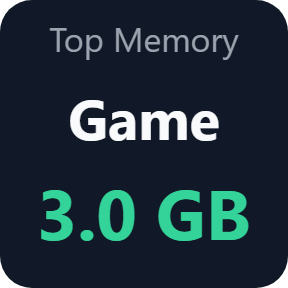
On an Ajazz or Mirabox deck with OpenDeck, the Top CPU key names the app that uses the most CPU right now, with its share, and Top Memory names the app that holds the most memory and how much. You know which app it is before you open Task Manager or Activity Monitor.
Show the top app or the top three, watch one app such as a game or a video editor, and let the key turn red from your limit. Press any key to open Task Manager on Windows or Activity Monitor on a Mac.
- Top CPU app
- Top memory app
- Top three on one key
- Watch one app
- Red from your limit
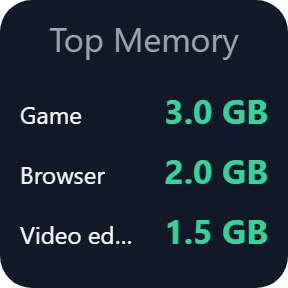


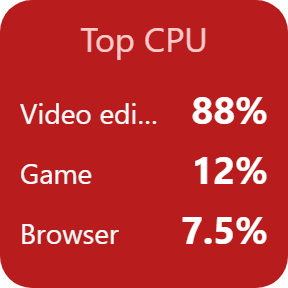

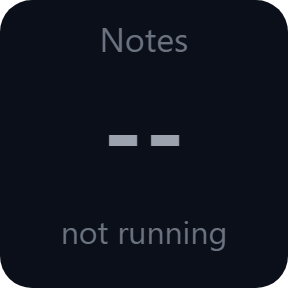
What the keys do
Top CPU
The name of the app that uses the most CPU now and its share. On Windows 100% means every core is busy; on a Mac it is counted as Activity Monitor counts it, with 100% for one core. Read every 2 seconds and averaged over about 6 seconds, so the number does not jump.
Top Memory
The app that holds the most memory now and how much, in GB or MB. On Windows the number is the private working set, the memory in use that belongs to that app alone. On a Mac it is the number in the Memory column of Activity Monitor.
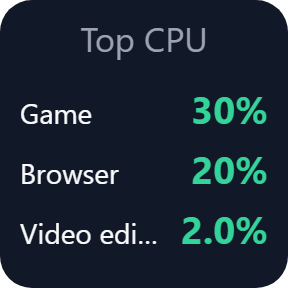
The top three
Choose The top three in the key's settings to see three apps and their numbers on one key, heaviest first.
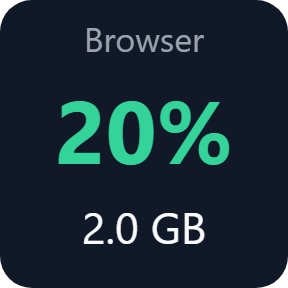
App Watch
Pick one app from the list of what runs now, such as a game, a browser or a video editor. The key shows its CPU and memory, or not running.
Red from your limit
The key turns red when an app reaches the limit you set: 80% CPU by default, and a memory limit in GB if you set one. Press any key to open Task Manager or Activity Monitor.
One app, one line
Processes with the same file name, such as a browser and its helper processes, are added up and shown as one app. On a Mac, a browser and its helpers also count as one app, under its name as in the Applications folder.
Install in OpenDeck
In OpenDeck, open the Plugins tab, install the .streamDeckPlugin file you downloaded, then enter your license key once in a key's settings.
Requirements
- Windows 10 or later, or macOS 13 or later (Apple silicon or Intel)
- OpenDeck 2.14 or later
Questions
How do I see which app uses the most CPU on an Ajazz or Mirabox deck with OpenDeck?
Place the Top CPU key in OpenDeck. It names the app using the most CPU right now with its share, and a press opens Task Manager on Windows or Activity Monitor on a Mac.
Can one deck key show the top three apps?
Yes. Choose The top three in the key's settings and it shows three apps and their numbers, heaviest first.
Can I watch just one game or program?
Yes. App Watch lets you pick one app from the list of what runs now. The key shows its CPU and memory, or not running, and turns red at the limit you set.
Purchase details, refunds and seller
- Price
- ¥780, paid once. Tax for your country is added at checkout.
- Payment
- Handled by Stripe through Link, Stripe's checkout service. Link appears as the seller on your receipt and card statement, and your card number never reaches GRAMSHIFT.
- Delivery
- Your license key and download link appear right after payment, and the receipt arrives by email.
- Countries
- The direct checkout is not offered in Ascension Island, China, Cuba, Iran, Kosovo, North Korea, Russia, Syria or Tristan da Cunha.
- Seller
- GRAMSHIFT, Tokyo, Japan. Contact: contact@gramshift.com
- Refunds
- If the plugin fails to run on your PC, email contact@gramshift.com within 14 days of purchase for a full refund. The license key stops working after a refund.
- License
- One key for your own use on up to 3 PCs.
Limits
- On Windows, names are program file names without .exe, for example explorer. On a Mac, names are app names as in the Applications folder, such as Google Chrome.
- On a Mac, CPU is counted as in Activity Monitor, so a Mac with 8 cores can show up to 800%.
- A process that has just started shows after a few seconds. It shows CPU and memory per app, not GPU, disk or network use.
- The direct version checks its license key with our server when you activate it, at each plugin start and about once a day. If the server cannot be reached, it keeps running for up to 44 days after the last successful check.