Stream Deck MK.2 profile for Windows
Blender shortcuts on your Stream Deck
A Stream Deck profile for Blender on Windows: 300 labeled keys on 10 pages put Blender's default shortcuts on a Stream Deck MK.2 (15 keys). Install it, keep the mouse pointer over the editor you are working in and press a key.
Extrude, loop cut, switch sculpt brushes and set keyframes with one press each. The numpad views work even on a keyboard without a numpad, and your Blender settings stay as they are.
- Numpad views and orbit
- Extrude, inset, bevel
- Sculpt brushes
- UV unwrap and pin
- Keyframes and easing
- Nodes and render
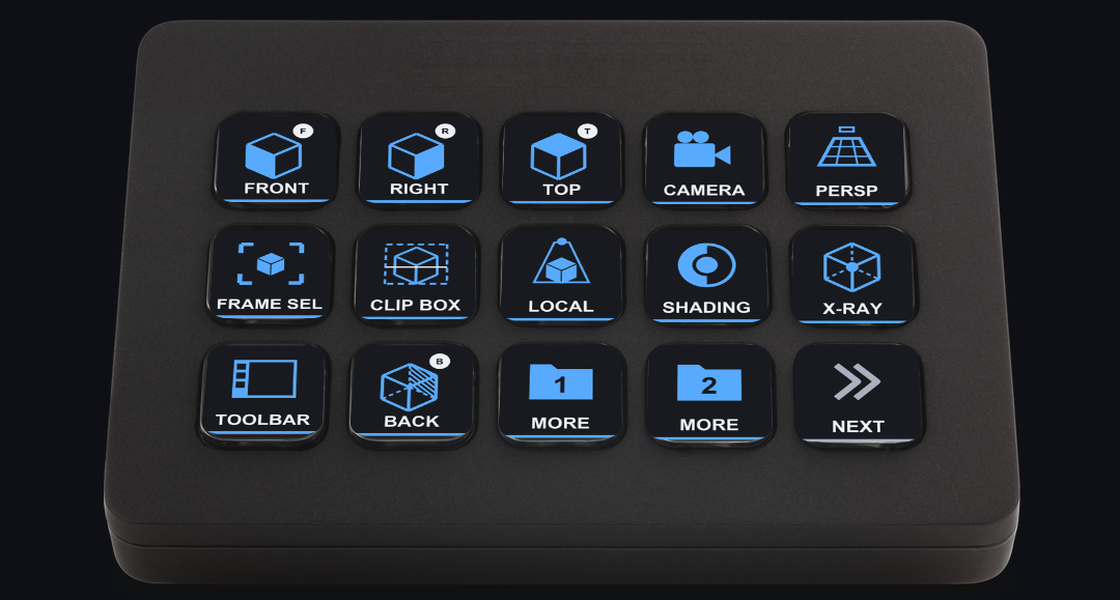
What the keys do
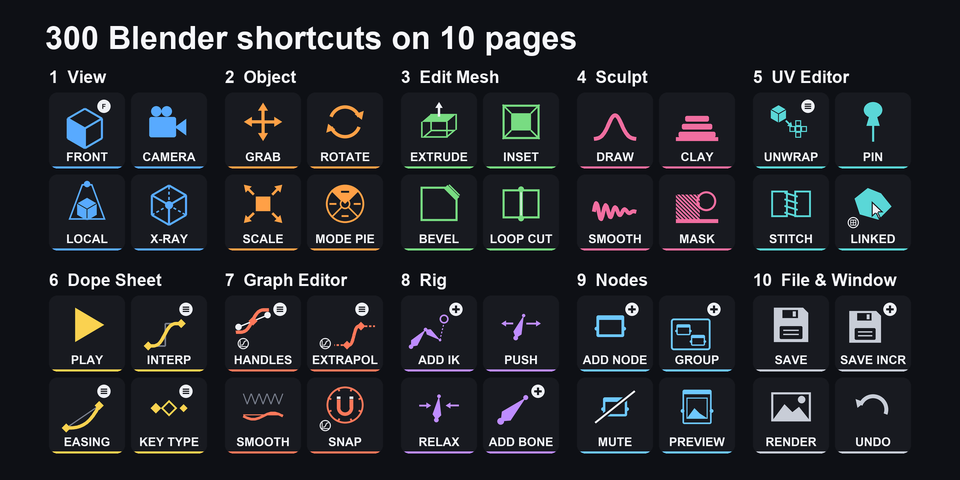
300 keys on 10 pages
One page each for views, objects, mesh editing, sculpting, UVs, the Dope Sheet, the Graph Editor, rigging, nodes, and files and windows. Every key carries a label, so you can see what it does before you press it.
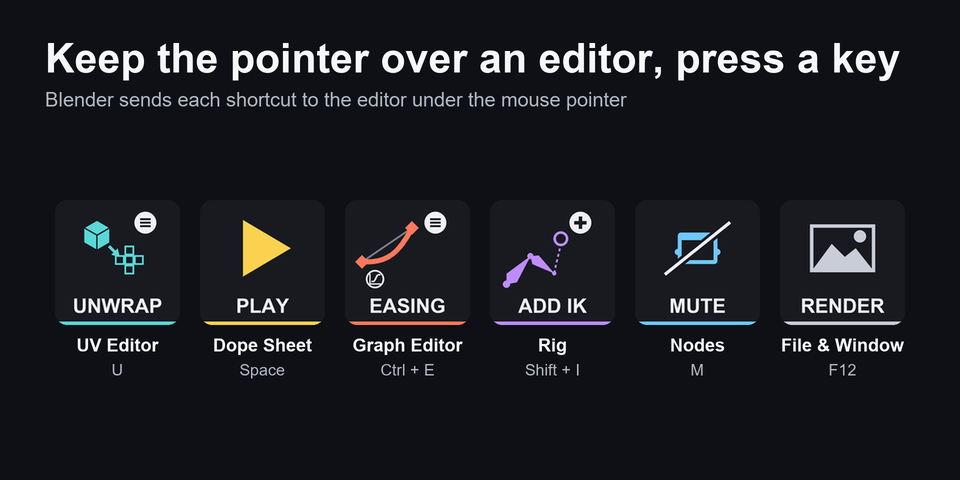
Acts on the editor under the pointer
Blender sends a shortcut to the editor under the mouse pointer. Keep it over the UV Editor, Graph Editor or a node editor and the keys of that page act there.
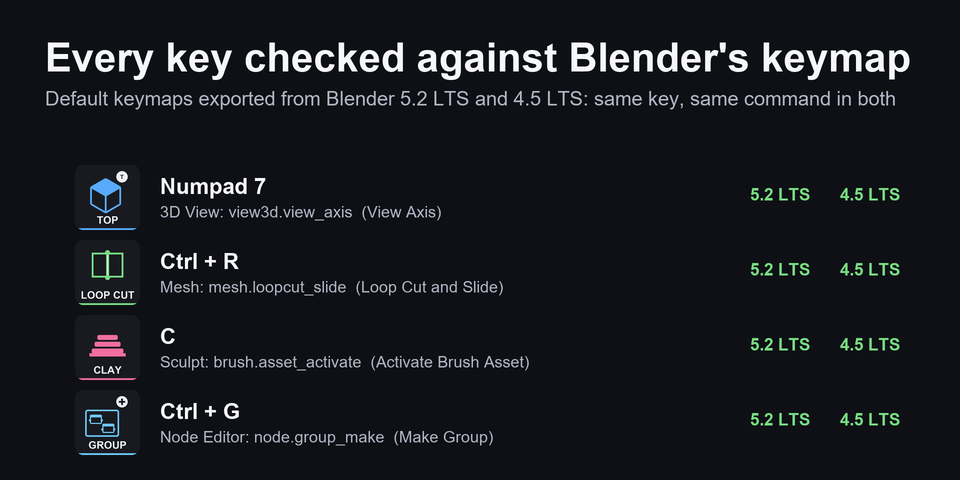
Matches Blender's default keymap
Every key was checked against the default keymaps exported from Blender 5.2 LTS and 4.5 LTS, such as Loop Cut (Ctrl+R) and Make Group (Ctrl+G). Your Blender settings stay as they are.
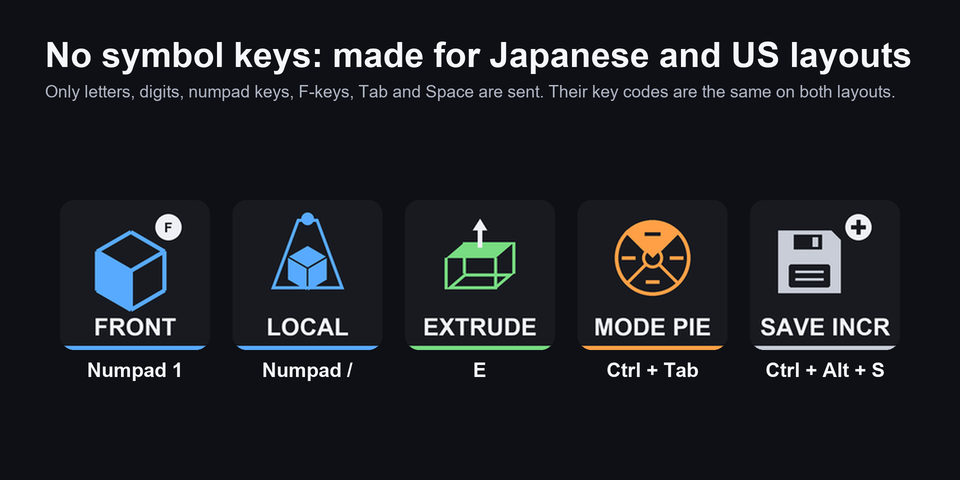
Numpad views without a numpad
FRONT, RIGHT, TOP and the other views send real numpad keys, so they work on a keyboard without a numpad. The keys use letters, digits, numpad keys, F-keys, Tab and Space, made for both Japanese and US layouts.
The 10 pages on your Stream Deck MK.2
The download holds one profile for Stream Deck MK.2 (15 keys). Each page has 30 keys: the first ones are on the page, the rest are in two MORE folders, and BACK returns.
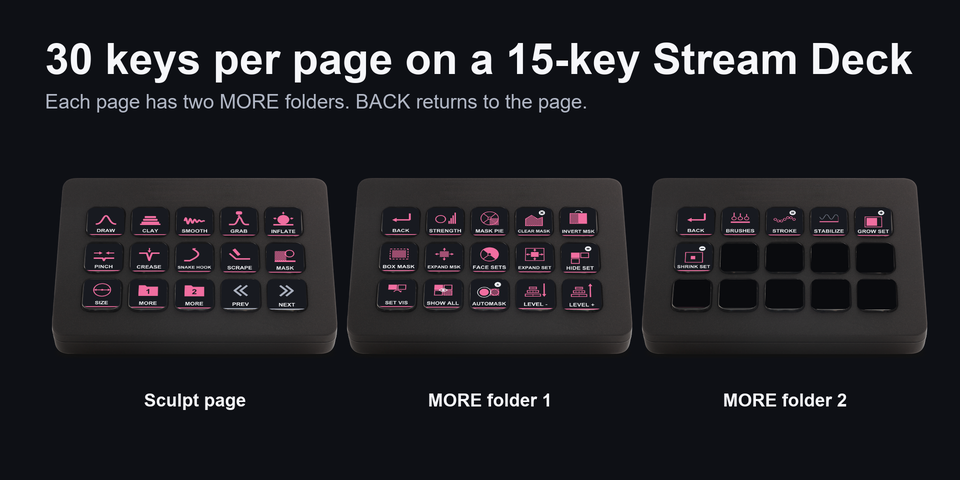
View
Numpad views, orbit, zoom, local view, shading, X-ray.
Object
Move, rotate, scale, add, duplicate, join, parent, apply.
Edit Mesh
Vertex, edge, face, extrude, inset, bevel, loop cut, knife, merge.
Sculpt
10 brushes, size, strength, masks, face sets.
UV Editor
Unwrap, pin, stitch, seams, align.
Dope Sheet
Play, keys, interpolation, easing, markers.
Graph Editor
Keys, interpolation, handles, easing, F-curve modifier.
Rig
Copy and paste pose, IK, push, relax, bone roll.
Nodes
Add, group, mute, links, frames.
File & Window
Save, render, undo, search, editor switching.
Built on the default keymap
Every shortcut key sends a shortcut of Blender's default keymap, so your Blender settings stay as they are.
Keep Blender in front and the mouse pointer over the editor you want to control, for example the 3D Viewport, UV Editor or Node Editor.
Keys of the Object, Edit Mesh, Sculpt and Rig pages work in that mode. Playback keys on the Dope Sheet page work in most editors.
Changed a shortcut in Blender? Edit that key's Hotkey in the Stream Deck app.
Set up in 3 steps
- Install it from the Elgato Marketplace, or download and unzip the file after buying direct.
- Double-click the .streamDeckProfile file. The Stream Deck app imports it.
- Select the profile on your Stream Deck, keep Blender in front with the mouse pointer over the editor you want and press a key.
Two places to buy
| Elgato Marketplace | Direct from GRAMSHIFT | |
|---|---|---|
| Amount | Same amount | Same amount, tax added at checkout |
| Checkout | Elgato Marketplace | Stripe (card) |
| How you get it | Installed through the Stream Deck app | A zip with the profile file you double-click |
| Account | Your Elgato account | None needed |
| Key labels | English | English |
Requirements
- Windows 10 or later
- Stream Deck MK.2 (15 keys)
- Stream Deck app 6.4 or later (import checked on 7.6)
- Blender with its default keymap and Emulate Numpad off (checked on 5.2 LTS and 4.5 LTS)
Questions
How do I put Blender shortcuts on a Stream Deck?
Double-click the Vertex Deck profile file and the Stream Deck app imports it. Select the profile, keep the mouse pointer over the editor you want and press a key: 300 labeled keys on 10 pages send Blender's default shortcuts.
Do I need to change Blender's keymap or settings?
No. The keys match Blender's default keymap ("Blender" keymap, Left click select, Spacebar Action: Play). If you changed a shortcut, edit that key's Hotkey in the Stream Deck app.
Which Stream Deck is it for?
Stream Deck MK.2 (15 keys), on Windows. The download holds the profile for that model.
Why does a key do nothing?
Blender sends a shortcut to the editor under the mouse pointer, and many shortcuts work only in one mode (Object, Edit, Sculpt or Pose). Check the pointer and the mode. A popup such as the splash screen also takes the keys.
Do the numpad views work without a numpad?
Yes. The view keys send real numpad keys, so they work on a keyboard without one. Keep Emulate Numpad off in Blender's preferences.
Why are two keys named BACK?
On the View page, BACK switches the 3D Viewport to the back view. In the MORE folders, BACK returns to the page you came from.
How do I reach the rest of a page?
Each page has two MORE keys that open folders, and BACK at the top left returns. PREV and NEXT at the bottom right move between the 10 pages.
What do I get when I buy direct?
A zip with the profile file and a README. Double-click the profile file to import it. No account is needed.
How do I get the file again?
Email contact@gramshift.com from the address you paid with, and include your order number, or the payment date and amount. We check the purchase and send a new link to the download page.
Can I get a refund?
Direct buyers, yes. If the profile does not work with your Stream Deck and Blender, email us within 14 days of purchase for a full refund. The download closes after a refund.
Does it work on a Mac?
No. The keys are made for Blender on Windows, so it is for Windows only.
Direct purchase details
- Price
- ¥2,400, the same amount as on the Elgato Marketplace. Tax for your country is added at checkout.
- Payment
- Handled by Stripe through Link, Stripe's checkout service. Link appears as the seller on your receipt and card statement, and your card number never reaches GRAMSHIFT.
- Delivery
- A download link appears right after payment, and the receipt arrives by email. You get the profile file and a README.
- Refunds
- If the profile does not work with your Stream Deck and Blender, email us within 14 days of purchase for a full refund. You can also ask Link support. The download closes after a refund.
- Use
- For your own use. Please do not share the file.
- Countries
- The direct checkout is not offered in Ascension Island, China, Cuba, Iran, Kosovo, North Korea, Russia, Syria or Tristan da Cunha.
- Seller
- GRAMSHIFT, Tokyo, Japan. Contact: contact@gramshift.com
Limitations
- For Stream Deck MK.2 (15 keys) on Windows. There are no profiles for other Stream Deck models, and no macOS keys.
- Made for Blender's default keymap ("Blender" keymap, Left click select, Spacebar Action: Play), checked on 5.2 LTS and 4.5 LTS. With another keymap such as Industry Compatible, or after you change a shortcut, a key may not match: edit that key's Hotkey in the Stream Deck app.
- Keep Emulate Numpad off in Blender's preferences. With it on, the digit keys (vertex, edge and face select, for example) act as numpad views.
- Shortcuts on symbol keys (such as period, comma and brackets), and on Home, End, Page Up, Page Down, the arrow keys and the Delete key are not included, for example frame stepping with the arrow keys. The DELETE keys on the deck send X.
- A key acts on the editor under the mouse pointer, and the same shortcut does different things in different editors and modes. Keys of the Object, Edit Mesh, Sculpt and Rig pages are made for that mode. In another mode the same shortcut can run a different command (Inset's I inserts a keyframe in Object Mode), so check the mode first. Ctrl+Z undoes it. A popup such as the splash screen takes the keys until it closes.
- Key tests with Blender ran on a Japanese keyboard layout. German and French layouts may move letter keys. If a key does not act as labeled, email contact@gramshift.com and we will help.
- Key labels are in English.