Stream Deck profile for Windows
CLIP STUDIO PAINT shortcuts on your Stream Deck
Put CLIP STUDIO PAINT (CSP) shortcuts on your Stream Deck and keep the pen in your other hand. Art Deck gives digital art, illustration, manga, comic and webtoon artists the default shortcuts for tools, undo, brush size, zoom, layers, frame border, text and balloon, one press away from your pen tablet.
Profiles for Stream Deck MK.2, XL, Neo and + on Windows. Each key uses a default shortcut of CLIP STUDIO PAINT, so there is nothing to import, and it works with US and Japanese keyboards.
- Tools and undo
- Brush size and opacity
- Zoom and rotate
- Layers
- Frame border and ruler
- Text and balloon
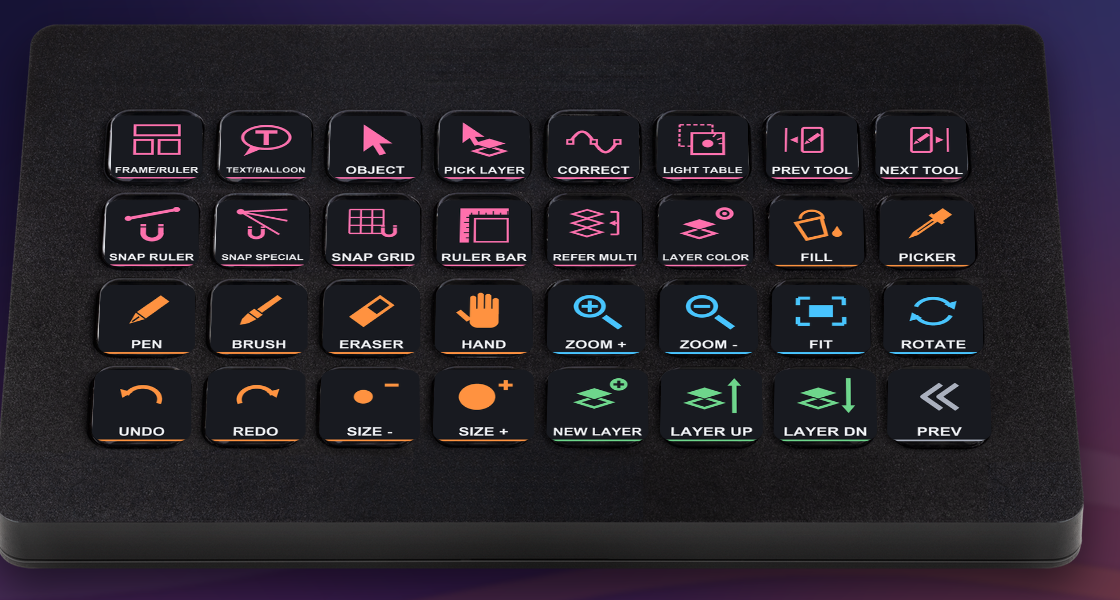
What the pages hold
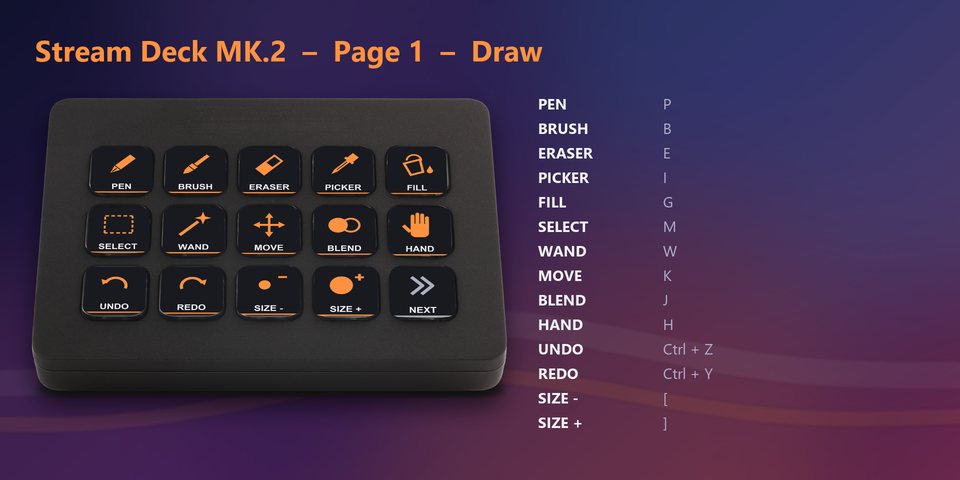
Draw
Pen, Brush, Eraser, Eyedropper, Fill, Selection, Move, Blend, Hand, Undo, Redo, Brush size, Brush opacity, Brush density and Colors.
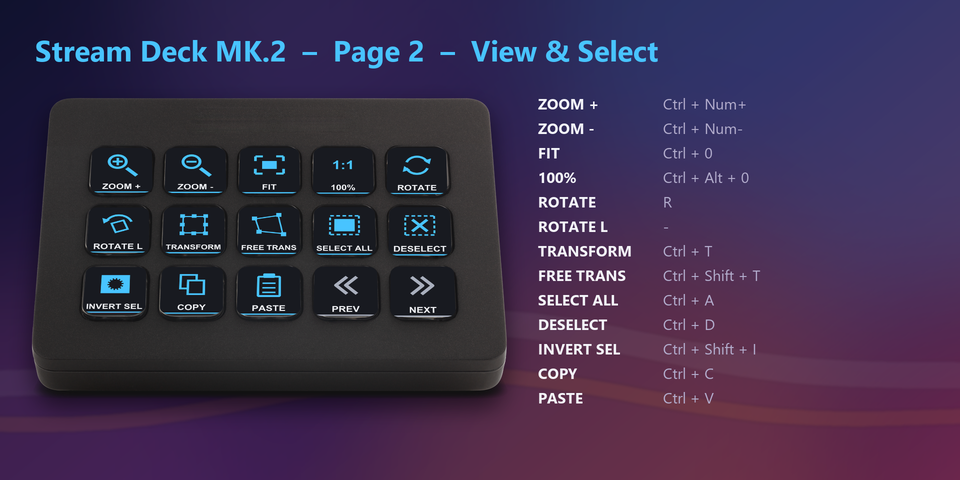
View & Select
Zoom, Fit, Rotate, Transform, Select all, Deselect, Invert, Copy, Cut, Paste, Erase and Save as.
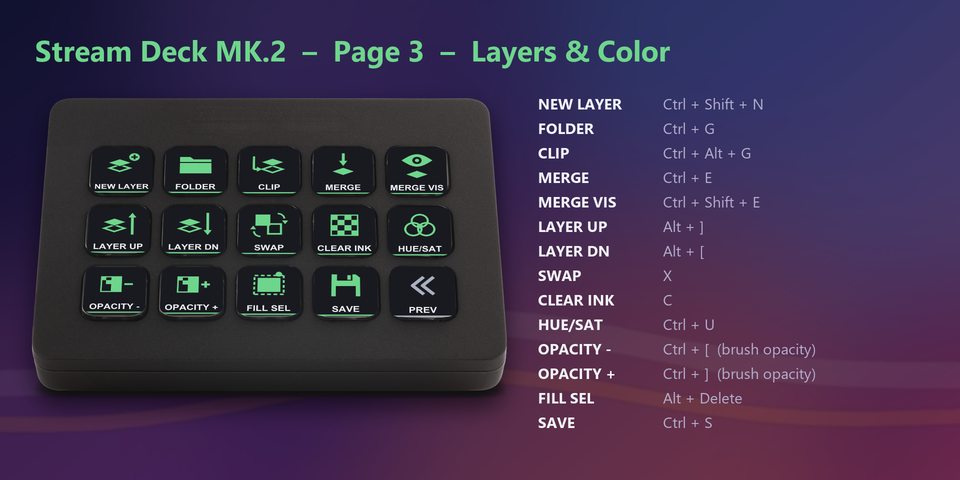
Layers & Color
New layer, Folder, Clip, Merge, Layer above / below and Layer color.
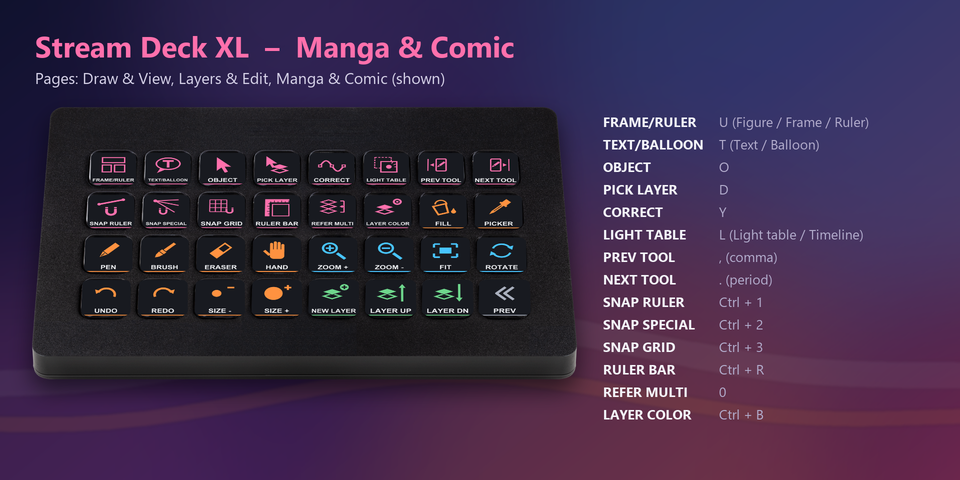
Manga & Comic
Frame border / Figure / Ruler, Text / Balloon, Object, Correct line, Light table and Snap to ruler / grid.
A profile for each Stream Deck
The download holds a profile for each of these Stream Deck models. Double-click the one for yours and the Stream Deck app imports it.
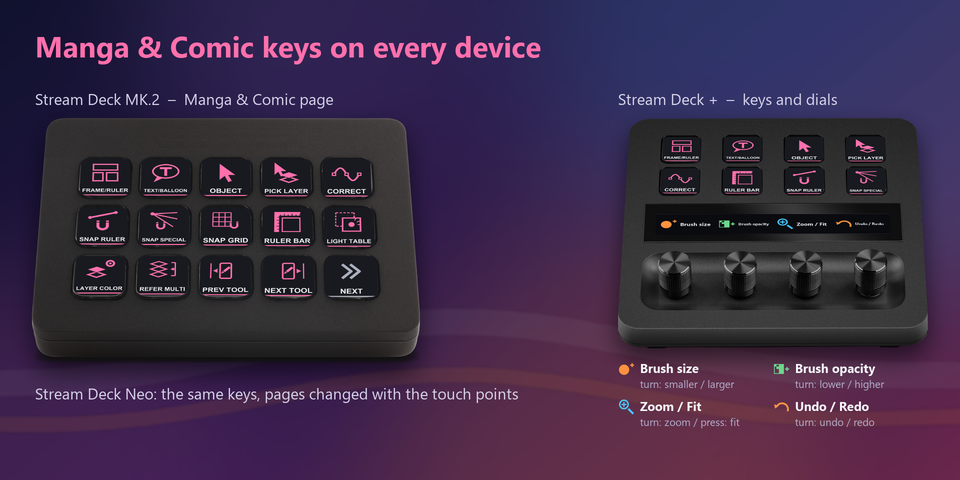
Stream Deck MK.2
Draw, View & Select and Layers & Color, plus a second profile with Manga & Edit pages.
Stream Deck XL
Draw & View, Layers & Edit, and Manga & Comic on 32 keys.
Stream Deck Neo
8 keys a page: tap the touch points to change pages.
Stream Deck +
The same pages plus dials for brush size, brush opacity, zoom and undo / redo.
Built on the default shortcuts
Every key sends a default shortcut of CLIP STUDIO PAINT for Windows, so there is no shortcut file to import.
Made for US (QWERTY) and Japanese keyboards. No Windows key is used.
Brush opacity and density change the tool you draw with, not the opacity of a layer.
If you changed a shortcut in CLIP STUDIO PAINT, edit that key in the Stream Deck app.
Set up in 3 steps
- Get the profiles from the Elgato Marketplace, or download the zip after buying direct and unzip it.
- Double-click the .streamDeckProfile file for your Stream Deck. The Stream Deck app imports it.
- Open CLIP STUDIO PAINT and select the profile on your Stream Deck. Each key sends its shortcut.
Two places to buy
| Elgato Marketplace | Direct from GRAMSHIFT | |
|---|---|---|
| Amount | Same amount | Same amount, tax added at checkout |
| Checkout | Elgato Marketplace | Stripe (card) |
| How you get it | Installed through the Stream Deck app | A zip of profile files you double-click |
| Account | Your Elgato account | None needed |
| Key labels | English | English |
Requirements
- Windows 10 or later
- Stream Deck MK.2, XL, Neo or +
- Stream Deck app 6.4 or later
- CLIP STUDIO PAINT for Windows with its default shortcuts
Questions
How do I put CLIP STUDIO PAINT shortcuts on a Stream Deck?
Double-click the Art Deck profile file for your Stream Deck. The Stream Deck app imports it. Then open CLIP STUDIO PAINT and select the profile: each key sends one of its default shortcuts, such as the pen, undo, brush size or a new layer.
Do I need to import shortcut settings into CLIP STUDIO PAINT?
No. Every key uses a default shortcut of CLIP STUDIO PAINT for Windows. If you changed a shortcut, edit that key in the Stream Deck app (it is a Hotkey action).
Does it work with a Japanese keyboard?
Yes. The keys are made for US (QWERTY) and Japanese keyboards. Rotate right and Reset display are left out, because their keys sit in different places on the two keyboards.
Why does the Frame border key also pick Figure or Ruler?
In CLIP STUDIO PAINT, U is shared by Frame border, Figure and Ruler, T by Text and Balloon, and L by Light table and Edit timeline. The key presses the shortcut, so it selects one of them.
Is there anything to activate after I buy direct?
No. You download a zip with the profile files and a README. There is nothing to activate and no account to make.
How do I get the files again?
Email contact@gramshift.com from the address you paid with, and include your order number, or the date and amount you paid. We check the purchase and reply with a new link to your download page.
Can I get a refund?
Yes, for a direct purchase. If the profiles do not work with your Stream Deck and CLIP STUDIO PAINT, email us within 14 days of purchase and we refund the full amount. The download closes after the refund.
Does it work on a Mac or an iPad?
No. The profiles send Windows shortcuts and are for CLIP STUDIO PAINT on Windows.
Direct purchase details
- Price
- ¥1,200, the same amount as on the Elgato Marketplace. Tax for your country is added at checkout.
- Payment
- Handled by Stripe through Link, Stripe's checkout service. Link appears as the seller on your receipt and card statement, and your card number never reaches GRAMSHIFT.
- Delivery
- A download link appears right after payment, and the receipt arrives by email. You get the profile files only: there is nothing to activate.
- Refunds
- If the profiles do not work with your Stream Deck and CLIP STUDIO PAINT, email us within 14 days of purchase for a full refund. You can also ask Link support. The download closes after a refund.
- Use
- For your own use. Please do not share the files.
- Countries
- The direct checkout is not offered in Ascension Island, China, Cuba, Iran, Kosovo, North Korea, Russia, Syria or Tristan da Cunha.
- Seller
- GRAMSHIFT, Tokyo, Japan. Contact: contact@gramshift.com
Limitations
- Not included: Rotate right and Reset display, whose keys sit in different places on US and Japanese keyboards, and commands that have no default shortcut in CLIP STUDIO PAINT (for example Flip horizontal).
- Keys send the default shortcuts. A shortcut you changed in CLIP STUDIO PAINT needs the same change on its key in the Stream Deck app.
- U, T and L are each shared by more than one tool in CLIP STUDIO PAINT, so those keys select one of the tools that share the shortcut.
- Brush opacity and density change the tool, not the layer.
- For CLIP STUDIO PAINT on Windows only. It does not work on a Mac, an iPad or a phone.
- Key labels are in English.