Stream Deck + XL profile for Windows
TradingView on your Stream Deck + XL
Yes, Chart Keys is a TradingView profile for Stream Deck + XL.
It lays out chart, interval, zoom, drawing, watchlist and trading keys, and four dials hold Zoom, Scroll, Fast Scroll and Watchlist.
The keys are laid out for Stream Deck + XL over three pages: Chart & Intervals, Zoom & Drawing and Watchlist & Trading. Swipe the touch strip to change pages. The keys send TradingView's default shortcuts.
- Three pages, touch strip to switch
- Four dials
- Intervals from 1 minute to 1 month
- Drawing tools and Bar Replay
- English labels
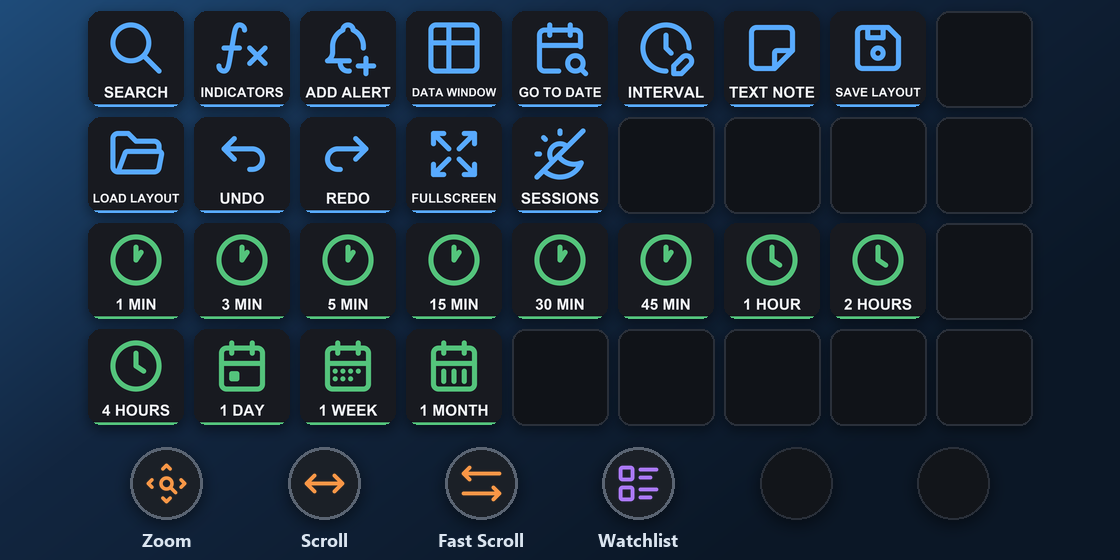
What is on each Stream Deck + XL page?
The profile has three pages. Swipe the touch strip to change pages.
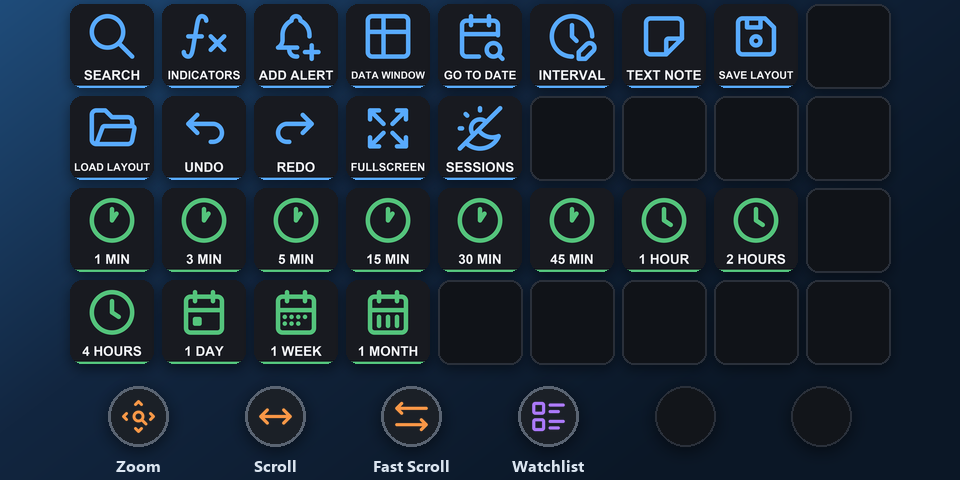
Chart & Intervals
Quick search, indicators, add alert, data window, go to date, interval box, text note, save and load layout, undo, redo, fullscreen, sessions. 1, 3, 5, 15, 30 and 45 minutes; 1, 2 and 4 hours; 1 day, 1 week, 1 month.
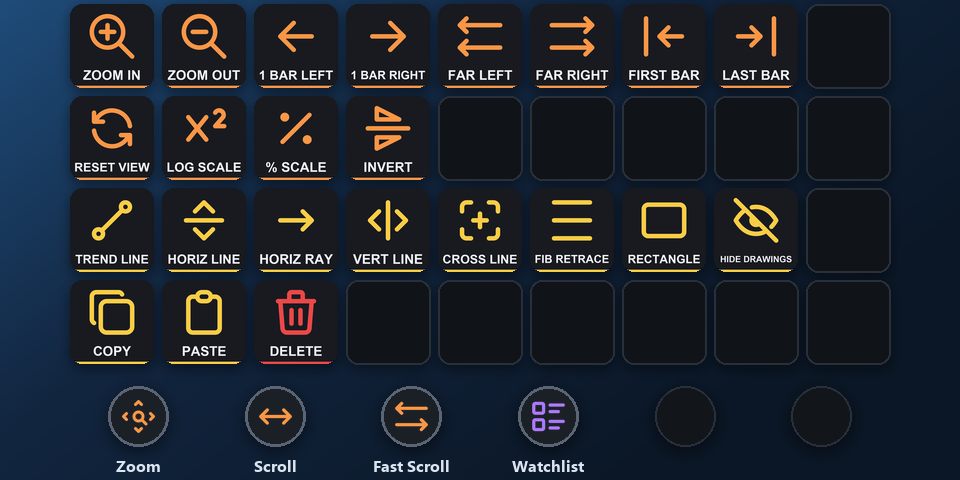
Zoom & Drawing
Zoom in and out, one bar or far left and right, first and last bar, reset view, log, percent and inverted scale. Trend line, horizontal line and ray, vertical line, cross line, Fib retracement, rectangle, hide drawings, copy, paste, delete.
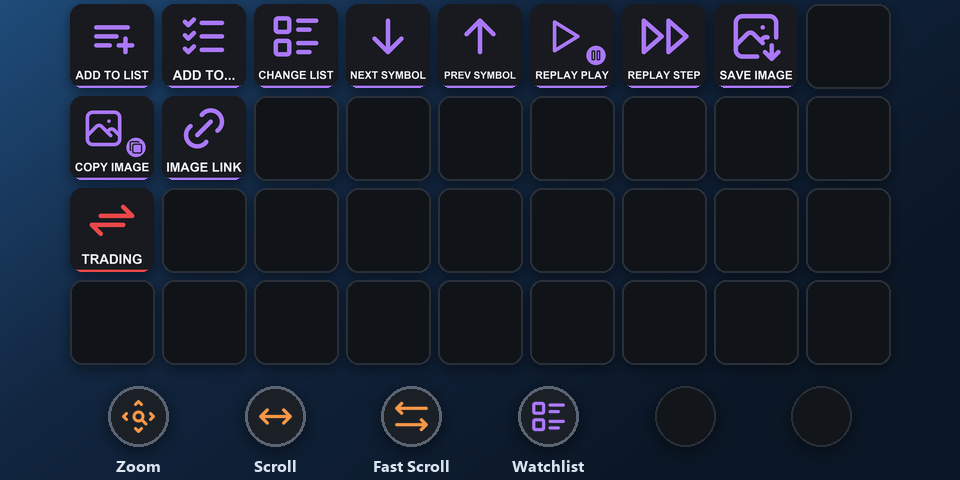
Watchlist & Trading
Add to a watchlist, next and previous symbol, change watchlist, Bar Replay play and step, save or copy the chart image, copy the image link. Order ticket, buy, sell, limit buy, limit sell and DOM, inside a folder that you open before any order key can be pressed.
What do the Stream Deck + XL dials do?
First dial: Zoom
Turn it to zoom out or in. Press it to reset the view.
Second dial: Scroll
Turn it to scroll one bar left or right. Press it to jump to the last bar.
Third dial: Fast Scroll
Turn it to scroll far left or right. Press it to jump to the first bar.
Fourth dial: Watchlist
Turn it to go to the previous or next symbol. Press it to change the watchlist.
The dials do the same on every page. You can put your own actions on the other dials in the Stream Deck app.
How do I set it up on Stream Deck + XL?
- Buy, then download and unzip the file.
- With Stream Deck + XL connected, double-click "Chart Keys for TradingView - shortcuts, Stream Deck + XL (Windows).streamDeckProfile". The Stream Deck app imports it.
- Select the profile for Stream Deck + XL in the Stream Deck app, open TradingView and press a key.
Requirements
- Windows 10 or later
- Stream Deck + XL
- The Stream Deck app
- TradingView in a web browser or the TradingView desktop app, with its default shortcuts
- Alert, layout, note, drawing and watchlist keys: signed in to TradingView. Order keys: a connected broker or Paper Trading
Questions about Stream Deck + XL
Is there a TradingView profile for Stream Deck + XL?
Yes. Chart Keys for TradingView includes a profile laid out for Stream Deck + XL: three pages on the keys (Chart & Intervals, Zoom & Drawing and Watchlist & Trading) and four dials (Zoom, Scroll, Fast Scroll and Watchlist). Import it in the Stream Deck app.
How do I set up TradingView shortcuts on Stream Deck + XL?
Double-click the Stream Deck + XL profile file in the download and the Stream Deck app imports it. Select it for Stream Deck + XL, open TradingView and press a key. The keys already match TradingView's default shortcuts.
What do the Stream Deck + XL dials do in TradingView?
First dial: Zoom. Turn it to zoom out or in. Press it to reset the view. Second dial: Scroll. Turn it to scroll one bar left or right. Press it to jump to the last bar. Third dial: Fast Scroll. Turn it to scroll far left or right. Press it to jump to the first bar. Fourth dial: Watchlist. Turn it to go to the previous or next symbol. Press it to change the watchlist.
How do I change pages on Stream Deck + XL?
Swipe the touch strip. The pages are Chart & Intervals, Zoom & Drawing and Watchlist & Trading.
Do I need to buy it again for another Stream Deck?
No. The same download holds profiles for the Corsair Galleon 100 SD and Stream Deck + XL on Windows, and Stream Deck MK.2, XL, Neo and + on Windows and Mac.
Direct purchase details
- Price
- ¥1,300. Tax for your country is added at checkout.
- Payment
- Handled by Stripe through Link, Stripe's checkout service. Link appears as the seller on your receipt and card statement, and your card number never reaches GRAMSHIFT.
- Delivery
- A download link appears right after payment, and the receipt arrives by email. You get the profile files and a README: there is nothing to activate.
- Refunds
- If the profile does not work with your Stream Deck and TradingView, email us within 14 days of purchase for a full refund. You can also ask Link support. The download closes after a refund.
- Use
- For your own use. Please do not share, resell or upload the file.
- Countries
- The direct checkout is not offered in Ascension Island, China, Cuba, Iran, Kosovo, North Korea, Russia, Syria or Tristan da Cunha.
- Seller
- GRAMSHIFT, Tokyo, Japan. Contact: contact@gramshift.com
More about Chart Keys for TradingView
- All models and details of Chart Keys for TradingView
- See this profile for Corsair Galleon 100 SD
- More Stream Deck + XL game and app profiles
Limitations
- The Stream Deck + XL profile is for TradingView on Windows.
- Made for TradingView's default shortcuts. Changed a shortcut in TradingView? Edit that key's Hotkey in the Stream Deck app.
- Keys work while the chart has the keyboard focus, not while you type in a text box.
- INDICATORS sends the / key, as on US and Japanese keyboard layouts. On other layouts, open Indicators with the mouse or change that key in the Stream Deck app.
- The replay keys work while Bar Replay is on.
- Typing a symbol name is not on a key: SEARCH opens the search box for you to type in.
- Multi-chart layouts, the Screener, the Pine Script editor, the DOM cells, the Alerts panel and deleting alerts are not on keys, and neither are mouse actions or the mouse wheel.
- Key labels are in English.