Corsair Galleon 100 SD profile for Windows, included in the plugin
Elite Dangerous on your Corsair Galleon 100 SD
Yes, Ship Deck for Elite Dangerous works on the Corsair Galleon 100 SD, and the plugin comes with a profile laid out for it.
The keys show the real state of your ship and press the keybinds you already play with, and the two dials hold power distribution and fire group.
After you install the plugin, pick "Ship Deck for Elite Dangerous, Galleon 100 SD" in the Stream Deck app's profile list. It has three pages for the display keys, Flight, Power & Weapons and Panels & Info, with Previous and Next page keys.
- Comes with the plugin
- Three pages for the display keys
- Power distribution and fire group dials
- Reads your own keybinds
- Landing gear, hardpoints, FSD and more
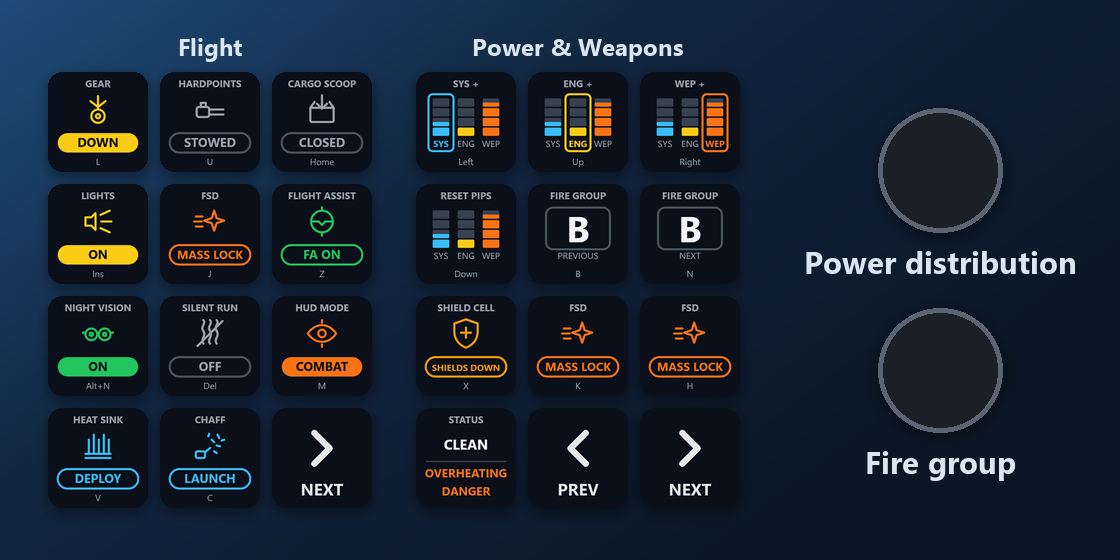
What is on each Galleon 100 SD page?
The profile has three pages for the display keys. The bottom-right keys turn the pages: Next page on Flight, Previous and Next page on Power & Weapons, and Previous page on Panels & Info.
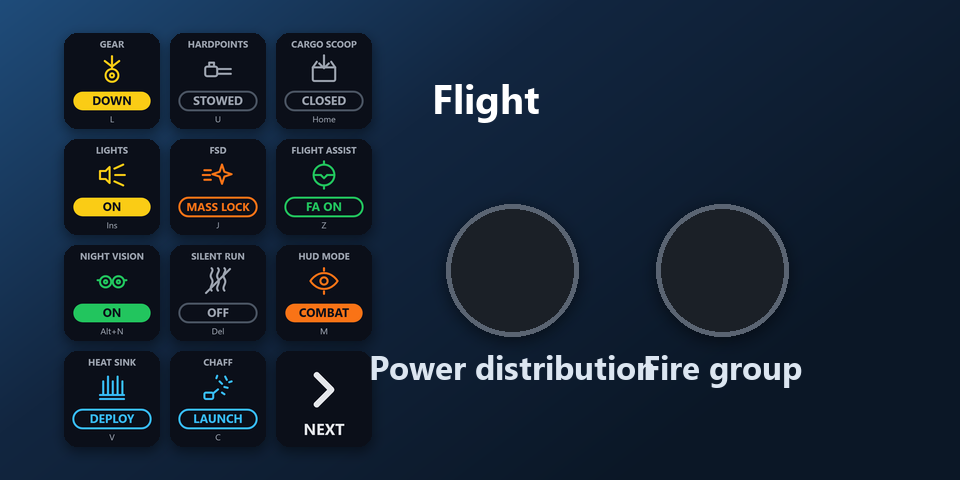
Flight
Landing gear, hardpoints, cargo scoop, lights, FSD, flight assist, night vision, silent running, HUD mode, heat sink, chaff.
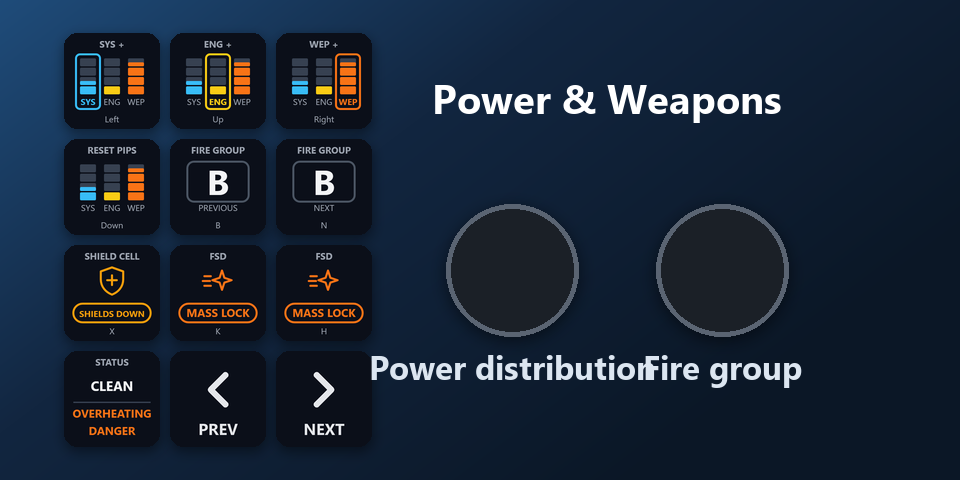
Power & Weapons
SYS, ENG and WEP pips, reset, fire group previous and next, shield cell, supercruise, hyperspace jump, status.
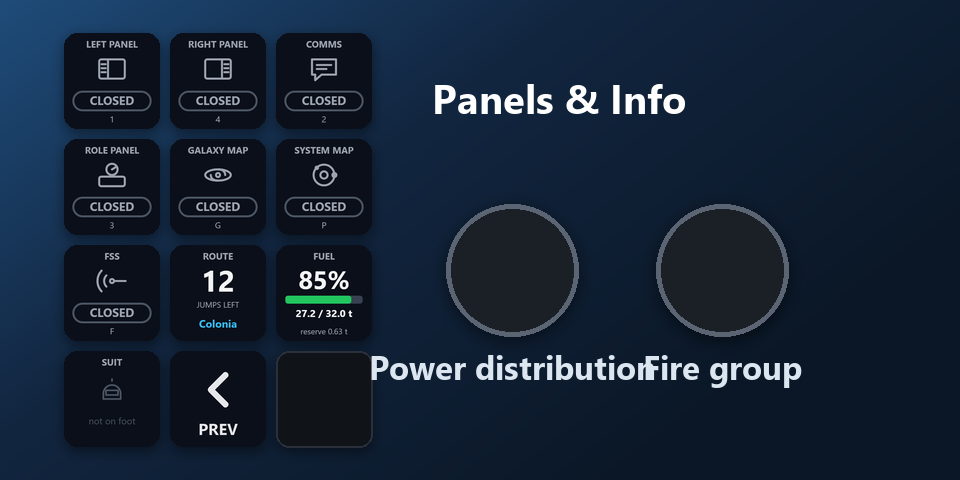
Panels & Info
Left, right and comms panels, role panel, galaxy map, system map, FSS, route, fuel, suit.
What do the Galleon 100 SD dials do?
Left dial: Power distribution
Turn it to pick SYS, ENG or WEP. Press it to add a pip there.
Right dial: Fire group
Turn it for the next or previous fire group.
Both dials do the same on every page, so they work while any page is on the keys.
How do I set it up on the Galleon 100 SD?
- Open the plugin file you download after buying. The Stream Deck app installs it, with its profiles.
- In the Stream Deck app, pick "Ship Deck for Elite Dangerous, Galleon 100 SD" in the profile list for your Galleon 100 SD. Your current profiles stay as they are.
- Enter your license key once in a key's settings. Nothing else to type: the keys read your game's keybinds.
- Start Elite Dangerous and load your commander. The keys follow your ship by themselves.
Requirements
- Windows 10 or later
- Corsair Galleon 100 SD
- The free Stream Deck app, where the Galleon 100 SD's display keys and dials are set up
- Elite Dangerous on PC
Questions about the Galleon 100 SD
Is there an Elite Dangerous profile for the Corsair Galleon 100 SD?
Yes. Ship Deck for Elite Dangerous comes with a profile laid out for the Galleon 100 SD: three pages on the display keys (Flight, Power & Weapons and Panels & Info) and two dials (power distribution and fire group). It is part of the plugin, so there is nothing else to buy.
How do I get the Ship Deck profile on the Galleon 100 SD?
Install the plugin, then pick "Ship Deck for Elite Dangerous, Galleon 100 SD" in the Stream Deck app's profile list for your Galleon 100 SD. Enter your license key once, start Elite Dangerous and load your commander.
What do the Galleon 100 SD dials do in Elite Dangerous?
Left dial: power distribution. Turn it to pick SYS, ENG or WEP, press it to add a pip there. Right dial: fire group. Turn it for the next or previous fire group.
How do I change pages on the Galleon 100 SD?
Press the Next page or Previous page key at the bottom right of the keys. Flight leads to Power & Weapons and Panels & Info.
Do I need to buy it again for another Stream Deck?
No. The plugin also comes with profiles for Stream Deck MK.2, XL, Neo and +, and one license key covers up to 3 of your PCs.
Direct purchase: details, refunds and seller
- Price
- ¥1,800. Tax for your country is added at checkout.
- Payment
- Handled by Stripe through Link, Stripe's checkout service. Link appears as the seller on your receipt and card statement, and your card number never reaches GRAMSHIFT.
- Delivery
- Your license key and download link appear right after payment, and the receipt arrives by email.
- Refunds
- If the plugin does not work on your PC, email us within 14 days of purchase for a full refund. You can also ask Link support. The license key stops working after a refund.
- License
- One key for your own use on up to 3 PCs.
- Countries
- The direct checkout is not offered in Ascension Island, China, Cuba, Iran, Kosovo, North Korea, Russia, Syria or Tristan da Cunha.
- Seller
- GRAMSHIFT, Tokyo, Japan. Contact: contact@gramshift.com
More about Ship Deck for Elite Dangerous
- All models and details of Ship Deck for Elite Dangerous
- More Corsair Galleon 100 SD game and app profiles
Limitations
- A key that shows NO KEY has no keyboard key in your preset: add one in the game's Controls (your HOTAS binding can stay).
- If the game runs as administrator, Windows blocks keys from Stream Deck: start it normally.
- One press sends one key. No macros, no repeats.
- PC only, not PlayStation or Xbox.
- Key labels follow your Stream Deck app: English or Japanese.