Corsair Galleon 100 SD profile for Windows and Mac, included in the plugin
CPU, GPU and RAM on your Corsair Galleon 100 SD
Yes, System Monitor works on the Corsair Galleon 100 SD, and the plugin comes with a profile laid out for it.
The keys show CPU, GPU, memory, disk and network live, each with a 60-second graph, and the two dials show CPU and GPU.
After you install the plugin, pick "System Monitor, Galleon 100 SD" in the Stream Deck app's profile list. Every reading sits on one page, and the bottom row stays free for your own keys.
- Comes with the plugin
- CPU and GPU on the dials
- Your own yellow and red warning levels
- Windows and Mac
- Bottom row free for your keys
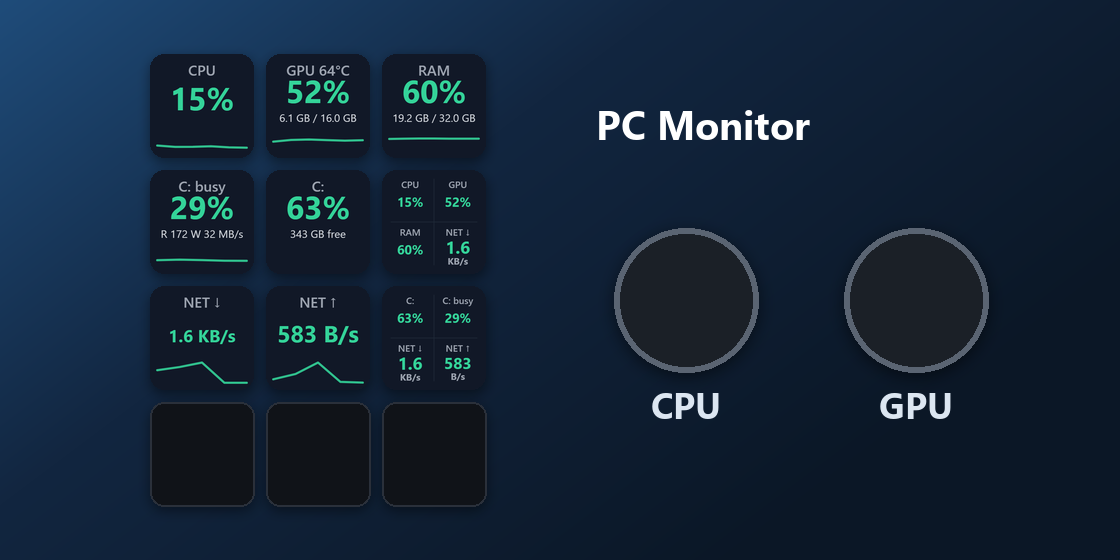
What is on the Galleon 100 SD keys?
The profile is one page for the display keys, so every reading is in view at once.
PC Monitor
Top row: CPU, GPU, memory. Second row: disk activity, disk space left, a Dashboard with four readings. Third row: download speed, upload speed, a second Dashboard. Bottom row: free for your own keys.
What do the Galleon 100 SD dials show?
Left dial: CPU
Shows CPU usage next to the keys. Press it to read again at once.
Right dial: GPU
Shows GPU usage. Turn it to pick another GPU if you have several. Press it to read again at once.
With CPU and GPU on the dials, every reading stays in view together with the keys.
How do I set it up on the Galleon 100 SD?
- Open the plugin file you download after buying. The Stream Deck app installs it, with its profiles.
- In the Stream Deck app, pick "System Monitor, Galleon 100 SD" in the profile list for your Galleon 100 SD. Your current profiles stay as they are.
- Enter your license key once in a key's settings. The keys show live numbers within a few seconds.
- Select a key to pick another look, drive, GPU or Dashboard reading, and your yellow and red warning levels.
Requirements
- Windows 10 or later, or macOS 13 or later (Apple silicon or Intel)
- Corsair Galleon 100 SD
- Stream Deck app 7.6 or later
Questions about the Galleon 100 SD
Is there a CPU and GPU monitor for the Corsair Galleon 100 SD?
Yes. System Monitor comes with a profile laid out for the Galleon 100 SD: CPU, GPU, memory, disk and network on the display keys, and CPU and GPU on the two dials. It is part of the plugin, so there is nothing else to buy.
How do I get the System Monitor profile on the Galleon 100 SD?
Install the plugin, then pick "System Monitor, Galleon 100 SD" in the Stream Deck app's profile list for your Galleon 100 SD. Enter your license key once and the keys show live numbers.
What do the Galleon 100 SD dials show?
Left dial: CPU usage. Right dial: GPU usage; turn it to pick another GPU if you have several. Press either dial to read again at once.
Does the Galleon 100 SD profile work on a Mac?
Yes. System Monitor runs on Windows 10 or later and macOS 13 or later, Apple silicon or Intel. On a Mac, the GPU key shows usage, without temperature.
Do I need to buy it again for another Stream Deck?
No. The plugin also comes with profiles for Stream Deck MK.2, XL, Neo, + and + XL, and one license key covers up to 3 of your computers.
Direct purchase: details, refunds and seller
- Price
- ¥780. Tax for your country is added at checkout.
- Payment
- Handled by Stripe through Link, Stripe's checkout service. Link appears as the seller on your receipt and card statement, and your card number never reaches GRAMSHIFT.
- Delivery
- Your license key and download link appear right after payment, and the receipt arrives by email.
- Refunds
- If the plugin does not work on your PC, email us within 14 days of purchase for a full refund. You can also ask Link support. The license key stops working after a refund.
- License
- One key for your own use on up to 3 computers (Windows or Mac).
- Countries
- The direct checkout is not offered in Ascension Island, China, Cuba, Iran, Kosovo, North Korea, Russia, Syria or Tristan da Cunha.
- Seller
- GRAMSHIFT, Tokyo, Japan. Contact: contact@gramshift.com
More about System Monitor
Limitations
- No CPU temperature, fan speed or power draw.
- On a Mac, the GPU key shows usage, without temperature.
- Some GPUs do not report a temperature to Windows; usage and VRAM still show.
- Key labels follow your Stream Deck app: English or Japanese.