OpenDeck plugin for Windows
Failed Scheduled Tasks Alert on OpenDeck
Did a backup or script fail overnight?
On an Ajazz or Mirabox deck with OpenDeck, the Failed Tasks key checks Windows Task Scheduler once a minute and turns red with the number of tasks whose last run failed. Press it to see which ones, with their result codes.
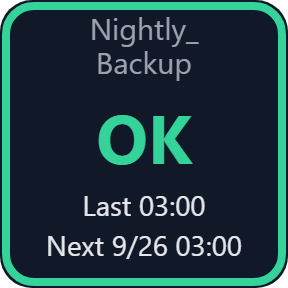
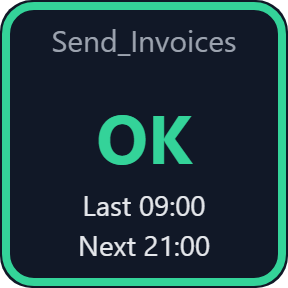
A Watch Task key follows one task and shows its last result, last run and next run, so you know your nightly job ran without opening Task Scheduler.
- Failed tasks counted
- Name and result code
- Last run and next run
- Choose folders to watch
- Optional Run the task now


What the keys do
Failed Tasks
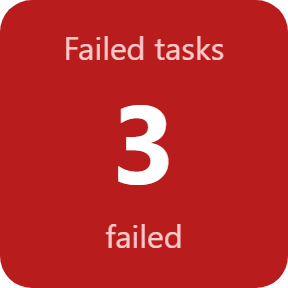
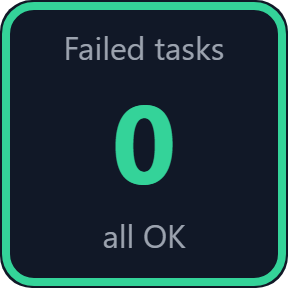
The number of scheduled tasks whose last run failed. Green with 0 / all OK when everything is fine, a red key with the count when something failed. It checks once a minute while the key is on screen.
Which tasks failed
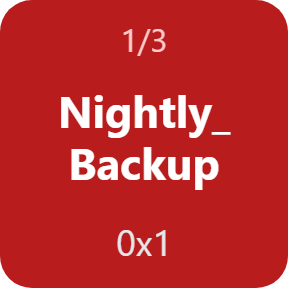
Press the key to step through the failing tasks, newest first: the task name and its result code, such as 0x1. After the last one, or after 15 seconds, the key shows the count again.
Choose what to watch
The top folder of the Task Scheduler Library (the default), all folders except Microsoft, or all folders. Count only names that start with a text such as Backup_, and choose whether disabled tasks count.
Only real failures
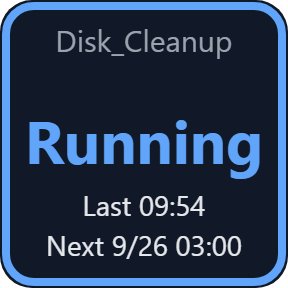
Tasks that are running, queued or have not run yet are not counted as failed. A run stopped before it finished, by you or by its time limit, is counted, so a backup that hung does not go unnoticed.
Watch Task
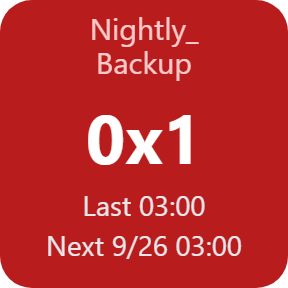
One task on one key: its name, its last result (OK, a result code, Running, Queued or Not run), its last run and its next run. Press to check again at once.
Run the task now
Turn it on for a Watch Task key and a press starts the task, like Run in Task Scheduler. It is off by default, so a press only checks again.
Install in OpenDeck
In OpenDeck, open the Plugins tab, install the .streamDeckPlugin file you downloaded, then enter your license key once in a key's settings.
Requirements
- Windows 10 or later
- Windows PowerShell (included with Windows)
- OpenDeck 2.14 or later
Questions
How do I see failed Task Scheduler tasks on an Ajazz or Mirabox deck with OpenDeck?
Place the Failed Tasks key in OpenDeck. It turns red with the number of tasks whose last run failed, and a press steps through their names and result codes.
Can a deck key show whether my nightly backup task ran?
Yes. A Watch Task key shows that task's last result, its last run and its next run, with a green frame when the last run succeeded and a red key when it failed.
Does the key change or delete my scheduled tasks?
No. It reads the task list and never changes or deletes a task. It starts one only when you turn on Run the task now for a Watch Task key.
Purchase details, refunds and seller
- Price
- ¥980, paid once. Tax for your country is added at checkout.
- Payment
- Handled by Stripe through Link, Stripe's checkout service. Link appears as the seller on your receipt and card statement, and your card number never reaches GRAMSHIFT.
- Delivery
- Your license key and download link appear right after payment, and the receipt arrives by email.
- Countries
- The direct checkout is not offered in Ascension Island, China, Cuba, Iran, Kosovo, North Korea, Russia, Syria or Tristan da Cunha.
- Seller
- GRAMSHIFT, Tokyo, Japan. Contact: contact@gramshift.com
- Refunds
- If the plugin fails to run on your PC, email contact@gramshift.com within 14 days of purchase for a full refund. The license key stops working after a refund.
- License
- One key for your own use on up to 3 PCs.
Limits
- It shows the last result Windows recorded. A script that fails but exits with code 0 looks like a success, and a program that uses a non-zero code for success shows as failed.
- Tasks of other users and system tasks that your account cannot see are not counted.
- Needs Windows PowerShell, which is part of Windows.
- The direct version checks its license key with our server when you activate it, at each plugin start and about once a day. If the server cannot be reached, it keeps running for up to 44 days after the last successful check.