
Why your phone can't open a .pes file on its own
An embroidery file is not a picture. A .pes, .dst or .jef file is a list of instructions for the machine: move the needle here, stitch, jump, trim, change to the next thread. Your gallery, your PDF reader and your browser have nothing that can turn that into an image.
Android doesn't recognize the file type either. In our tests on a Pixel 9 (Android 16) and a Galaxy A03s (Android 13), the system attached no file type at all (no MIME type) to .pes, .dst, .jef, .exp, .vp3 or .xxx files. Without a type, your file manager doesn't know which app to offer, so you get "Can't open file" or a list of apps that have nothing to do with embroidery.
So the fix always starts the same way: an app that reads embroidery formats and draws the stitches.
Three ways to open an embroidery file on Android
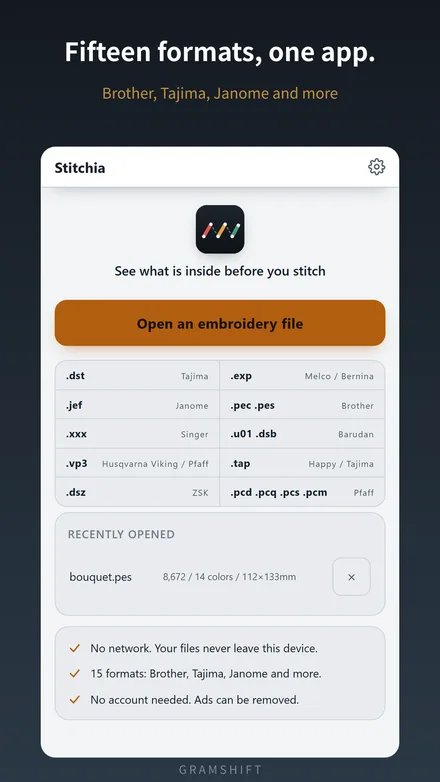
- From inside the viewer app. Open the app, tap its open button (in Stitchia it's Open an embroidery file) and pick the file from Downloads, Google Drive or wherever it is. It doesn't matter how the file is named or where it came from, so try this first.
- From your file manager or an email attachment. Tap the file, then choose the viewer under Open with. Once a viewer is installed, it shows up in that list.
- With Share. Some apps only offer Share, not Open with. Share the file and pick the viewer.
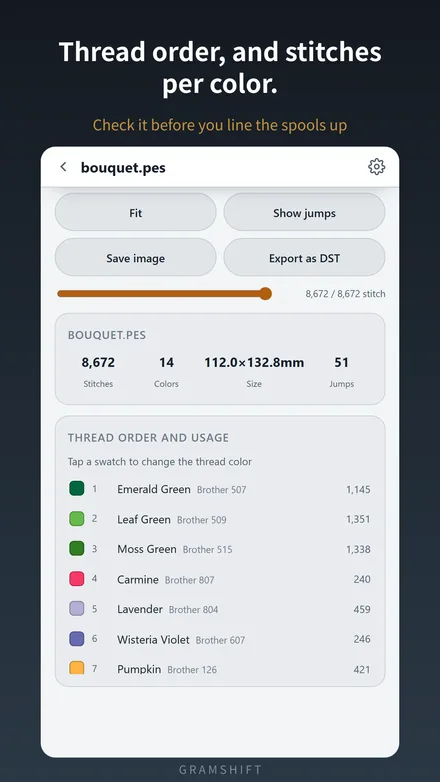
Once it opens you should see the design drawn stitch by stitch, along with its numbers. The sample file in the screenshots below, bouquet.pes, reads as 8,672 stitches, 14 colors, 112.0 × 132.8 mm.
Have a Brother machine? Brother's own Artspira app can also import external embroidery files. Brother's support page lists PES, PHC, PHX and DST. If those are the only formats you use, that may be all you need. A general viewer covers the rest: Janome, Pfaff, Singer, Husqvarna Viking and the commercial formats.
6 reasons an embroidery file still won't open (and the fix)
1. It's a ZIP, not the design itself
Designs bought online usually arrive as a .zip, often with the same design inside in several machine formats. An app that reads .pes can't do anything with the .zip wrapped around it.
- Unzip it. In Files by Google, go to the folder with the ZIP, tap it, and tap Extract. The files land in the same folder (Google's help page). Then open the format your machine uses.
- Or open the ZIP directly with a viewer that reads ZIPs. Stitchia opens a .zip without unzipping it. If there are several designs inside, it lists them and you pick one. It skips the hidden
__MACOSXfolder that ZIPs made on a Mac carry. - Password-protected ZIP? You need the password first. Stitchia can't open an encrypted ZIP, so extract it with an archive app that asks for the password.
2. "Can't open file" or no app is offered
That's the missing file type from above. Install a viewer, then open the file from inside the viewer (way 1). If the viewer still doesn't appear under Open with, use Share or the in-app open button. Neither one depends on the file type.
3. Your machine's format isn't one the app reads
Each brand has its own format, and viewers differ in which ones they read. Check the list before blaming the file. These are the 15 that Stitchia reads:
| Brand | Extensions |
|---|---|
| Brother | .pes .pec |
| Tajima (the commercial standard) | .dst |
| Happy | .tap |
| Janome | .jef |
| Melco / Bernina | .exp |
| Husqvarna Viking / Pfaff | .vp3 |
| Pfaff | .pcs .pcd .pcq .pcm |
| Singer | .xxx |
| Barudan | .u01 .dsb |
| ZSK | .dsz |
If your file is in a different format, check whether the shop you bought it from offers one of these and ask for it.
4. It's an .emb (or another software "working file")
.emb is the native file of Wilcom EmbroideryStudio. Wilcom describes it as storing "outlines, stitches, thread colors, and other data" together. It's a file for editing in that software, not one a home machine stitches from. Its layout isn't publicly documented: pyembroidery, an open-source library that reads about 40 embroidery formats, doesn't read it, and Stitchia doesn't open it either.
Fix: ask whoever sent it to export it in your machine's format (.pes for Brother, .jef for Janome, .dst for commercial machines). The same goes for .art files from BERNINA's embroidery software.
5. The file is damaged or only partly downloaded
An interrupted download can leave a file with the right name but missing data. Viewers either refuse it or draw nothing. Stitchia tells you "Could not read the file. It may be damaged" instead of showing an empty screen. Download it again. If it came in a ZIP, extract it again from the fresh download.
6. It opens, but the colors are wrong
The file isn't broken. Some formats store thread colors and some don't. When the file has no colors, the viewer has to make up placeholder colors, and every viewer makes up different ones.
| Format | Thread colors stored in the file? |
|---|---|
| .pes .pec (Brother) | Yes. Colors refer to Brother's thread table; .pes can also carry thread names and numbers |
| .jef (Janome) | Yes. Colors refer to Janome's thread table |
| .vp3 (Husqvarna Viking / Pfaff) | Yes. Color, thread number and brand |
| .xxx (Singer) | Yes. Color values |
| .pcs .pcd .pcq .pcm (Pfaff) | Yes. Color values |
| .dst .dsb .dsz | Usually no. Some software writes color lines (TC) into the 512-byte header, and a viewer can use them if they're there |
| .exp .u01 .tap | No |
Based on how pyembroidery's readers handle each format (for example, its DST reader turns TC header lines into threads) and on Stitchia's own readers, which were ported from it.
Fix: use the seller's color chart (the list of threads in stitching order) and set the colors yourself. In Stitchia, tap a swatch in the thread list to pick the color. The app remembers it for that file and tells you on screen when the colors are placeholders. The stitch order is still correct; only the colors were guessed.
This works in the other direction too. Converting a design to DST leaves the colors behind. Stitchia can export a DST, but the file it writes has no color lines, so write down the thread order before you send it to someone.
Once it opens: three things worth checking before you stitch
- Finished size vs. your sewing field. The sample is 112.0 mm wide, so it won't fit a 100 × 100 mm embroidery area. Compare against the sewing field in your machine's manual, not the name of the hoop. The size comes from the needle coordinates in the file, and fabric, stabilizer and hooping can change the result a little.
- Number of colors = how many times you thread the machine. 14 colors means threading it 14 times. It counts color blocks, so the same thread can come up more than once.
- Stitches per color and thread numbers. The thread list shows each color in order with its stitch count, for example Leaf Green 1,351 stitches against Carmine 240. For Brother files, the number shown is the one on Brother's own thread color list (Emerald Green = 507), which is the number you need when buying more. Don't confuse it with the color's position in the 64-color table inside the .pes file: Emerald Green is number 54 there, but you buy thread 507.
Summary
- Android can't open embroidery files by itself. It doesn't even assign them a file type. You need a viewer app.
- Open the file from inside the viewer first. Open with and Share are the alternatives.
- A ZIP has to be extracted, unless the viewer reads ZIPs. Password-protected ZIPs need the password.
- .emb is a software working file. Ask for your machine's format instead.
- Wrong colors in a DST are placeholders, not damage. Set them from the color chart.
Frequently asked questions
Can I open PES files on Android for free?
Yes. Stitchia is free on Google Play and opens 15 embroidery formats, including PES, DST and JEF. It shows a banner ad. An optional one-time purchase removes the ads and nothing else; every feature works without buying it.
Can I convert PES to DST on my phone?
Stitchia can export an open design as DST, the format commercial machines use. DST stores no thread colors, so write down the thread order before you send the file. It does not convert designs into PES or other home-machine formats.
Why does my DST file show strange colors?
A DST file usually stores the stitches and the points where the thread changes, but not which color each thread is. The viewer fills in placeholder colors, and each app picks different ones. Set the real colors from the seller's color chart.
Does opening a file upload it anywhere?
Not with Stitchia. The file is read on your phone, nothing is uploaded, and no account is needed.
Related
- All GRAMSHIFT guides
- PESファイルをスマホで開く方法 (in Japanese: format table and the five numbers to check before stitching)