Corsair Galleon 100 SD profile, included in the plugin
A music visualizer on your Corsair Galleon 100 SD
Yes, Audio Visualizer for Windows works on the Corsair Galleon 100 SD, and the plugin comes with a profile laid out for it.
Six display keys join into one picture that moves with the music, games and videos your PC plays, three keys show peak, VU and LUFS levels, and three more switch to the next effect, the next colors or pause.
After you install the plugin, pick "Audio Visualizer, Galleon 100 SD" in the Stream Deck app's profile list. Everything is on one page of the display keys. Listen to starts on Auto, which follows the sound Windows plays; to show another output or mix, pick it in a key's settings after installing.
- Comes with the plugin
- One page for the display keys
- One picture across six keys
- Peak, VU and LUFS
- Next effect, colors and pause
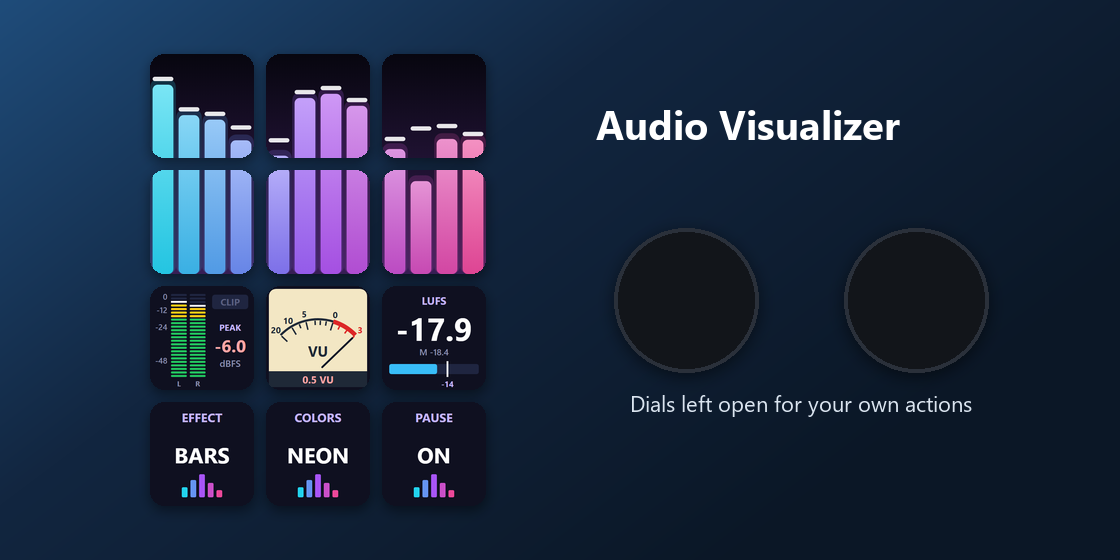
What is on the Galleon 100 SD page?
The profile has one page for the display keys, so every key is in reach without turning pages.
Audio Visualizer
The top two rows form one picture across six keys, Bars in the Neon colors to start; press a picture key for the next effect. Below: a Peak meter with a clip light, a VU needle and a Loudness meter in LUFS, then keys for the next effect, the next colors and pause.
What about the Galleon 100 SD dials?
Dials: free for your other actions
Audio Visualizer's actions are made for the keys, so this profile leaves both dials empty. Put any dial action you like on them in the Stream Deck app.
The picture, the meters and the switch keys all live on the display keys.
How do I set it up on the Galleon 100 SD?
- Open the plugin file you download after buying. The Stream Deck app installs it, with its profiles.
- In the Stream Deck app, pick "Audio Visualizer, Galleon 100 SD" in the profile list for your Galleon 100 SD. Your current profiles stay as they are.
- Enter your license key once in a key's settings.
- Play music, a game or a video, and the keys move with it. Listen to starts on Auto; to show another output or a Wave Link mix, choose it in a key's settings.
Requirements
- Corsair Galleon 100 SD
- Windows 10 or later
- The free Stream Deck app 6.9 or later, where the Galleon 100 SD's display keys are set up
Questions about the Galleon 100 SD
Is there a music visualizer profile for the Corsair Galleon 100 SD?
Yes. Audio Visualizer for Windows comes with a profile laid out for the Galleon 100 SD: one page on the display keys with a six-key music picture, three level meters and three switch keys. It is part of the plugin, so there is nothing else to buy.
How do I get the Audio Visualizer profile on the Galleon 100 SD?
Install the plugin, then pick "Audio Visualizer, Galleon 100 SD" in the Stream Deck app's profile list for your Galleon 100 SD. Enter your license key once. Listen to starts on Auto; pick another output in a key's settings if you want.
Can I see peak, VU or LUFS levels on the Galleon 100 SD?
Yes. The profile has a Peak key (dBFS with a clip light), a VU needle and a Loudness key (LUFS). Press a meter key to reset the highest peak.
Does it use the Galleon 100 SD dials?
No. Audio Visualizer's actions are made for the keys, so the profile leaves the dials free for your other actions.
Does it record or send my audio?
No. Sound is measured in memory only to draw the picture. Nothing is recorded, saved or sent, and your volume, mute and default device stay as they are. The direct version goes online only to check its license key.
Can I change the keys?
Yes. Every key can be moved or changed in the Stream Deck app like any other key, for example another meter, or more keys added to the picture.
Direct purchase: details, refunds and seller
- Price
- ¥1,200. Tax for your country is added at checkout.
- Payment
- Handled by Stripe through Link, Stripe's checkout service. Link appears as the seller on your receipt and card statement, and your card number never reaches GRAMSHIFT.
- Delivery
- Your license key and download link appear right after payment, and the receipt arrives by email.
- Refunds
- If the plugin does not work on your PC, email us within 14 days of purchase for a full refund. You can also ask Link support. The license key stops working after a refund.
- License
- One key for your own use on up to 3 PCs.
- Countries
- The direct checkout is not offered in Ascension Island, China, Cuba, Iran, Kosovo, North Korea, Russia, Syria or Tristan da Cunha.
- Seller
- GRAMSHIFT, Tokyo, Japan. Contact: contact@gramshift.com
More about Audio Visualizer
- All models and details of Audio Visualizer for Windows
- More Corsair Galleon 100 SD game and app profiles
Limitations
- One output at a time: if two play, pick one in Listen to.
- Windows only: the plugin does not run on a Mac.
- The profile uses the display keys only; the dials are left free.
- The profile's page name is in English. Key labels follow your Stream Deck app: English or Japanese.
- The direct version checks its license key with our server when you activate it, each time the plugin starts, and about once a day while it runs. If it cannot reach the server, it keeps working for up to 44 days after the last successful check.