
How to open an IFC file on Android, step by step
- Install Layeria from Google Play. It is free to download, with optional in-app purchases.
- Save the IFC file to your device. Download it from an email or a chat, or keep it in Google Drive.
- Open the Files app (Files by Google or your phone's own file manager), go to Downloads or the folder you saved to, and tap the .ifc file. If Android asks which app to use, choose Layeria.
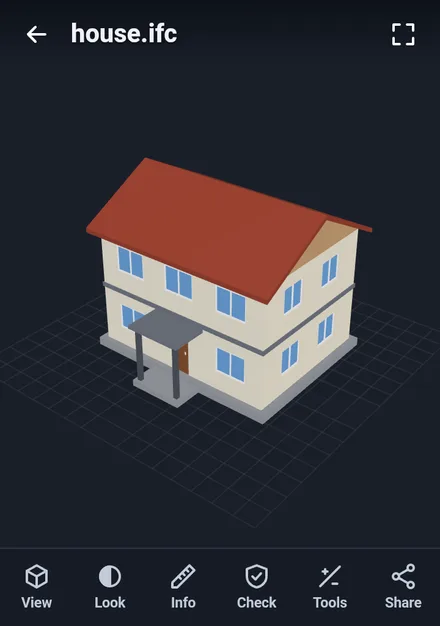
- The model opens in 3D. Drag with one finger to turn it, pinch to zoom, and drag with two fingers to move it.
Other ways in: in Google Drive or in a Gmail attachment, use Open with and choose Layeria, or start Layeria and tap Open a file. Zipped models (.ifczip) open the same way. Files you open recently stay in a list on the first screen, with a small picture of each one.
Show one storey at a time
Open View and choose a level under Storey to see only that floor. Under Show by type, turn element types such as walls, slabs and windows on or off, for example to hide the slabs and look at the walls of one floor. Show all brings everything back.
Elements are shown in the colors saved in the file. If you prefer one color for the whole model, open Look and turn off Show the file's colors.
Tap an element to see its properties
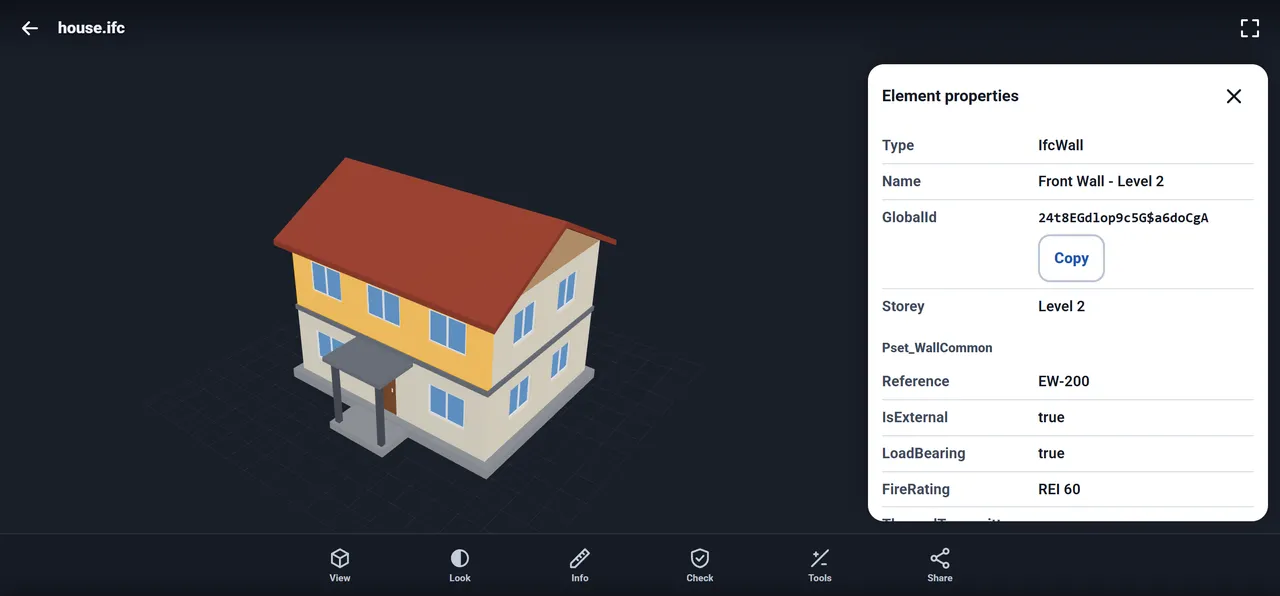
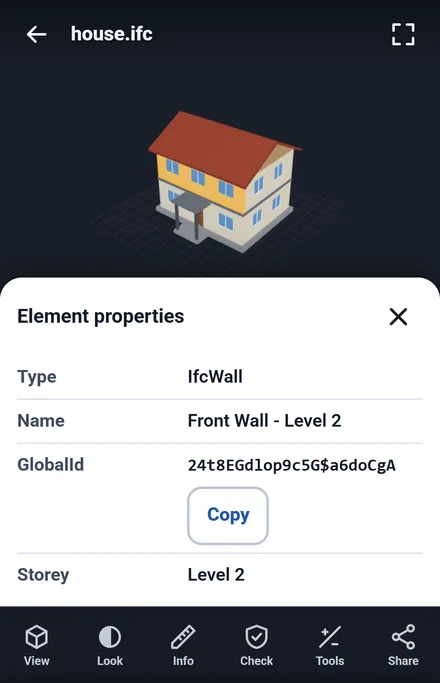
Tap a wall, a slab, a door or any other element. The Element properties panel shows:
- Type, such as IfcWall or IfcWindow, and the Name of the element
- The GlobalId, with a Copy button, so you can paste it into a message or an issue list
- The Storey it belongs to
- Its property sets, for example Pset_WallCommon with Reference, IsExternal, LoadBearing and FireRating
Size, section cuts and distances
Info shows the overall size of the model along X, Y and Z, in mm, cm or inches. If a file does not state its length unit, Layeria reads it as meters and shows a File unit picker so you can choose the right one.
With Pro, a one-time purchase (not a subscription), open Tools for:
- Section: cut the building along X, Y or Z and slide the cut to look inside
- Measure: tap two points to get the distance between them
- Compare: look at several files side by side
You can also switch to a front, back, left, right, top, bottom or isometric view under View, and turn on an orthographic view there. Share sends a picture of the model to another app.
On an Android tablet or a Chromebook
Layeria is the same app on Android phones, Android tablets and Chromebooks that have Google Play. Install it from Google Play and open files the same way. On a larger screen you see more of the building next to the properties panel, as in the picture at the top of this page.
STEP, STL and 3MF open in the same app
Layeria is not only for buildings. In the same app you can open:
- STEP and IGES (.step, .stp, .iges, .igs) CAD files
- STL, 3MF, OBJ and PLY files for 3D printing, with the size, volume, surface area and an estimate of the filament weight
- A print check that marks open edges (holes) in the model
What happens to your file
The files you open, your recent files list and its small pictures stay on your device. They are not sent to our servers, and there is no sign-up or login. A picture only leaves the app when you choose to share it.
Frequently asked questions
How do I open an IFC file on my Android phone?
Install Layeria from Google Play, then tap the .ifc file in the Files app and choose Layeria. You can also use Open with in Google Drive or Gmail, or tap Open a file inside Layeria. The building opens in 3D.
Can I view an IFC file without a computer?
Yes. Layeria opens the IFC file right on your phone or tablet, so you can turn the model, pick a storey and check the properties of an element without a PC.
Which IFC versions does Layeria open?
Layeria opens IFC2x3, IFC4 and IFC4.3 files, as .ifc or as zipped .ifczip files.
Can I see just one floor of the building?
Yes. Open View and choose the level under Storey. You can also show or hide element types such as walls, slabs and windows.
Can I see the properties of a wall or a window?
Yes. Tap the element to see its type, name, GlobalId, storey and property sets. The GlobalId has a Copy button.
Does it work on an Android tablet or a Chromebook?
Yes. Layeria is the same app on Android phones, Android tablets and Chromebooks with Google Play, and you open files the same way.
Is the IFC viewer free?
Layeria is free to download, with in-app purchases. Opening and viewing IFC files, storeys, element properties and the overall size are free, with a small banner ad. Pro, a one-time purchase, adds section cuts, two-point distances, comparing files side by side and an unlimited recent files list, and removes ads.
Is my IFC file uploaded anywhere?
No. The files you open stay on your device and are not sent to our servers. There is no sign-up or login.